
In the landscape of modern digital supply chain transformation, the synchronization between manufacturing execution and warehouse logistics is the differentiator between operational excellence and systemic bottlenecking. Within SAP S/4HANA, Advanced Production Integration (API) represents the most sophisticated method of bridging Production Planning (PP) and Extended Warehouse Management (EWM). Unlike legacy “Basic” integration which relies on simple delivery documents, API utilizes the Production Material Request (PMR) to allow EWM to manage the staging and consumption of components with granular control.
The success of this integration is fundamentally dependent on the integrity of the master data foundation. In an S/4HANA-EWM environment, master data is not merely a set of static records; it is the logic engine that dictates how materials flow from storage bins to the production line. This guide provides a senior-level technical walkthrough for configuring the master data required for Advanced Production Integration, moving systematically from ERP foundations to EWM execution.
I. Global Product Master Data: Setting the Functional Classification
The journey of a production component begins in the Global Product Master. Before EWM can execute a staging task, it must understand the “nature” of the material’s movement. This is achieved by assigning Product Groups, which serve as the primary filter for staging logic.
In SAP Production Planning, staging is driven by two core integration models — Delivery‑Based (DB) and Advanced Production Integration (API).
Please check the details of the two core integration models — Delivery‑Based (DB) and Advanced Production Integration (API) – SAP EWM-PP Integration: Master Guide to Production Staging and Shopfloor Mapping – SAP EWM-PP Integration Methods: Delivery-Based vs. Advanced Production Integration (API)
These high‑impact logistics workflows break down into four real‑world manufacturing scenarios:
- Scenario 1: Two SAP EWM‑managed storage locations in one warehouse (DB & API)
- Scenario 2: One SAP EWM‑managed storage location (DB & API)
- Scenario 3: MM‑IM managed storage location (DB only)
- Scenario 4: Two SAP EWM‑managed storage locations across two warehouses (DB only)
Please check the details of the 4 scenarios — SAP EWM-PP Integration: Master Guide to Production Staging and Shopfloor Mapping – The Four Business Landscapes of Production Staging
Some processes support both DB and API, while others are restricted to a single method — making the right staging choice critical for optimizing production efficiency, warehouse automation, and end‑to‑end supply chain performance.
Product Master data for Advance Production Integration (API)
Advanced Production Integration (API) is SAP’s real‑time, high‑automation staging method that connects EWM and PP without delivery documents.
It enables faster material flow, zero‑touch staging, and high‑accuracy production supply, ideal for modern, digital manufacturing.
API supports multiple staging strategies:
- Single‑Order Staging — Materials are staged exclusively for one production order, ensuring precision, traceability, and lean manufacturing.
- Cross‑Order Staging — Materials are staged once for multiple orders, reducing warehouse workload, handling time, and overall logistics cost.
- No Staging — Materials are consumed directly from the storage bin, ideal for high‑frequency, low‑complexity production environments.
API delivers real‑time visibility, automated replenishment, and optimized warehouse‑to‑production flow — boosting manufacturing efficiency, reducing errors, and improving end‑to‑end supply chain performance.
Please check the the staging methods in detail – The Comprehensive Guide to SAP Production Staging: 17 Methods from IM to EWM and JIT
Product Group Assignment (/SAPAPO/MAT1)
The business purpose of this step is to categorize materials based on their consumption patterns on the shop floor. In the SCM Extended Warehouse Management master data, the Product Group (assigned at the Global level) tells the system whether a material should be staged specifically for one order or consolidated across several.
Technical Steps:
- Navigate to Transaction /SAPAPO/MAT1.
- Enter the Product ID and select the Global Data checkbox.
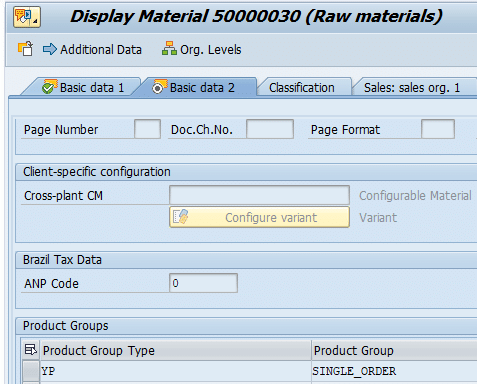
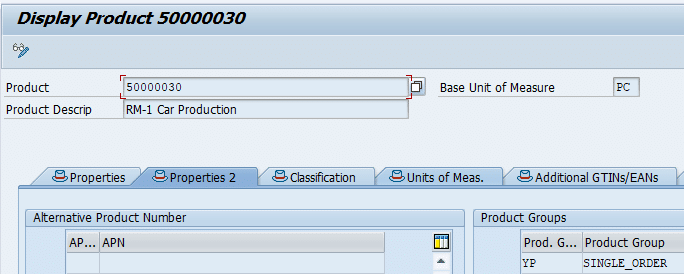
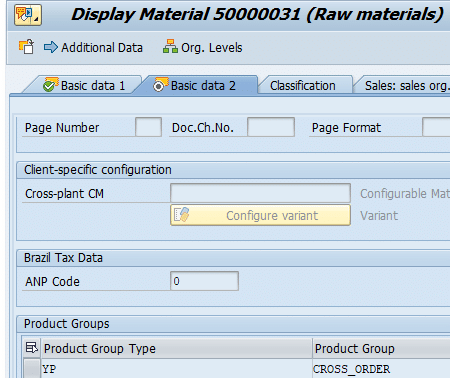
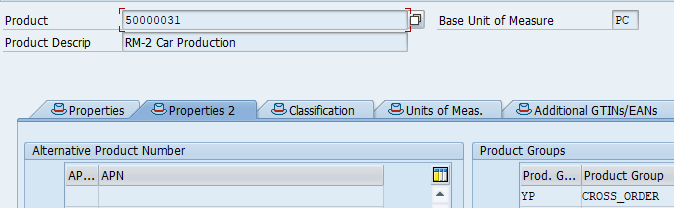
- On the Properties 2 tab, locate the Product Group section.
- Assign the Prod. Group Type (YP) and the corresponding Product Group.
| Product | Prod. Group Type | Product Group | Technical Significance |
| 50000030 | YP | SINGLE_ORDER | Triggers staging specifically for a single production order (Order-related). |
| 50000031 | YP | CROSS_ORDER | Allows consolidation of staging requirements across multiple orders. |
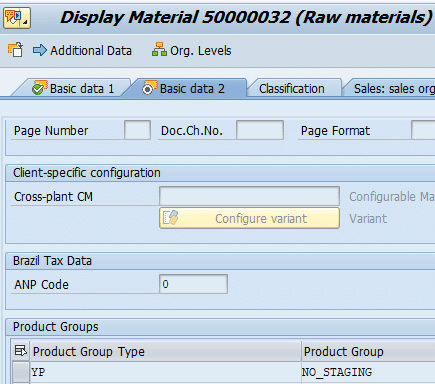
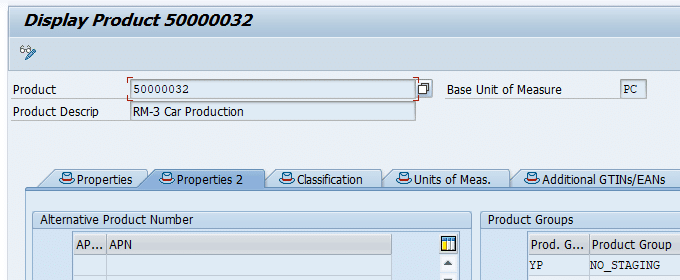
| 50000032 | YP | NO_STAGING | Components that are already at the PSA or do not require warehouse staging. |
Architect’s Note: Failure to maintain these groups correctly often results in the EWM wave management system failing to “pick up” component requirements, leading to empty staging waves.
Check the configuration of Product Group in detail: Mastering SAP EWM Advanced Production Integration: The Ultimate Configuration Guide – Master Data & Product Grouping for Production Supply
a) Product Group Assignment for Single Order Staging in S4/ERP
b) Product Group Assignment for Single Order Staging in EWM
c) Product Group Assignment for Cross Order Staging in S4/ERP
d) Product Group Assignment for Cross Order Staging in EWM
e) Product Group Assignment for No Staging in S4/ERP
f) Product Group Assignment for No Staging in EWM
II. ERP Production Structures: BOM, Routing, and Versions
The ERP system (S/4HANA Core) remains the system of record for the manufacturing blueprint. However, for EWM integration, these structures must contain specific storage and supply area indicators.
1. Material BOM Creation (CS01)
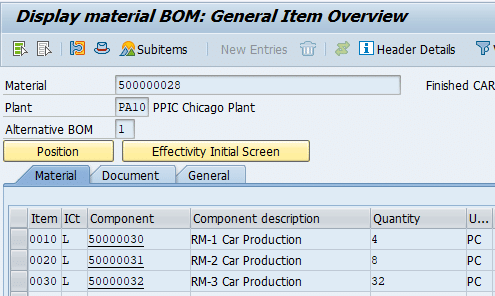
The Bill of Materials (BOM) defines the components. For material 500000028, we establish the link to the warehouse at the item level.
- Transaction: CS01
- Usage: 1 (Production)
- Status: Active (1)
- Base Quantity: 1
| Item | Component | Category | Qty | ||
| 010 | 50000030 | L (Stock) | 4 PC | ||
| 020 | 50000031 | L (Stock) | 8 PC | ||
| 030 | 50000032 | L (Stock) | 32 PC |
2. Create Work Center (CR01)
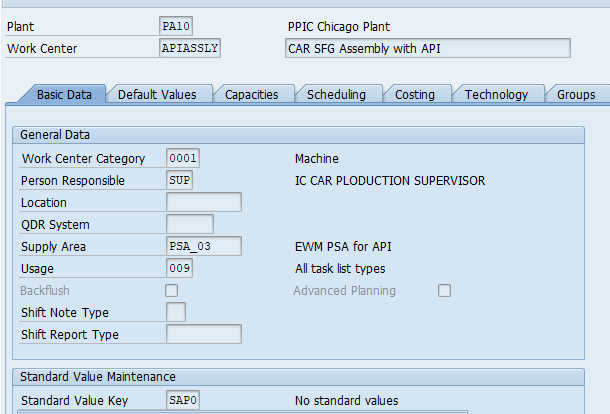
Work center is used in SAP Production Planning to define the physical manufacturing location where operations are executed.
In this step, we assign key data such as work center category, capacities, activity types, costing parameters, and scheduling details. A properly configured work center ensures accurate capacity planning, precise cost calculation, and smooth execution of production operations across PP, EWM, and shop‑floor processes.
To produce our FG , we will define one work center as “APIASSLY”. Start CR01 to create the work center and input the details as shown in the below screenshot
CLICK HERE to check the creation of Supply Area PSA_03
Click on costing tab
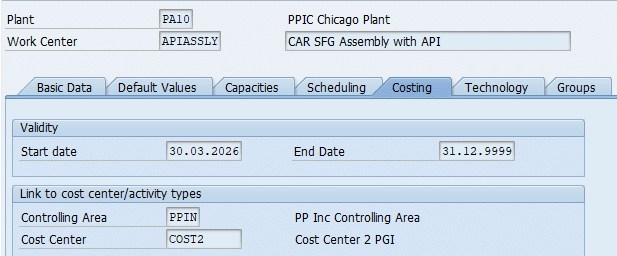
Controlling Area & Cost Center
Please check the below post to check the detail of How to configure Controlling Area & Create Cost Center.
Read Configuration of Controlling Area →3. Routing Configuration (CA01)
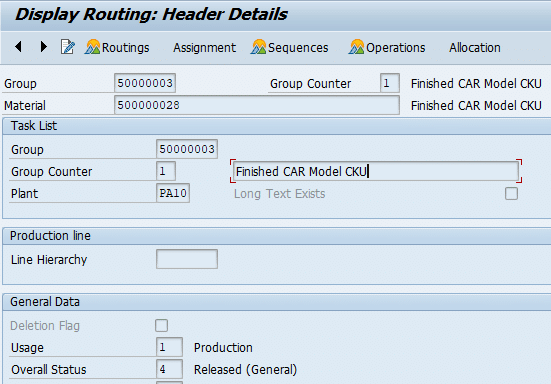
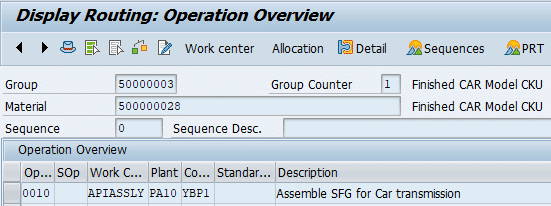
The Routing defines the “where” and “how” of production. We apply these routings to 500000028 via Group 50000003.
Operation Overview (Operation 010): The critical field here is the Control Key (YBP1).
CLICK here to check the control key configuration in detail: Mastering SAP EWM Advanced Production Integration: The Ultimate Configuration Guide – Defining Control Keys (Transaction OPJ8)
| Field | Value | Business Purpose |
| Work Center | APIASSLY | Physical location of the manufacturing step. |
| Control Key | YBP1 | Relevant for Costing or Scheduling |
| Setup / Machine / Labor | 30 / 10 / 10 min | Activity types for cost and capacity planning. |
4. Production Version Management (C223)
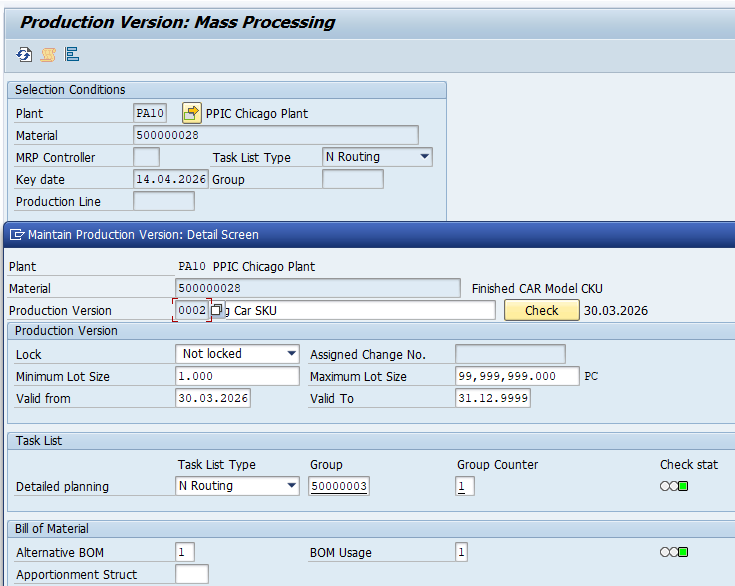
The Production Version is the mandatory “bridge” that links a specific BOM alternative to a Routing. Without an active Production Version, S/4HANA cannot communicate the material requirements to EWM.
- Transaction: C223
- Validation: Use the “Check” function. A Green Traffic Light (Test Status) is non-negotiable. It confirms that the Task List exists and the BOM is valid for the specified lot size (1 to 99,999,999).
III. The Bridge: PSA, Control Cycles, and PSA-Bin Assignment
The connection between the warehouse and the shop floor is a three-part structure: the physical area (PSA), the logic (Control Cycle), and the specific bin (PSA-Bin Assignment).
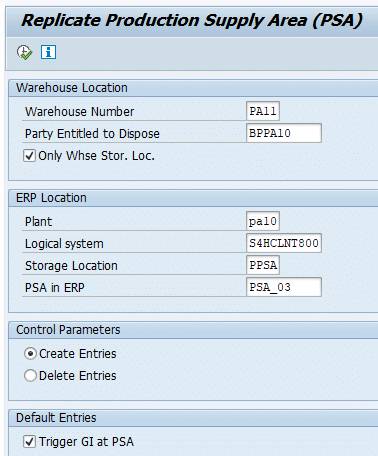
1. PSA Creation and Replication (PK05 & /SCWM/PSA_REPLICATE)
The Production Supply Area (PSA) is defined in ERP (Transaction PK05) for Plant PA10 and Storage Location PPSA.

Replicate PSA to EWM:
- Use Transaction /SCWM/PSA_REPLICATE
Start Transaction /SCWM/PSA_REPLICATE.
- Logical System: Enter your ERP system ID (e.g., ERPCLNT001).
- Party Entitled to Dispose: BPPA10 (This ensures EWM knows which Business Partner owns the stock).
2. Control Cycle Definition (LPK1)
The Control Cycle defines the staging intent in the ERP system.
Staging Indicator must be set to 5 (EWM Staging)
- This tells the S/4HANA core to hand over the staging responsibility to the EWM warehouse.
Create the control cycle for all the three raw materials which needs to be staged.
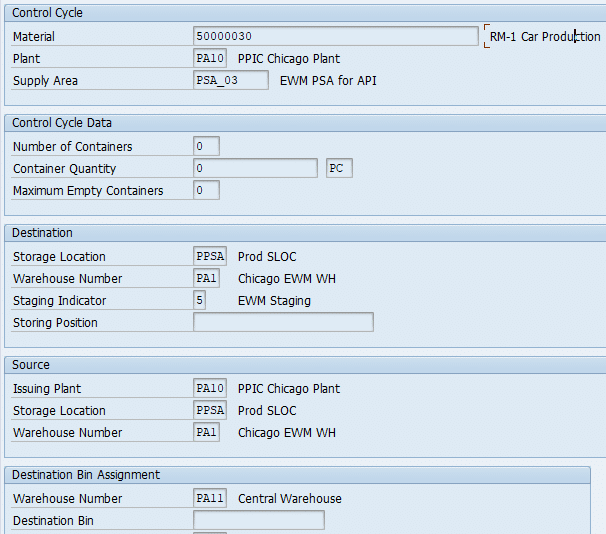
Similarly Create Control cycle for 500000031 & 500000032
3. PSA-Bin Assignment: The Critical Link (/SCWM/PSASTAGE)
This is the most vital step in the “Bridge” configuration. It maps the PSA to a specific Warehouse Bin and determines the Staging Method.
The Critical Link of PSA-Bin Assignment
- It maps the PSA to a specific Warehouse Bin and determines the Staging Method.
3.1 PSA-Bin Assignment for Single Order Staging
For single Order staging maintain the PSA-BIN assignment for the product 500000031 as below
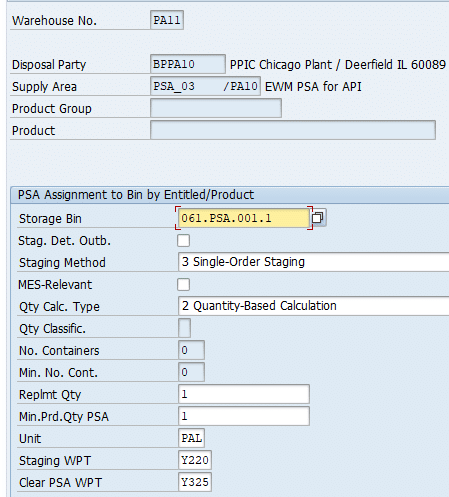
The Proposed Quantity for staging is calculated based on the Open Required Quantity of the PMR. The system considers existing staging Warehouse Tasks and the Open Goods Issue Quantity. If Open Required Quantity exists then the system proposes the Staging Quantity.
In the above screenshot, the Min.Prd.Qty PSA (1 PAL) serves as a threshold. If the sum quantity (Stock on Production Supply Area + Warehouse Task Quantity) is below this threshold, the system uses the Replmt Qty (1 PAL) as staging proposal.
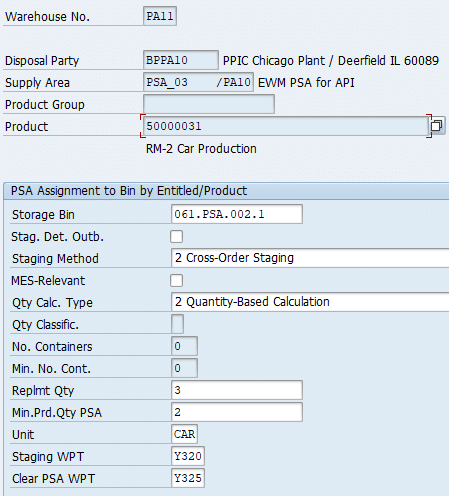
3.2 PSA-Bin Assignment for Cross Order Staging
For Cross Order staging maintain the PSA-BIN assignment for the product 500000032 as below
3.3 PSA-Bin Assignment for Crate Parts Staging
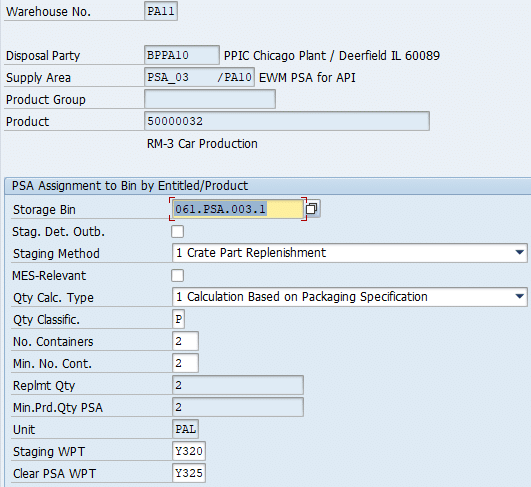
Products that use the Crate Parts Replenishment need to be available at the PSA in huge quantities. Therefor these products are not relevant for staging. The system will create replenishment Warehouse Tasks if the stock falls below a threshold.
The product 50000032 should be kept in a certain quantity at the PSA to ensure that always enough stock is available that could be consumed by the production lines. Therefore, the Crate Part Replenishment functionality is used in the production supply context, This process step is used to replenish the product as soon as the stock falls below a certain threshold.
As per the setting above for the product 50000032 , there should be at least two Pallets of this material at the PSA (fields – “Min. No. Count” and “Qty. Class”.), In case of insufficient stock in the PSA (stock falls below threshold of two pallets), the product shall be replenished by 2 PAL (fields – “Number of Containers” and “Qty. Class.”).
Example:
After Initial Stock Upload, there are 2 PAL at the PSA. If the Crate Part Replenishment would be executed right now, no stock needs to be replenished. Assuming that now one pallet is consumed and the Replenishment is executed again, the system will recognize that the stock at the PSA dropped below the threshold of two pallets (open Warehouse Tasks to the PSA will be considered by the calculation). In this case it will create two Warehouse Tasks to replenish each one PAL of the Product EWMS4-601.
Replenishment source is Narrow Aisle Storage (Storage Type Y011) and destination is the PSA (Storage Type Y061) storage bin 061.PSA.003.1.
IV. EWM Warehouse Product Configuration (/SCWM/MAT1)
Once the products are transferred from ERP via CIF (Core Interface), they must be extended to the specific EWM Warehouse view. This configuration dictates putaway, removal, and replenishment logic.
Mandatory Field: Party Entitled to Dispose (BPPA10) must be maintained for all entries to define stock ownership.
Warehouse Product: EWMS4-50 (Finished Good)
- Putaway Control: YQ05 (Bulk Storage).
- Storage Section Ind: YS01 (Fast Moving Items).
- Bulk Storage Ind: Y2.
- Removal Control: YR02.
Warehouse Product: Components (502, 503, 601)
For components, we must define the replenishment parameters to ensure the production line never runs dry.
| Product | Storage Type | Min. Qty | Max. Qty | Min. Replen. Qty | Max Bins |
| EWMS4-502 | Y051 | 8 CAR | 32 CAR | 2 CAR | 12 |
| EWMS4-503 | Y051 | 16 CAR | 64 CAR | 4 CAR | 12 |
| EWMS4-601 | Y051 | – | – | – | – |
Architect’s Insight: Product EWMS4-601 is treated as a “Crate Part.” Its replenishment is driven by Packaging Specifications rather than simple Min/Max quantities in the product master.
V. Warehouse Infrastructure and Bin Management
Physical infrastructure must be optimized for the “GR-from-Production” and “Staging-to-Production” flows.
1. Manual Bin Creation (/SCWM/LS01)
Create the physical staging and goods receipt bins in Warehouse PA11.
| Storage Bin | Storage Type | Storage Section | Usage |
| 061.PSA.001.1 | Y061 | YS00 | Staging Bin for Single-Order. |
| 061.PSA.002.1 | Y061 | YS00 | Staging Bin for Cross-Order. |
| 061.PSA.003.1 | Y061 | YS00 | Staging Bin for Crate Parts. |
| GR-PROD | Y915 | YI00 | Receipt bin for finished goods. |
2. Bin Sorting and Determination
Execute Transaction /SCWM/SBST for Activity Areas Y061 and Y915. This optimizes the sequence in which warehouse tasks are presented to the operator’s RF device.
For the inbound flow of finished goods, configure Staging Area and Door Determination (/SCWM/STADET_IN) for Warehouse Process Type Y116. This ensures that as soon as a product is received from the production line (Work Center YPW1), the system knows to direct it to the GR-PROD bin.
VIII. Troubleshooting: Activating the EWM Application Log
In complex integrations, the Application Log is the consultant’s first line of defense. Use Transaction /SCWM/ACTLOG for Warehouse PA11.
- Subobject MFG_PDI_COMPL (Wave Release): Set to “4 Additional Information.” This captures the detailed “handshake” between the Production Material Request and the Staging Wave.
- Subobject REPLENISHMENT (Exception Log): Set to “4 Additional Information.” Use this to diagnose why a “Crate Part” or “Min/Max” replenishment failed to trigger.
FAQ
A: Staging Indicator 5 (in LPK1) is a high-level flag that tells S/4HANA that EWM is in control. The specific Staging Method (1=Crate, 2=Cross-Order, 3=Single-Order) is defined within EWM (Transaction /SCWM/PSASTAGE) to dictate the exact warehouse movement logic.
A: In EWM, multiple plants can be managed by one warehouse. The “Party Entitled to Dispose” identifies the legal entity (Business Partner) that owns the stock, which is essential for accurate inventory posting back to the ERP Core.
A: YBP1 is configured to trigger a communication to the EWM system upon order release. This creates the Production Material Request (PMR) in EWM, which serves as the base document for all staging activities.
A: If the “Check” indicator is not green, the system will not be able to determine the BOM or Routing during order creation. Consequently, EWM will not receive the component requirements, and staging will be impossible.
Conclusion
Master data configuration for Advanced Production Integration is a meticulous process that requires absolute alignment between the ERP manufacturing structures and the EWM execution settings. By ensuring that the PSA-Bin assignments, PPF actions, and Warehouse Product attributes are correctly synchronized, organizations can achieve a truly automated, “clean” digital supply chain.


