SAP Production Staging is the strategic process of moving components from warehouse storage locations to the Production Supply Area (PSA) to satisfy manufacturing demand. This process scales in technical complexity across six levels—ranging from basic Inventory Management (IM) to Advanced Extended Warehouse Management (EWM), Manufacturing Execution Systems (MES), and Just-In-Sequence (JIS) logic. Selecting the appropriate staging architecture is critical for ensuring material availability while minimizing work-in-process (WIP) inventory.
Top 3 Benefits of Optimized Staging:
- Inventory Accuracy: Real-time visibility of stock as it transitions from bulk storage to the shop floor.
- Automation Efficiency: Significant reduction in manual administrative tasks through backflushing and system-driven replenishment.
- Lead-Time Reduction: Streamlined material flow through optimized picking paths and precisely timed delivery.
1. Introduction: The Evolution of Material Flow in SAP S/4HANA
In a modern S/4HANA environment, material staging is the heartbeat of the digital supply chain. Its core purpose is to bridge the gap between long-term storage and the point of consumption: the Production Supply Area (PSA). Historically, this was a manual coordination effort; however, digital transformation has shifted the focus toward automated, demand-driven replenishment. The choice of staging method impacts not only warehouse labor costs but also the accuracy of manufacturing costing and the overall agility of the production line.
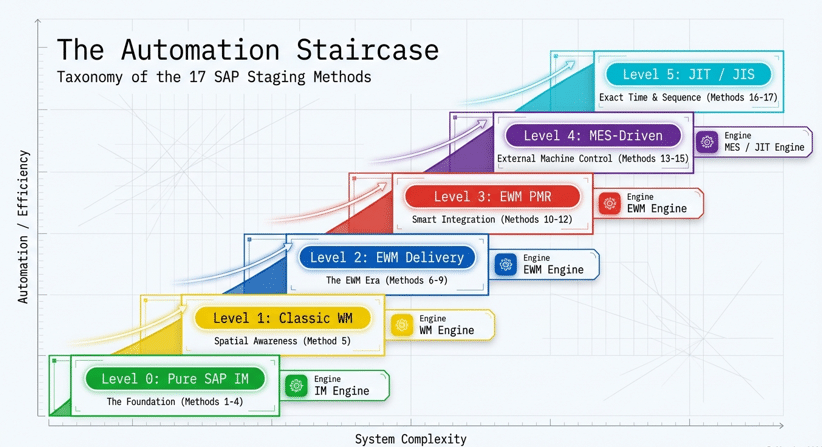
2. Level 0: Pure SAP IM — Staging Without WM/EWM
In the simplest SAP architecture, staging occurs at the Inventory Management (IM) level. There are no warehouse bins or tasks; stock is managed purely at the Storage Location level.
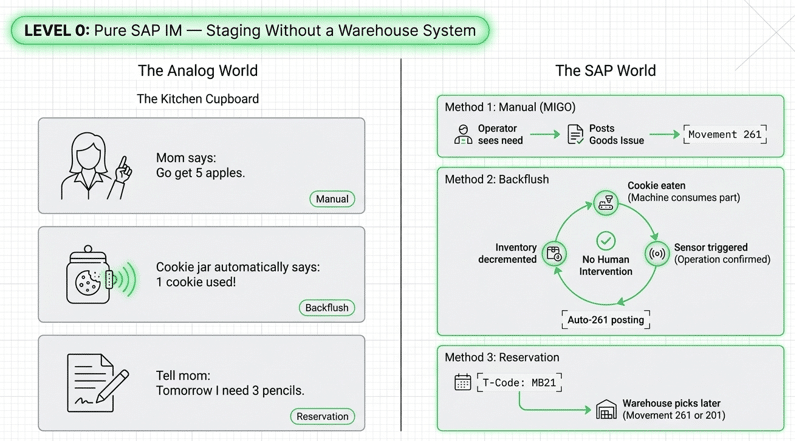
Method 1: Manual Staging (MIGO / MB1A / Movement 261)
The most basic “pull” from production. When an operator needs 5 apples from the cupboard to the kitchen, they simply go and get them. In technical terms, the operator performs a manual Goods Issue to the Production Order using Movement Type 261. There is zero automation here.
Method 2: Backflushing (The Automatic Post)
This method focuses on automatic consumption rather than replenishment. Imagine a cookie jar: every time you eat a cookie, the jar automatically records “One cookie used!” and the system is updated later. In SAP, when a production operation is confirmed, the system automatically posts a Movement Type 261 for the components. This is ideal for high-volume, low-value “C-parts” like screws.
Method 3: Reservation-Based Staging (MB21)
A forward-planning approach. You tell the system, “Tomorrow, I need three pencils,” and it records this requirement on a list. Using transaction MB21, a reservation is created. The warehouse then picks against this reservation using Movement Type 261 or 201.
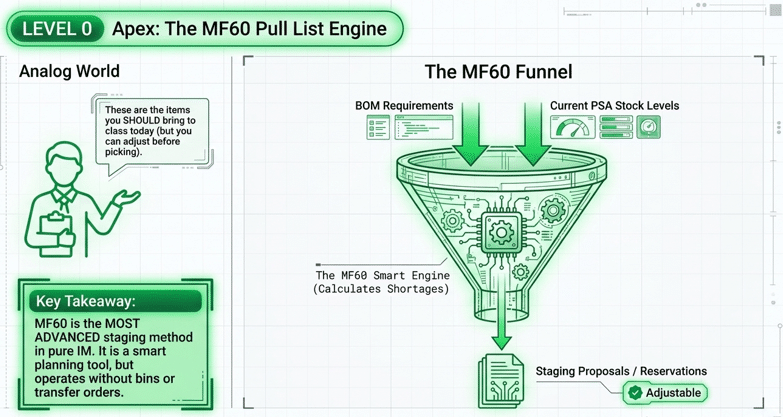
Method 4: MF60 Pull List (The IM “Pro” Tool)
This is the bridge for organizations that need sophisticated pull logic but want to avoid the configuration overhead of a full Warehouse Management system. MF60 acts as a smart planning tool that identifies shortages across production orders and proposes staging. The user can adjust these quantities before the system generates the actual reservations or goods issues.
3. Level 1: Classic WM Staging
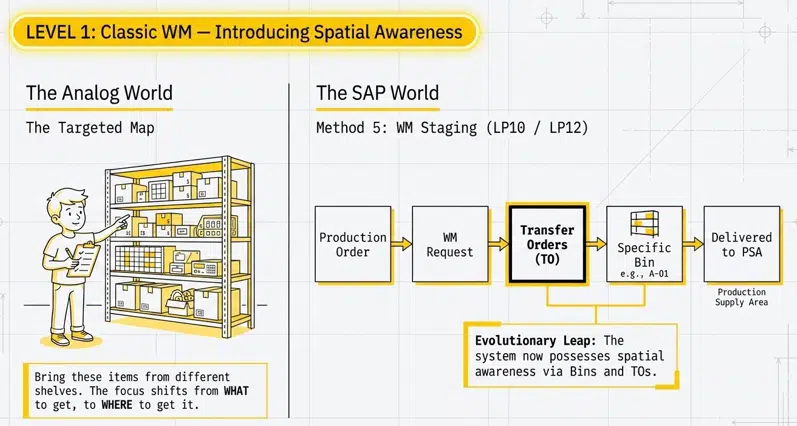
Level 1 introduces Warehouse Management (WM), where materials are tracked at the bin level and moved via Transfer Orders (TOs).
Method 5: WM Staging (LP10 / LP12)
Here, the Production Order triggers a WM staging request. This is like a brother being given a list to find specific items on different shelves (bins) in the garage. The system generates a Transfer Order, a picker retrieves the material from a specific bin, and delivers it to the PSA. In this level, the PSA is finally recognized as a specific warehouse coordinate.
4. Level 2: EWM Delivery-Based Staging
With Extended Warehouse Management (EWM), staging begins to utilize Outbound Delivery documents to orchestrate the movement.
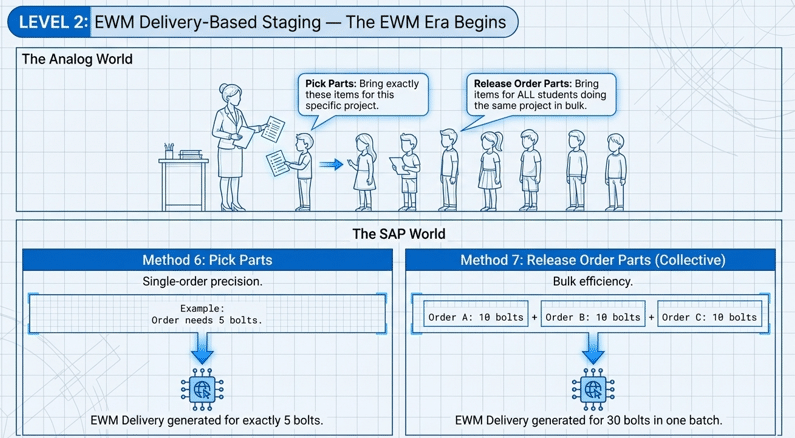
Method 6: Pick Parts
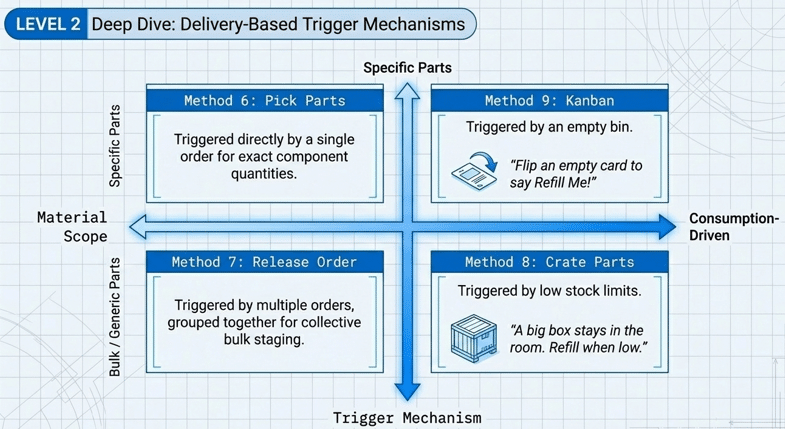
Used for high-precision, order-specific requirements. If an order requires exactly 5 bolts, EWM generates a pick task for exactly 5 bolts.
Method 7: Release Order Parts (Collective Staging)
Efficiency-driven staging. If five different orders require a total of 30 bolts, EWM groups these requirements into a single collective pick to minimize warehouse travel time.
Method 8: Crate Parts (The Replenishment Logic)
This follows a “refill the box” philosophy. A large container stays at the PSA; when the quantity drops below a defined threshold, the system triggers a replenishment to fill the crate back to capacity.
Method 9: Kanban Staging
A Lean-centric approach where a physical or digital signal (the card flip) triggers the movement. When a bin is emptied, the signal notifies EWM to stage a pre-defined quantity to the PSA.
5. Level 3: EWM Advanced Production Integration (PMR-Based)
Level 3 represents a major architectural shift. By moving to Production Material Requests (PMR), SAP eliminates the need for delivery documents, significantly reducing document overhead in S/4HANA and enabling a “pull-based” logic.
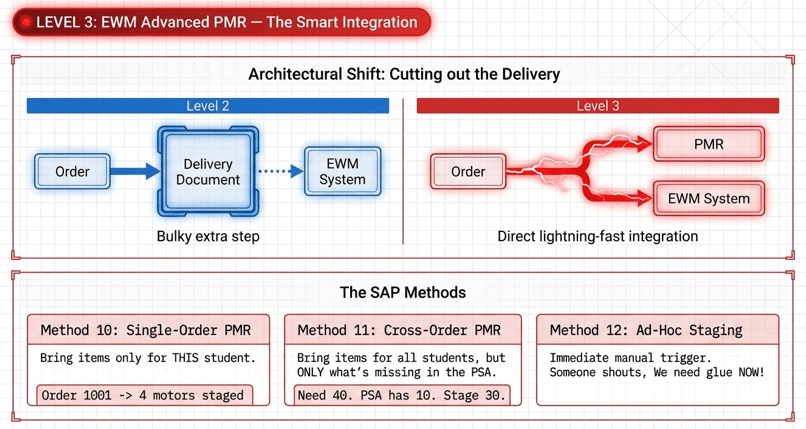
Method 10: Single-Order Staging (PMR)
High-accuracy staging dedicated to one specific production order.
Method 11: Cross-Order Staging (PMR)
The system calculates net requirements at the PSA. If the orders require 40 screws and 10 are already at the PSA, EWM is “smart” enough to only stage the missing 30.
Method 12: Ad-Hoc Staging
Designed for unplanned technical needs. If a machine breaks or an operator suddenly needs glue, an ad-hoc request triggers an immediate warehouse task without a preceding order-based plan.
6. Level 4: MES-Driven Staging
In highly automated environments, a Manufacturing Execution System (MES) acts as the orchestrator, communicating with EWM via IDocs or API calls.
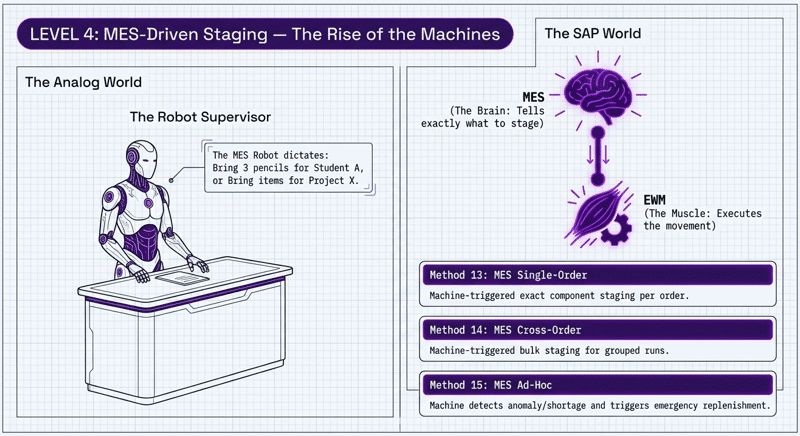
Method 13: MES Single-Order
An automated “Robot” signal triggers a pick for a specific order.
Method 14: MES Cross-Order
The robot triggers a collective replenishment for all items needed for a specific production run or project.
Method 15: MES Ad-Hoc
An urgent “Bring it NOW” signal initiated by the MES to cover immediate shortages.
7. Level 5: The Pinnacle — JIT and JIS Staging
The most advanced material flow strategies, often seen in the automotive industry.
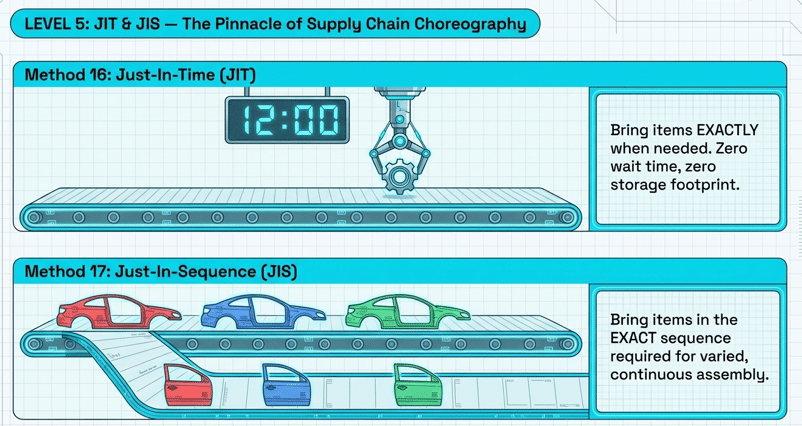
Method 16: Just-In-Time (JIT)
Components are staged exactly when they are required for consumption, minimizing inventory footprint at the PSA.
Method 17: Just-In-Sequence (JIS)
Components arrive not only just-in-time but in the exact sequence required for the assembly line (e.g., a red car door, then a blue car door), vital for mixed-model production lines.
8. Summary Table: Comparing SAP Staging Methods
| Method Name | SAP Level | Trigger Document | Primary Use Case |
| Manual Staging | Level 0 (IM) | Manual Entry (MIGO) | Simple, low-volume shops |
| Backflush | Level 0 (IM) | Order Confirmation | High-volume, low-value parts |
| Reservation-Based | Level 0 (IM) | Reservation (MB21) | Forward planning/Maintenance |
| MF60 Pull List | Level 0 (IM) | Staging Proposal | Advanced IM / Shortage planning |
| WM Staging | Level 1 (WM) | Production Order | Bin-managed warehouses |
| Pick Parts | Level 2 (EWM) | Outbound Delivery | Exact quantity per order |
| Release Order Parts | Level 2 (EWM) | Outbound Delivery | Collective staging for efficiency |
| Crate Parts | Level 2 (EWM) | Outbound Delivery | Container-based replenishment |
| Kanban Staging | Level 2 (EWM) | Kanban Signal | Lean manufacturing/Bin-empty |
| Single-Order (PMR) | Level 3 (EWM) | PMR | Order-specific high accuracy |
| Cross-Order (PMR) | Level 3 (EWM) | PMR | Net-requirement staging |
| Ad-Hoc Staging | Level 3 (EWM) | PMR / Manual | Urgent, unplanned material needs |
| MES Single-Order | Level 4 (MES) | IDoc/API Signal | Robot-driven order staging |
| MES Cross-Order | Level 4 (MES) | IDoc/API Signal | Robot-driven project staging |
| MES Ad-Hoc | Level 4 (MES) | IDoc/API Signal | Robot-driven urgent requests |
| JIT Staging | Level 5 (JIT) | JIT Signal | Minimum inventory, timed arrival |
| JIS Staging | Level 5 (JIS) | JIS Signal | Sequenced assembly requirements |
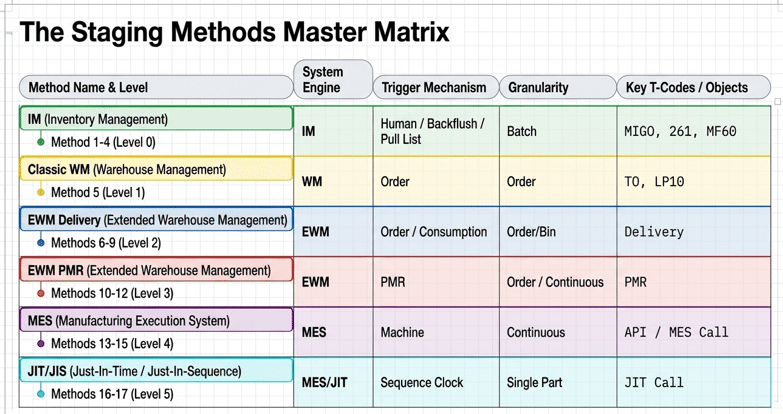
9. Strategic Implementation: Choosing the Right Method
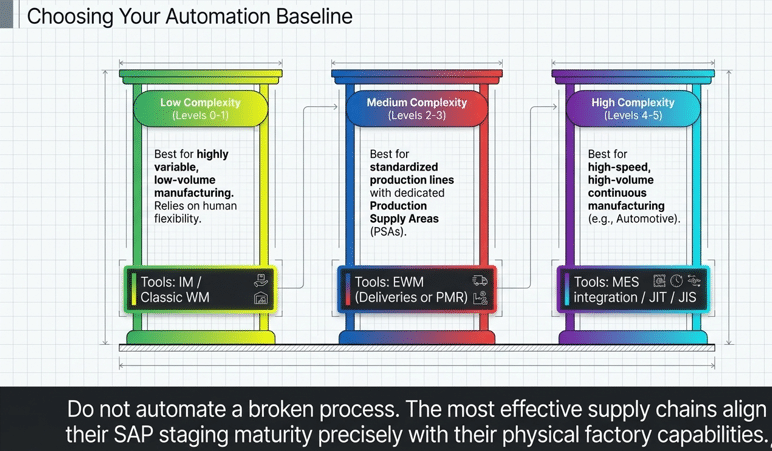
From a Solution Architect’s perspective, selecting a staging method is a trade-off between system overhead and operational control.
9.1 The Architectural Shift (PMR)
Moving from Level 2 (Delivery-based) to Level 3 (PMR-based) is a significant technical evolution. Delivery-based staging is often “push” oriented and creates a high volume of delivery documents. PMR-based staging is “pull” oriented, allowing EWM to analyze current PSA stock before creating tasks, thus reducing document clutter and improving data consistency in S/4HANA.
9.2 Infrastructure Considerations
If your facility lacks bin-level tracking, Level 0 is your only option. However, if you require “Pull logic” but wish to avoid full EWM complexity, MF60 is the ideal bridge tool.
9.3 Automation Level
For facilities with high labor costs or high-velocity lines, Level 4 (MES-driven) is the gold standard, removing human error from the request process through direct system integration.
10. FAQ: Common SAP Staging Queries
MF60 is a planning tool used in IM-managed environments to identify shortages and create staging proposals. LP10 is used specifically in Classic WM to trigger Transfer Orders (TOs) for moving stock from warehouse bins to the PSA.
PMR should be utilized when you want to leverage “smart” staging, such as Cross-Order replenishment, which considers existing PSA stock levels. It also reduces the number of delivery documents stored in the system.
Yes. While backflushing is a Level 0 IM method for recording consumption (Goods Issue), it is frequently used in EWM environments to automate the final accounting of materials after the physical staging task has been completed.
Crate Part staging is system-monitored; the system triggers a refill when the quantity drops below a calculated threshold. Kanban is signal-monitored; it usually relies on a human or sensor flipping a card when a bin is physically empty.
JIT ensures the material is there when needed. JIS (Just-In-Sequence) ensures the material is there in the specific physical order required for the production sequence, which is essential for assembly lines with high product variance.
11. Conclusion & Call to Action (CTA)
The journey from manual “apple picking” in an IM cupboard to the robotic precision of JIS staging represents the maturity of an organization’s digital supply chain. Whether you are leveraging the smart planning of the MF60 Pull List or the advanced PMR logic of S/4HANA EWM, the goal remains the same: a lean, transparent, and efficient production floor.
Ready to optimize your production environment? Explore our deep-dive configuration guides or contact our architectural team for a Digital Supply Chain roadmap today.