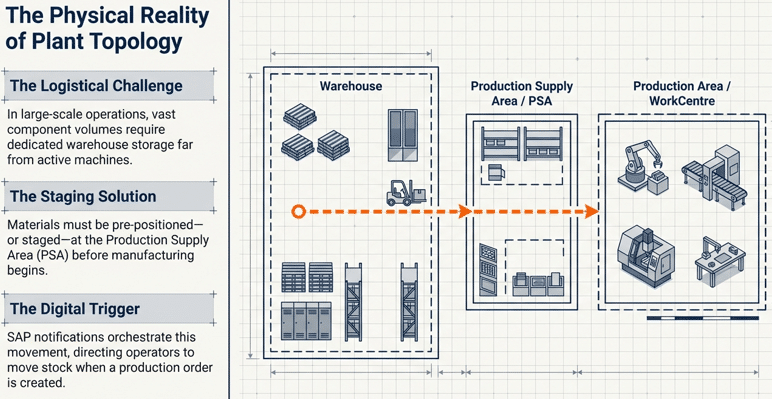
Production Staging is the systematic physical movement of raw materials and components from a warehouse storage location—typically a bulk or “Receiving on Dock” (ROD) area—to a designated Production Supply Area (PSA) to support manufacturing execution. This process ensures that the specific materials required for a production or process order are available at the machine or work center at the precise time of consumption.
Primary Benefits of Optimized Production Staging:
- Storage-Bin Transparency: Provides real-time visibility into stock levels at both the source warehouse bins and the destination PSA bins.
- Automated Replenishment: Triggers material movements automatically via SAP based on production order release or minimum stock thresholds.
- Operational Efficiency: Clearly segregates warehouse duties (EWM Resource execution) from production activities (operator consumption), reducing shopfloor congestion.
1. Production Staging: Bridging the Gap Between Warehouse and Shopfloor
In the complex architecture of modern manufacturing, the physical and logical disconnect between bulk material storage and the production line is a primary driver of inefficiency. In a localized, small-scale facility, components may be stored within arm’s reach of the production operator. However, in enterprise-grade “Big Plant” environments, the volume and variety of components necessitate a dedicated, high-density warehouse managed by SAP Extended Warehouse Management (EWM).
The challenge arises from the functional gap between the Warehouse Operative (the “Warehouse Guy”) and the Production Operator. An operator on the assembly line cannot abandon their station to navigate a 50,000-square-foot warehouse to retrieve a single pallet of components. Conversely, a warehouse operative needs system-driven instructions to know exactly what, when, and where to deliver materials to keep the line moving.
This is where SAP EWM-PP integration becomes the critical bridge. By mapping the shopfloor to the system through Production Supply Areas (PSA) and specific staging landscapes, organizations can synchronize the demand from Production Planning (PP) with the execution capabilities of EWM. This guide provides a master-level technical deep dive into how this integration is architected in SAP S/4HANA.
2. Master Data Prerequisites: The Foundation of Integration
Before executing staging, several critical master data objects must be synchronized between the ERP and EWM environments. A Senior Consultant knows that staging fails most often due to misalignment in these foundational elements.
2.1 The Production Supply Area (PSA)
The PSA is the physical location where materials are staged. In the system, it is defined as a master data object that links the Warehouse Number and the Plant.
- Transaction Code:
PK05. - Architectural Role: The PSA serves as the “delivery address” for the warehouse. It is mapped to a specific EWM Storage Bin.
2.1.1 Creation of PSA in S4/ECC
Create the PSA in S4/ECC with transaction PK05. We created PSA “PSA_03” & “PSA_04”.


2.1.2 Creation of PSA in EWM
You can create PSA in EWM manually or you can replicate them through Below transaction code /SCWM/PSA_REPLICATE – Replicate Production Supply Area


With this now required Production Supply Areas are created in both S4/ECC & EWM
2.2 The Work Center (WC) and PSA Relationship
In SAP PP, the Work Center (Transaction CR02) represents the machine or assembly station. To enable seamless staging, the Work Center must be assigned to a PSA. When a production order is created, the system uses this relationship to determine exactly where the components need to be delivered.
2.3 Control Cycles and Staging Indicators
The Control Cycle defines how a material is staged. Common staging indicators include:
- Pick Parts: Materials staged specifically for a single production order.
- Crate Parts (Bulk): Materials staged in fixed containers, independent of a specific order, usually based on a reorder point at the PSA.
- Release Order Parts: Materials staged for multiple orders based on a summary requirement.
3. SAP EWM-PP Integration Methods: Delivery-Based vs. Advanced Production Integration (API)
Choosing the correct integration method determines whether the ERP system (S/4HANA) or the Warehouse Management system (EWM) holds the “brain” for the staging process.
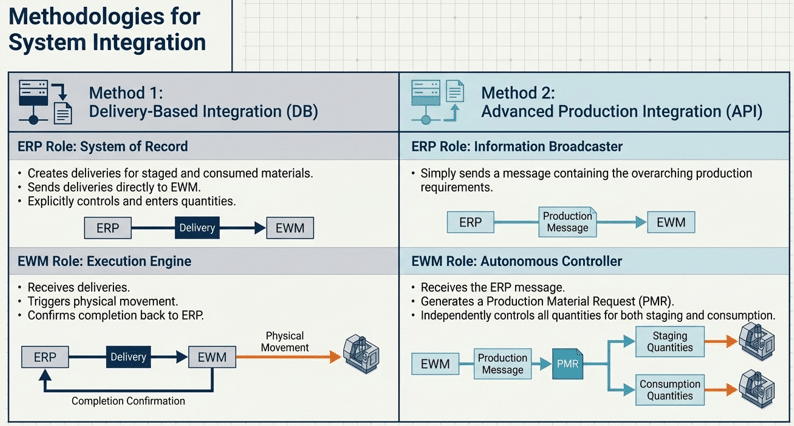
| Feature | Delivery-Based Integration (DB) | Advanced Production Integration (API) |
| Primary Document | ERP Outbound/Inbound Deliveries | Production Material Request (PMR) |
| Technical Object | LIKP / LIPS (Sales/Logistics) | /SCWM/PMR (EWM Native Document) |
| Control Authority | ERP (Quantities determined in PP/IM) | EWM (Quantities controlled in Warehouse) |
| Flexibility | Rigid; change requires ERP updates | High; allows for partial staging/consumption |
| Backflushing Support | Standard ERP Backflush | Granular EWM-based backflush sync |
| Reversals/Cancellations | Requires manual delivery deletion | Managed via PMR status updates |
| Typical Use Case | Legacy migrations or simple setups | Complex S/4HANA EWM implementations |
Consultant’s Insight: Advanced Production Integration (API) is the strategic choice for S/4HANA. By using the PMR, EWM becomes aware of the entire production order requirement at once, rather than receiving a fragmented stream of delivery documents.
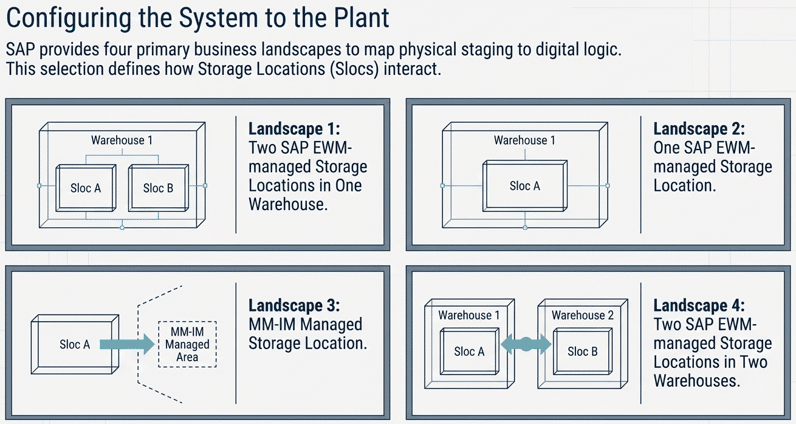
4. The Four Business Landscapes of Production Staging
The logical mapping of storage locations (Slocs) to warehouse numbers is the most critical architectural decision in an EWM-PP project. SAP supports four primary landscapes.
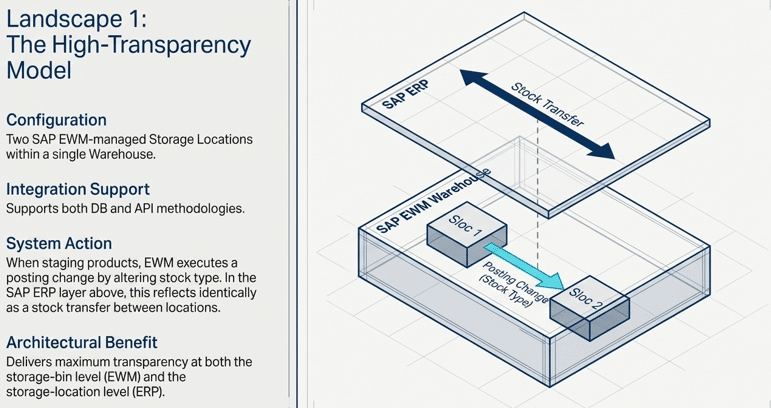
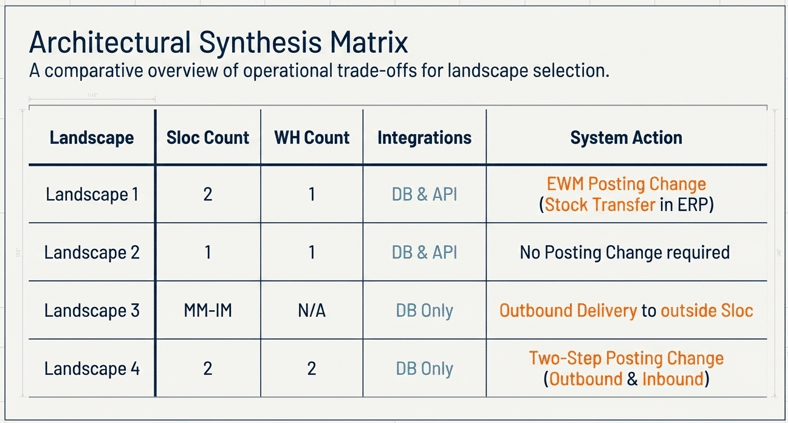
4.1 Landscape 1: Two SAP EWM-Managed SLOCs in One Warehouse (DB & API)
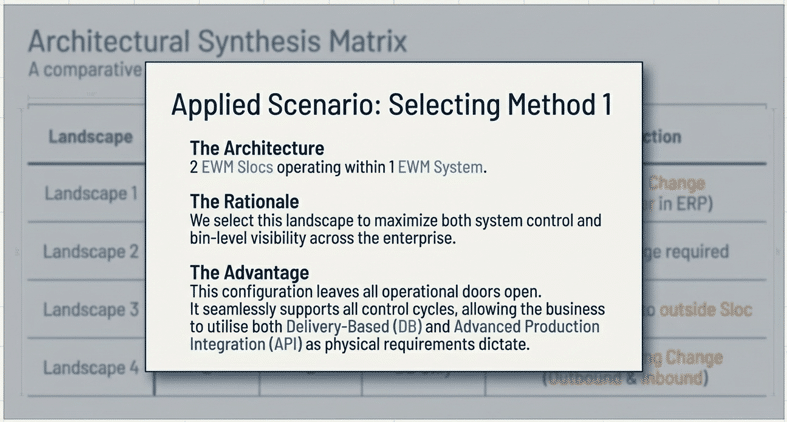
This is widely considered the “Gold Standard” for enterprise implementations. In this model, the plant has two storage locations (e.g., ROD for Receiving/Bulk and PRD for Production) both assigned to the same EWM Warehouse Number.
- Mechanism: When staging occurs, EWM executes a Posting Change.
- Technical Movement: In ERP, this triggers a movement type (typically 311) to move stock from ROD to PRD. In EWM, the stock type changes (e.g., from F1 to F2).
- Consultant’s Use-Case: Best for organizations requiring full financial and physical segregation of warehouse stock versus shopfloor WIP (Work in Process).
4.2 Landscape 2: One SAP EWM-Managed Storage Location (DB & API)
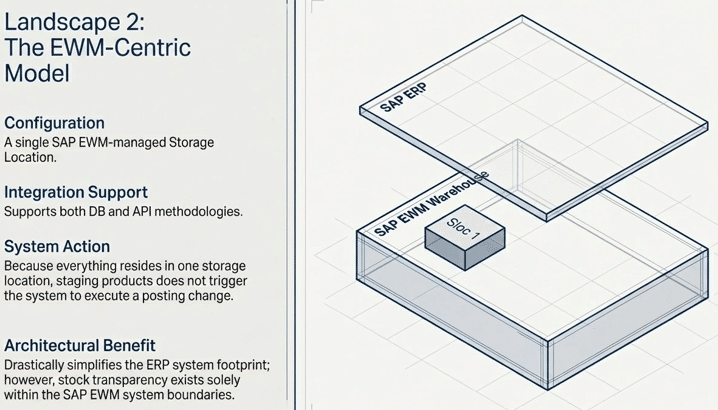
In this simplified model, both the bulk storage and the PSA are managed under a single ERP storage location.
- Mechanism: Staging is purely a bin-to-bin movement within EWM (
Warehouse Task). - ERP Impact: None. Since the storage location doesn’t change, there is no financial posting in the ERP.
- Consultant’s Use-Case: Ideal for smaller facilities where financial stock separation is not required, reducing the volume of ERP transactional documents.
4.3 Landscape 3: MM-IM Managed Storage Location (DB Only)
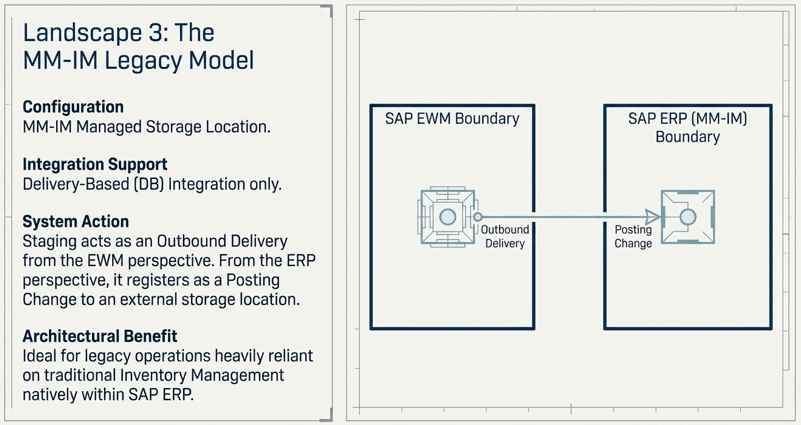
Here, the warehouse is EWM-managed, but the production area (PSA) is managed at the IM (Inventory Management) level only.
- Mechanism: Staging is treated as an Outbound Delivery from EWM.
- ERP Impact: A Goods Issue (Movement Type 311 or 261) is posted as the material leaves the EWM warehouse.
- Consultant’s Use-Case: Common in “Sidecar” implementations or legacy transitions where the shopfloor has not yet been modernized to support bin-level EWM management.
4.4 Landscape 4: Two SAP EWM-Managed SLOCs in Two Warehouses (DB Only)
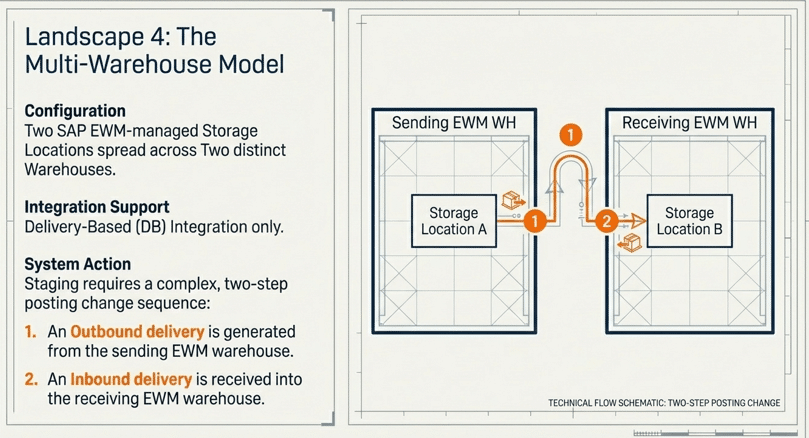
This is a sophisticated “Campus” scenario where the production facility and the distribution center are managed as separate warehouse numbers.
- Mechanism: A Two-Step Posting Change.
- Workflow: An Outbound Delivery is issued from the “Sender” EWM warehouse, and an Inbound Delivery is created for the “Receiver” EWM warehouse.
- Consultant’s Use-Case: Necessary for large industrial campuses where materials must travel across public roads or through distinct logical entities between storage and production.
4.5 Summary: The Four Business Landscapes of Production Staging
Below is the summary of all the Four Business Landscapes of Production Staging.
5. Deep Dive: Scenario Analysis – Two EWM SLOCs in One Warehouse
To illustrate the power of EWM-PP integration, let us analyze the most common high-performance configuration: Landscape Method 1 (Two EWM Slocs, One Warehouse).
The Integrated Stock Movement Path
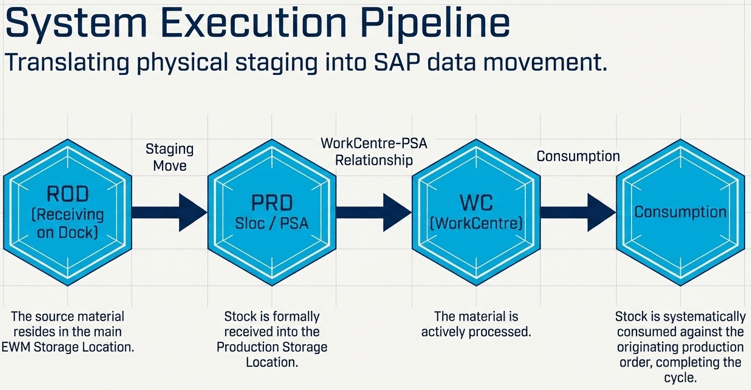
In this scenario, the system maintains a “Chain of Custody” for every component:
- ROD Storage Location (Source): Raw materials arrive and are put away into high-rack bins.
- Pro Tip: While the source is logically the “ROD” Sloc, in a mature EWM setup, this represents the Bulk Storage Type where the EWM Resource (Forklift) will initiate the pick.
- PRD Storage Location / PSA (Destination): The system identifies the staging requirement and moves the material to the PSA bin.
- Work Center (WC): The physical station where the Operator consumes the staged material.
- Consumption: The material is “Backflushed” or manually consumed, clearing the stock from the PRD Sloc and the PSA bin while updating the Production Order costs.
Flow Logic: ROD (Bulk Storage) ➔ Posting Change (Staging) ➔ PRD (PSA Bin) ➔ Consumption ➔ Production Order
6. Step-by-Step Technical Workflow and Execution
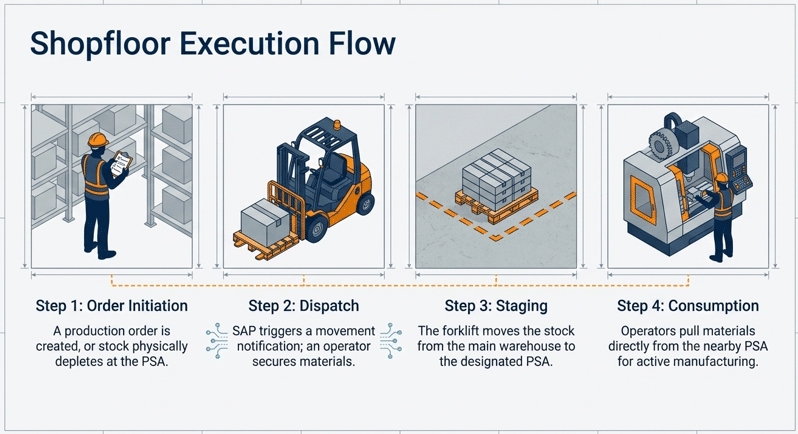
A successful staging process involves a highly orchestrated sequence of events between the PP and EWM modules.
Phase 1: Requirement Generation
- Production Order Release (CO01/CO02): The trigger point. Upon release, the system checks the “Staging Indicator” in the Control Cycle.
- PMR Creation (API Method): If using Advanced Production Integration, the ERP sends a message to EWM to create a Production Material Request. The PMR remains the “Single Source of Truth” in EWM for the entire order lifecycle.
- Stock Level Check: The system evaluates the current stock at the PSA. If using Crate Parts, it checks if the quantity is below the reorder point.
Phase 2: Warehouse Execution
- Warehouse Task (WT) Creation: EWM generates WTs to move stock from bulk bins to the PSA.
- RF Execution: The EWM Resource (Warehouse Operative) receives a task on their mobile Radio Frequency (RF) device. They scan the source bin, the product, and the destination PSA bin.
- Confirmation: Once confirmed, the stock is logically and physically at the PSA. In Landscape 1, this triggers the ERP 311 movement.
Phase 3: Exception Handling (The Real-World Consultant View)
What happens when things go wrong?
- Stock Deficit (Pick Denial): If the bulk bin is empty, the EWM Resource can trigger a “Pick Denial.” The system can be configured to automatically look for the material in an alternative storage type or alert the Production Controller.
- Partial Staging: API allows the warehouse to stage only a portion of the total requirement (e.g., staging 500 units of a 2,000-unit requirement due to PSA space constraints).
7. Strategic Advantages for Digital Transformation Leaders
For C-level stakeholders and Digital Supply Chain architects, EWM-PP integration is not just a technical configuration; it is a strategic necessity.
7.1 Elimination of “The Hidden Factory”
Without integration, staging is often managed via “tribal knowledge” or paper slips. This creates a “Hidden Factory” of undocumented movements. EWM-PP integration brings these movements into the light, providing accurate labor data and inventory accuracy.
7.2 Just-in-Time (JIT) and Lean Manufacturing
By utilizing “Crate Part” staging and automated reorder points, organizations can minimize the amount of inventory sitting on the shopfloor. This reduces clutter, improves safety, and frees up valuable manufacturing square footage.
7.3 Accurate Costing and S/4HANA Transparency
Integrating staging ensures that the “financial twin” of the material matches the “physical twin.” With Landscape 1, the movement from ROD to PRD provides an immediate financial snapshot of how much capital is currently tied up in production-ready stock versus long-term storage.
8. FAQ: Professional Queries on SAP Production Staging
A: Technically, ROD (Receiving on Dock) is a storage location (SLOC) used during the Goods Receipt process. In this guide’s context, “ROD” refers to the source storage location where warehouse stock resides. In a real-world EWM setup, the “Bulk” or “High-rack” storage types are logically mapped to this ROD SLOC
A: While technically possible to configure both, it is highly discouraged for architectural consistency. API is the modern standard for S/4HANA, providing superior visibility through the PMR. Delivery-based staging should be reserved for specific scenarios where a simple outbound flow is required.
A: When an operator confirms a production yield (CO11N), the system “backflushes” the components. In an integrated EWM setup, this backflush triggers a Goods Issue in ERP, which then communicates with EWM to reduce the stock level at the PSA storage bin.
A: Missing or incorrect Warehouse Process Types (WPT). If the WPT is not correctly determined for the staging movement, the system will not know which staging strategy (e.g., FIFO) or which destination PSA to use.
9. Conclusion
Mapping the shopfloor to your SAP system is a journey from operational chaos to synchronized precision. By selecting the appropriate landscape—whether it be the granular transparency of Landscape 1 or the simplicity of Landscape 2—and leveraging the power of Advanced Production Integration, organizations can ensure that their production lines never stop.
Selecting the right staging strategy is a foundational decision in your S/4HANA journey. Explore more SAP insights to optimize your S/4HANA implementation and transform your warehouse into a high-performance fulfillment engine.