
In legacy SAP environments, the integration between warehouse management and manufacturing was primarily “delivery-based.” This created significant latency; the warehouse would process an outbound delivery to “ship” components to the production line, often losing visibility of that stock until a backflush occurred.
With Advanced Production Integration in SAP S/4HANA, this paradigm has shifted to a document-centric model focused on the Production Material Request (PMR). In this architecture, the EWM system has direct visibility into the components required for a specific Production Order. This shift allows for more granular control over staging and consumption.
Key Strategic Advantages:
- Real-Time Synchronization: Material movements are posted instantly in EWM and reflected in the S/4HANA core, ensuring financial and inventory alignment.
- Granular Visibility: High Rack Narrow Aisle Storage (Y011) and the Production Supply Area (PSA) are managed as a single ecosystem, allowing consultants to track stock from the source bin to the point of consumption.
- Enhanced Execution: The framework supports multiple staging strategies—Single-Order, Cross-Order, and Crate Part Replenishment—to accommodate different manufacturing velocities and material characteristics.
- Mobile-First Design: All staging and consumption steps are fully RF-enabled, reducing manual errors and improving data accuracy on the shop floor.
1. Prerequisites & Master Data Setup
To execute a successful test of this integration, the organizational structure must be precisely defined. This guide focuses on Warehouse PA11 and Plant PA10, representing a discrete manufacturing environment (Car Production).
Please check the below post for details of the master data of all the products used in the Advance Production integration
Comprehensive Guide to Master Data Configuration for Advanced Production Integration in SAP S/4HANA and EWM – Product Master data for Advance Production Integration (API)
1.1 Test Material Profiles
The following materials are configured with specific staging methods to demonstrate the versatility of the PMR document.
| Material Number | Description | Conversion Factor | Staging Method |
| 50000028 | Fast Moving – Finished Product | 1 PAL = 6 PC | N/A (Produced) |
| 50000030 | RM-1 Car Production (Fast Moving) | 1 PAL = 48 PC | Single-Order Staging |
| 50000031 | RM-2 Car Production (Fast Moving) | 1 PAL = 48 PC | Cross-Order Staging |
| 50000032 | RM-3 Car Production (Fast Moving) | 1 PAL = 192 PC | Crate Part Replenishment |
1.2 Required Initial Stock Levels
Before testing, ensure the following stock is available in the warehouse:
- Material 50000030: 1 Full Pallet (48 PC) in Storage Type Y051 (Standard Raw Material Storage).
- Material 50000031: 2 Full Pallets (48 PC each) in Storage Type Y011 (High Rack Narrow Aisle).
- Material 50000032: 2 Full Pallets (192 PC each) in Storage Type Y011.
2. Step-by-Step Process: From Demand to Production Order
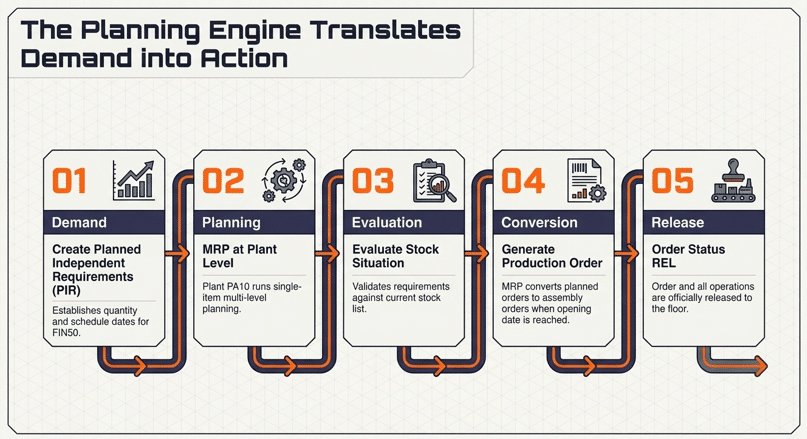
Below are the steps to transfer demands into the action
Step 1: Demand Management (PIR)
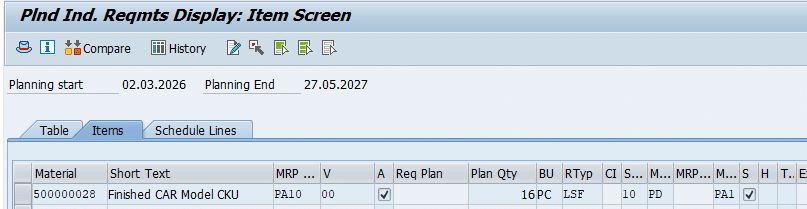
The process is triggered by Planned Independent Requirements (PIR) for the finished car (50000028). PIRs establish the demand schedule, providing the “signal” for the Material Requirements Planning (MRP) engine.
To create the demand run MD61. In the below screenshot demand for 16 Cars has been raised for the given period
Please Click the here to see the details of production strategy used and generation of requirement type “LSF” : Mastering SAP S/4HANA Production Planning Strategies: A Comprehensive Guide to Strategies 10, 11, 20, and 40
Step 2 & 3: MRP & Stock Evaluation
A single-item, multi-level MRP run is executed for Plant PA10.
- Planning Strategy: For Material 50000028, a Make-to-Stock (MTS) strategy is utilized.
- Logic: The system analyzes the PIR, checks available stock, and generates planned orders for the assembly while creating dependent requirements for components 50000030, 50000031, and 50000032.
- Evaluation: Use the Stock/Requirements list to confirm that the planning run successfully recognized the requirements and generated the necessary supply elements.
Run MD04 to see the Stock Evaluation as shown in the below screenshot
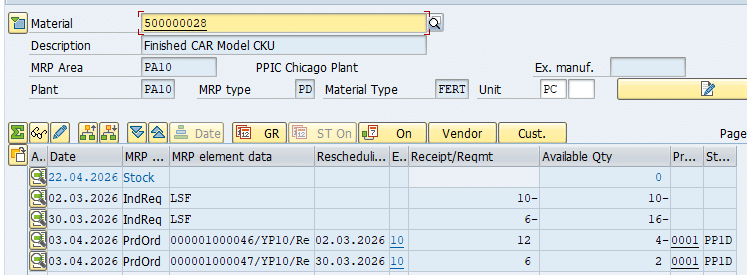
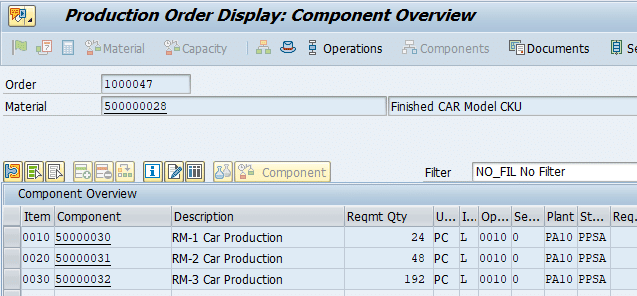
To demonstrate SAP EWM Production Integration, we will create two production orders, each containing three components, which will automatically generate two Production Material Requests (PMRs) in EWM. Each component will represent a different staging method: Single‑Order Staging, Cross‑Order Staging, and Create Part Staging.
Since Cross‑Order Staging in SAP EWM replenishes materials to the Production Supply Area (PSA) for multiple production orders simultaneously, it is essential to create two production orders and two corresponding PMRs. This setup allows us to accurately test how EWM consolidates demand and stages shared components across multiple orders in a real production scenario.
Step 4 & 5: Order Lifecycle and Release
The planned orders are converted into Production Orders. However, the integration with EWM only becomes “active” once the order is Released (REL).
- The Release Trigger: The release is often governed by a “Scheduling Margin Key,” which defines the timeframe for when production is permitted to start. Once the status hits REL, the S/4HANA system automatically communicates the requirement to EWM, creating the PMR.
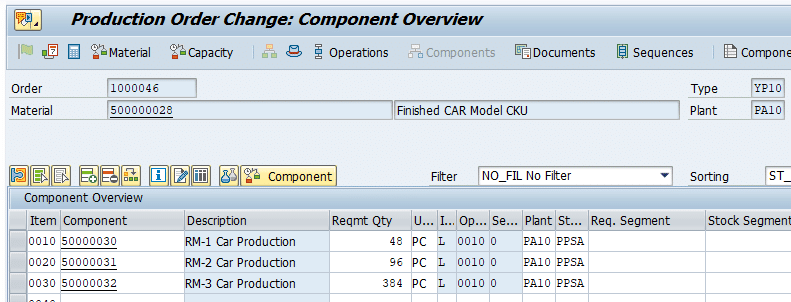
Production Order 1
- Product 50000030 = 48 PC, Single Order Staging.
- Product 50000031 = 96 PC, Cross Order Staging.
- Product 50000032 = 384 PC, Crate Parts Staging.
Production Order 2
- Product 50000030 = 24 PC, Single Order Staging.
- Product 50000031 = 48 PC, Cross Order Staging.
- Product 50000032 = 192 PC, Crate Parts Staging.
3. Technical Core: The Production Material Request (PMR)
The PMR is the internal EWM document that represents the production order’s warehouse requirements. It is categorized under Document Category PWR.
3.1 Consultant Validation Checklist
Before proceeding to execution, use the Warehouse Monitor to validate the PMR:
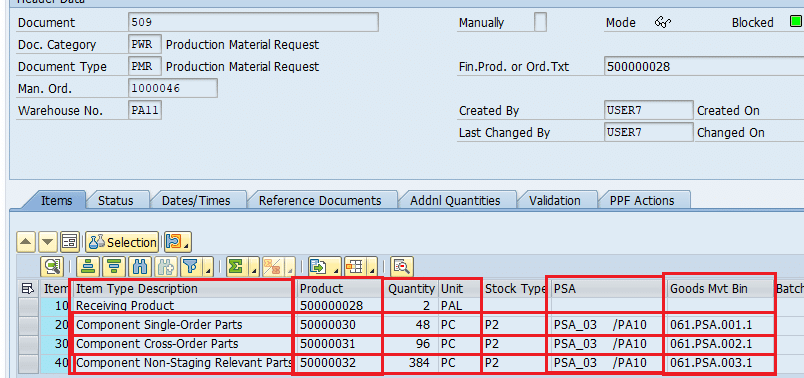
- Header Integrity: Ensure the “Production Status” is Released.
- Item Details: Cross-check the quantities against the Production Order Component Overview.
- Assignment: Verify that each item has a PSA (e.g., PSA_03) and a Goods Movement Bin assigned via the “Assign Bin to PSA” Fiori app.
- Status Monitoring:
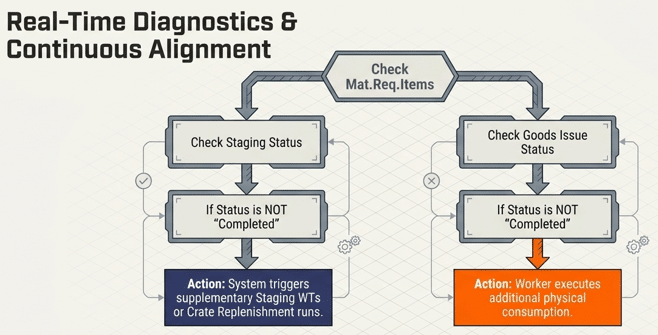
- Cmpl. Stat. (Completion Status): Must be “Not Started.”
- Goods Issue Status: Must be “Not Started.”
4. Deep Dive: Execution of Every Staging Method
Staging is the process of moving material from source storage types (Y011/Y051) to the final PSA destination (Storage Type Y061).
- Source: Y011 (High Rack) or Y051 (Raw Material Storage).
- Destination: Y061 (PSA) storage bins. Specifically:
- 061.PSA.001.1: Single-Order Staging.
- 061.PSA.002.1: Cross-Order Staging.
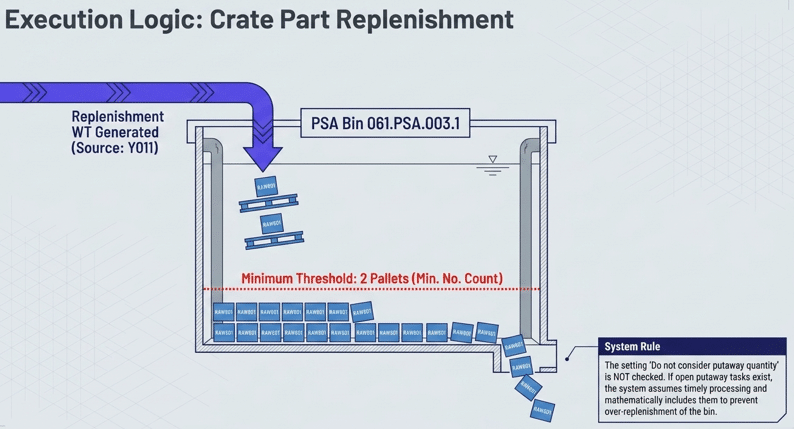
- 061.PSA.003.1: Crate Part Replenishment.
Along with Testing of the staging methods , please check the below post to check the configuration of the Staging and creation of master data
Configuration & Test Data Creation
Along with Testing of the staging methods, please check the below post to review the configuration of the Staging and creation of master data.
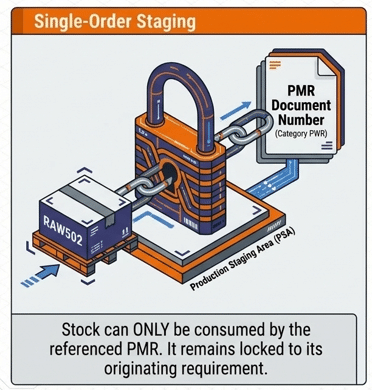
Staging Strategy 1: Single-Order Staging (Material 50000030)
This method creates a strict link between the staging task and the PMR.
- The PWR Reference: Once the Warehouse Task (WT) is confirmed, the stock at the PSA carries a document reference (Document Category PWR and the PMR number).
- Execution: Tasks are managed in the YO* queue.
- Consultant Tip: This method is ideal for high-value or order-specific components where you must prevent “stock poaching” by other production lines.
Staging Strategy 2: Cross-Order Staging (Material 50000031)
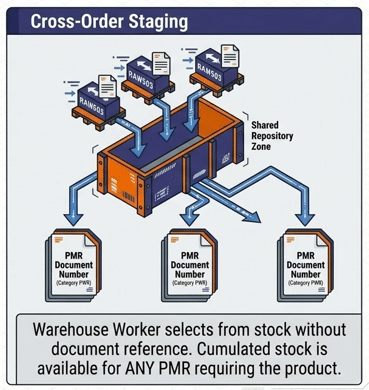
Cross-order staging is more flexible, cumulating requirements across multiple PMRs.
- Logic: The system calculates the total need for a specific material across all open orders and proposes a single staging move.
- Stock Ownership: Stock confirmed at the PSA has no PMR reference.
- Execution: Managed in the YR* queue. Any Production Order requiring Material 50000031 can consume this stock.
Please check the below post to test the cross order staging in detail
Mastering Cross-Order Staging in SAP EWM: A Comprehensive Guide to Production Supply Optimization
Cross-Order Staging End to End Testing
We have moved the complete Cross-Order Staging process into a dedicated deep‑dive article. It covers configuration, PSA behavior, staging logic, and real testing scenarios step‑by‑step.
Staging Strategy 3: Crate Part Replenishment (Material 50000032)
Crate Part Replenishment is triggered by stock levels, not by specific PMR line items.
- Threshold Logic: The system uses the Min. No. Count and Qty. Class fields. For example, if the PSA falls below 2 pallets, the system triggers replenishment for 2 more pallets (the “Number of Containers”).
- Execution (Schedule Replenishment):
- Warehouse: 1010
- PSA: PSA-Y001 (internal mapping for area 1710)
- Program: Run F8 with “Show Log Immediately” selected.
- Important Configuration: In Storage Type Y061, the flag “Do not consider putaway quantity” should be unchecked. This ensures that if a pallet is already en route (open WT), the system won’t create a redundant replenishment task.
Comparison of Staging Methods
| Feature | Single-Order Staging | Cross-Order Staging | Crate Part Replenishment |
| PMR Reference | Yes (Category PWR) | No | No |
| Trigger | Specific PMR Line | Cumulative PMR Need | Stock Threshold |
| Flexibility | Lowest (Locked to Order) | Medium | Highest (Bulk Supply) |
| Typical Use | Critical/Unique Parts | Common Components | Fast-Moving Hardware |
| Queue | YO* | YR* | Standard Replenishment |
5. Production Execution: Consumption at the PSA
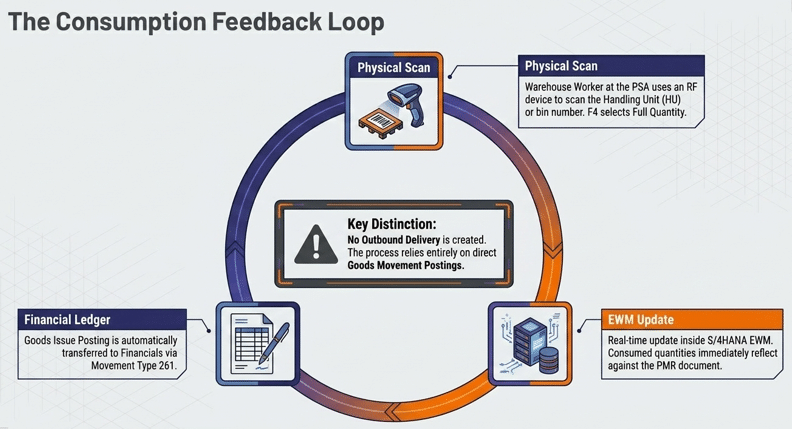
Consumption is the act of posting the Goods Issue (GI) to the Production Order. In Advanced Production Integration, this is a real-time post using Movement Type 261.
5.1 RF-Enabled Consumption Workflow
The line operator utilizes an RF device following this path: Outbound Process -> Consumption -> Consumption by Manufacturing Order.
- Scanning: The worker scans the Handling Unit (HU) at the PSA bin. If the material is not HU-managed, the bin number is scanned.
- Quantity Adjustments:
- SF3 (ChU…): Change the Unit of Measure if the operator is consuming pieces from a pallet.
- F4 (FullQ): Used to consume the entire quantity of the scanned HU/Bin immediately.
- System Update: Upon confirmation, the PMR Goods Issue status updates, and the S/4HANA financial records reflect the 261 movement.
6. Post-Execution Validation & Troubleshooting
6.1 Verifying Completion Status
After consumption, consultants must verify the “Cmpl. Stat.” (Completion Status).
- PMR Status: Once all items are staged and consumed, the status should be Completed.
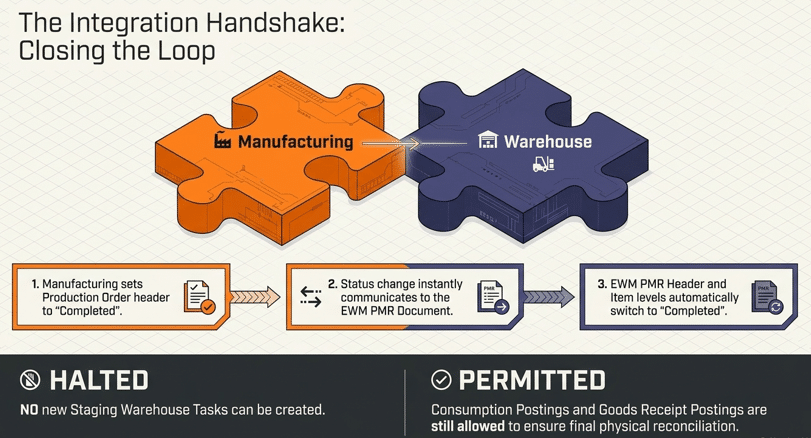
- Production Order Header: When the production supervisor completes the order header in S/4HANA, this status is pushed back to EWM.
- Critical Knowledge: Even after the PMR is marked as “Completed,” the system still permits Goods Receipt (GR) and additional Consumption postings. However, no new Staging WTs can be created.
6.2 Troubleshooting Scenarios
- Replenishment Not Triggering: If the system says “No replenishment to execute,” check for open putaway tasks. If the “Do not consider putaway quantity” flag is unchecked, the system counts incoming stock as “available.”
- Over-Consumption: If the line operator consumes 50 pieces when the PMR requested 48, EWM dynamically updates the “Consumed Quantity” field in the PMR to maintain accuracy.
- Stock Issues: If staging fails, verify that the Handover Point (Y001) is correctly configured as an intermediate step for the High Rack (Y011) to PSA (Y061) flow.
7. Conclusion
The Advanced Production Integration in SAP S/4HANA represents a massive leap forward for manufacturing transparency. By utilizing the PMR document and Movement Type 261 directly within EWM, businesses eliminate the silos between warehouse operations and the production line. This synchronization ensures that “missing parts” are a thing of the past, as inventory is tracked with precision from the moment it enters the High Rack until it is consumed into a finished car.
8. FAQ
A: PMR allows for real-time synchronization and visibility. Unlike deliveries, which are “one-way” signals, the PMR stays active and updates its “Cmpl. Stat.” and “Goods Issue” statuses as warehouse tasks are confirmed and consumption is posted
A: No. Stock staged via Single-Order Staging is locked to the specific PMR reference (Category PWR). This ensures that critical components are available only for the intended assembly.
A: Using the RF device, operators can use the SF3 function to change the unit of measure and post a partial quantity. The remaining quantity stays in the PSA bin for future use.
A: The system will ignore any en-route stock (open warehouse tasks) and create new replenishment tasks based only on what is physically in the bin. This may lead to over-stocking at the PSA
A: The PMR remains in the system for history and reporting, but once the Production Status is “Completed,” the system prevents any further staging activities.
.
.

