
In high-volume manufacturing environments, the ability to decouple component supply from specific production orders is a strategic necessity for maintaining warehouse agility. Cross-Order Staging in SAP EWM facilitates this by replenishing components to the Production Supply Area (PSA) for multiple production orders simultaneously. Cross-order staging eliminates the 1:1 link between components and specific orders, creating a shared supply pool at the PSA available to any active production requirement.
1. Quick Facts: SAP EWM Cross-Order Staging
- Core Definition: The simultaneous replenishment of components to a PSA to support multiple active production orders from a consolidated requirement pool.
- Operational Advantage: Decouples supply from demand spikes, allowing for smoother warehouse throughput and reduced line-side congestion.
- Trigger Mechanism: Replenishment is automated based on PSA stock falling below a defined “Minimum Quantity” threshold.
- System Integration: Operates via Production Material Requests (PMRs) using transaction
/SCWM/STAGE.
This architecture ensures that the warehouse functions as a proactive supply engine rather than a reactive order-filler, driven by the following technical determination criteria.
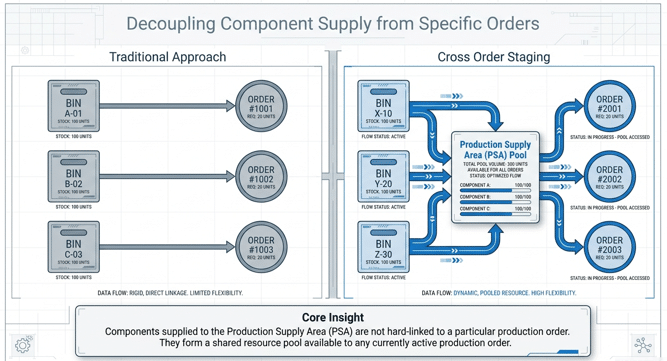
2. The Architecture of Cross-Order Staging: Determination Criteria
A resilient SAP EWM-PP integration is built upon the foundation of precise determination criteria. For a Solution Architect, these parameters are the levers that control stock ownership, destination accuracy, and replenishment frequency. Without rigorous master data alignment, the staging engine cannot accurately calculate the delta between warehouse stock and production demand.
We have created the master data in the below post which propels the charterastics of the cross order staging. Please see in the below link
Comprehensive Guide to Master Data for Advanced Production Integration in SAP S/4HANA and EWM – III. The Bridge: PSA, Control Cycles, and PSA-Bin Assignment – 3.2 PSA-Bin Assignment for Cross Order Staging
Since our focus is now on cross order staging so we will see each element of cross order staging in the details
2.1 Key Determination Components
The system evaluates several master data elements to initialize the staging process:
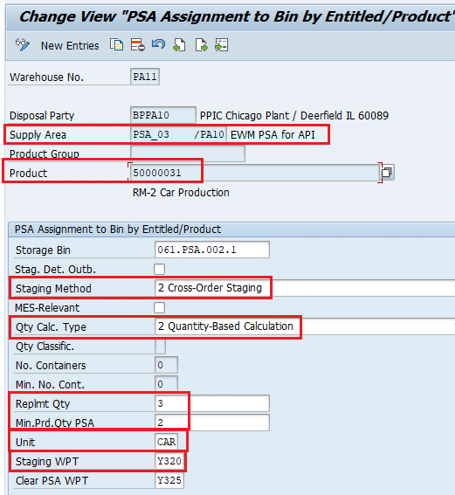
- Party Entitled to Dispose: Represents the Business Partner linked to the specific Plant. This ensures financial and physical stock ownership remains synchronized during the transfer to production.
- Production Supply Area (PSA): The physical staging location on the shop floor. PSAs are defined in the Production Planning (PP) module and replicated to EWM to bridge the gap between planning and execution.
- Product/Product Group: Utilizing the Product Master Data, the system identifies specific materials or material groups eligible for cross-order logic versus those requiring specific handling.
Note: There are two Quantity calculation Type. First as shown above – “2-Quantity Based Calculation” & There is another quantity calculation type as “3-Calculation Based on PMRs”
In this post we have tested cross order staging with Quantity calculation Type as “2-Quantity Based Calculation” as shown in the above Picture. Please check the below post for the cross order staging with Quantity calculation Type as “3-Calculation Based on PMRs”
2.2 Determined Criteria: Logic and Triggers
Once the “who” and “where” are established, the system applies “Determined Criteria” to manage the execution of movements.
| Criterion | Technical Impact on Staging |
| Storage Bin | The specific destination bin within the PSA identified during the creation of the staging Warehouse Task (WT). |
| Staging Method | Specifically set to Cross-Order to allow multi-order support. (Note: Manual batch assignment in PP defaults this to Single-Order). |
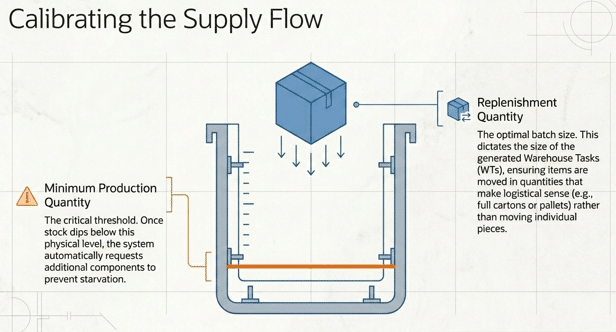
| Replenishment Quantity | The “Payload”: The standardized quantity moved in a single WT (e.g., 3 CAR / 24 PC) to optimize labor and equipment utilization. |
| Minimum Production Quantity in PSA | The “Trigger”: The threshold level. When PSA stock drops below this value, the system initiates new replenishment activity. |
3. The Cross-Order Staging Algorithm: Step-by-Step Logic
To mitigate the “Bullwhip Effect”—where small fluctuations in production demand cause erratic swings in warehouse activity—SAP EWM employs a sophisticated staging algorithm. This logic ensures that only authorized requirements are staged at the optimal moment.
3.1 Selection of Relevant Production Material Requests (PMRs)
The algorithm begins by filtering the global pool of PMRs based on two primary technical gatekeepers:
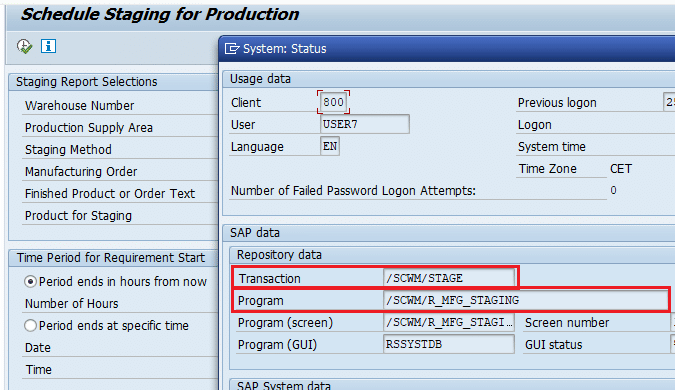
- Start Requirement Date: The system only considers PMR items where the start requirement date is less than or equal to the date specified on the selection screen of transaction
/SCWM/STAGE. For example, if a report is run on 23.04.2026, only orders with requirement dates on or before that timestamp (e.g., 02.04.2026) are selected. - PMR Status: Only PMRs with the status “DMC Production Order = 1 Released” are eligible. In this context, “1” is the technical value representing the “Released” status. This prevents the warehouse from staging materials for orders that are still in the planning or “Created” phase.
Technical Closure (TECO) Remark: To maintain a clean staging queue and high data integrity, non-confirmed production orders can be excluded by executing a Technical Closure (TECO).
This status removes the order’s relevance for staging, preventing redundant stock accumulation at the PSA.
We have created two Production Material Request below which are demanding staging including Cross Order Staging
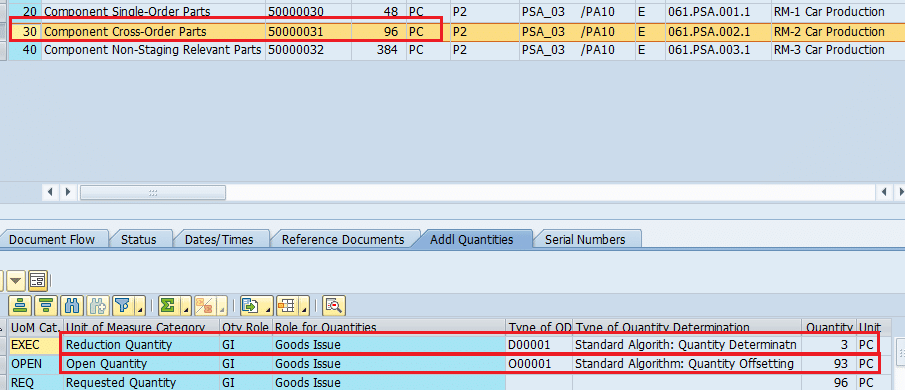
Production Material Request (PMR) Number 509
- Product 50000030 = 48 PC, Single Order Staging.
- Product 50000031 = 96 PC, Cross Order Staging.
- Product 50000032 = 384 PC, Crate Parts Staging.
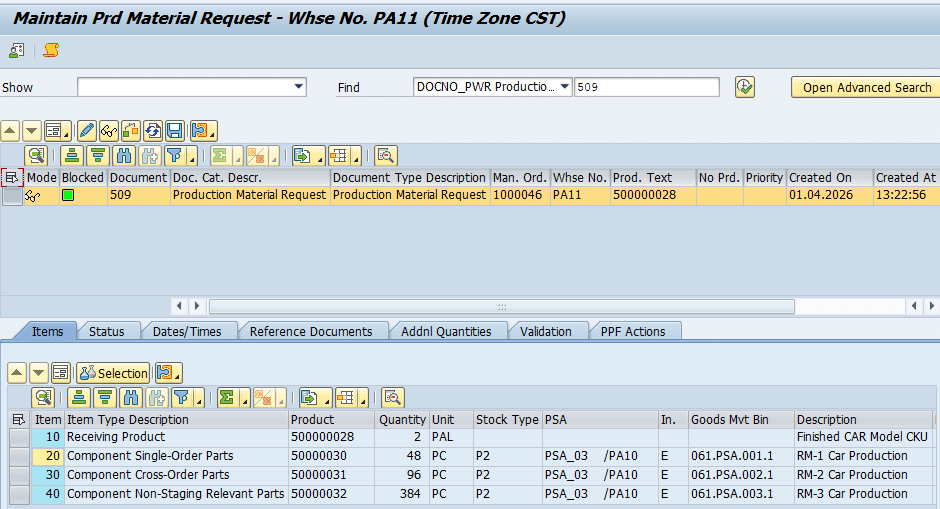
Out of this requested quantity of 96 PC for cross Order staging in PMR number 509, 3 PC is already consumed.
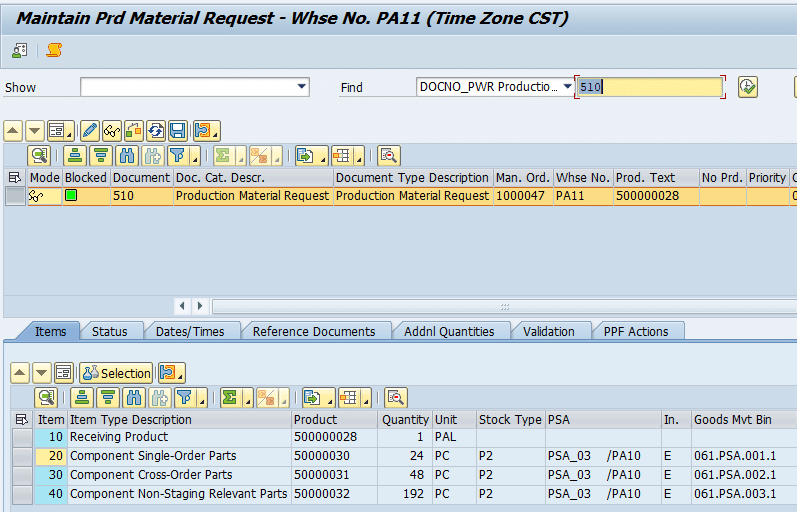
Production Material Request (PMR) Number 510
- Product 50000030 = 24 PC, Single Order Staging.
- Product 50000031 = 48 PC, Cross Order Staging.
- Product 50000032 = 192 PC, Crate Parts Staging.
Please check the following POST to see the PMR creation part in detail. – Master Guide: Testing Advanced Production Integration in SAP S/4HANA (Staging & Consumption)
4. Mathematical Synthesis: Calculating Open Staging Quantities
The “Open Staging Quantity” calculation is the central logic of the replenishment engine. It ensures that every Warehouse Task created is mathematically justified by the actual deficit at the PSA.
4.1 The Core Formula
The system calculates the replenishment requirement using the following logic:
Open Staging Quantity = Open Remaining quantity – PSA quantity – WT quantity
4.2 Calculation Case Study: PMR 509 & 510
Consider a report run on 23.04.2026 for Product 50000031, involving two separate requirements with a start requirement date of 02.04.2026:
- PMR 509 (Open Remaining Quantity):
- Required: 96 PC
- Consumed (Goods Issue already posted): 3 PC
- Calculation: 96 PC – 3 PC = 93 PC
- PMR 510 (Open Remaining Quantity):
- Required: 48 PC
- Consumed: 0 PC
- Calculation: 48 PC – 0 PC = 48 PC
- Consolidated Requirement:
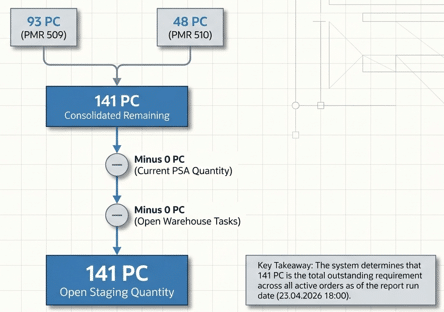
- (93 PC from PMR 509) + (48 PC from PMR 510) = 141 PC Consolidated Requirement.
Assuming the current PSA stock and open WTs are zero, the system recognizes a total need of 141 PC.
[ARCHITECT’S INSIGHT: PREVENTING REDUNDANCY] By strictly subtracting existing PSA stock and Warehouse Tasks (WTs) that are already “in-flight,” the algorithm prevents the creation of redundant staging tasks. This calculation protects the warehouse from over-servicing the PSA and wasting valuable labor and floor space.
5. System Execution: The /SCWM/STAGE Report and Batch Processing
Operationally, cross-order staging is managed through transaction /SCWM/STAGE, often automated via scheduled batch jobs to ensure continuous production flow.
5.1 WT Creation in Cross Order Staging
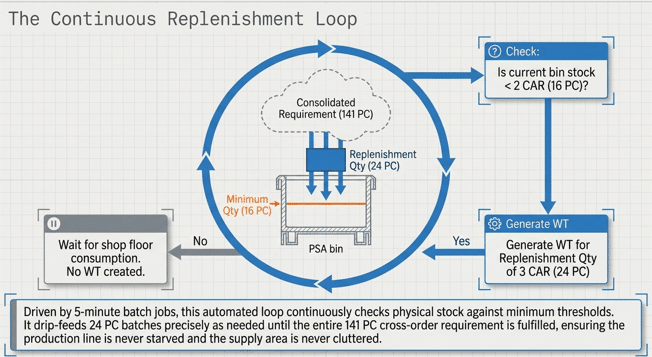
In a standard digital factory, the staging batch job is typically scheduled at frequent intervals (e.g., every 5 minutes). The system does not attempt to fulfill the entire 141 PC requirement in one massive movement; instead, it creates WTs in increments defined by the Replenishment Quantity (e.g., 3 CAR or 24 PC).
Let,s schedule the batch job to simulate the real business behavior of cross Order staging
The system monitors the PSA bin continuously. If the Minimum Quantity is set to 2 CAR (16 PC), and the bin currently contains 16 PC, the system will not trigger a new WT. Only when consumption drives the stock level below 16 PC will the next report run trigger a new 24 PC Warehouse Task. This cycle repeats until the total consolidated requirement of 141 PC is fulfilled.
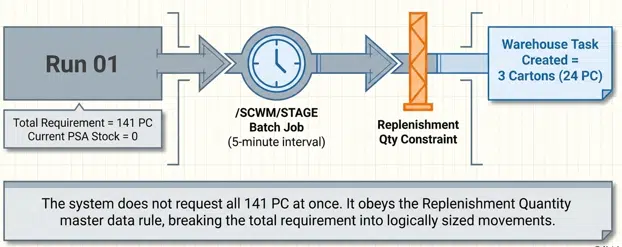
Batch job has created the first WT of 24 PC as per the setting in control cycle (3 CAR = 24 PC)

Job log
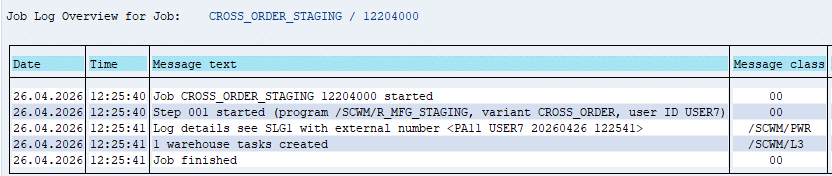
Since WT is already created for Minimum Replenishment quantity, system will not create any WT in the next runs until it is consumed and PSA qty falls below minimum quantity (2 CAR =16 PC)
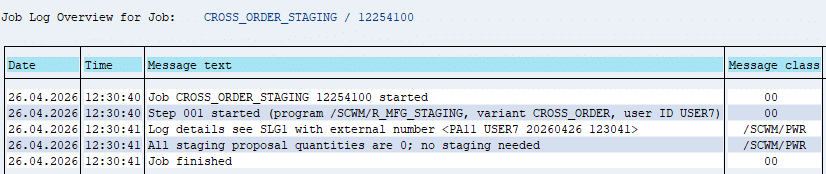
Lets Complete this staging and consume the 24 PC
Confirm the WT first. Start /SCWM/RFUI
Manual Selection -> Selection by WO -> Input the WO
Since we are picking 3 CAR i.e. partial pallet so we will create pick HU (Packaging Material -EWMS4-CAR00)
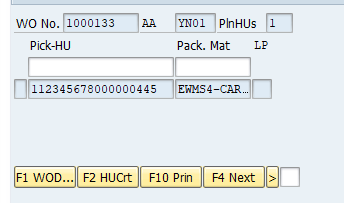
Our Pick HU is now placed in the PSA
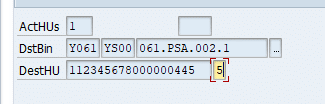
Stock in PSA

Since Stock is now Present in the PSA BIN
- System will change the stock type from F2 to P2 due to Availability Check.
- Since Stock Type F2 is linked with PP1S & Stock Type P2 is linked with PPSA, so system will post a Material Document with 411 Movement Type (SLOC to SLOC Transfer) to update the SLOC from PP1S to PPSA.
Material Document of 411 Movement Type (Storage Location to Storage Location Transfer)
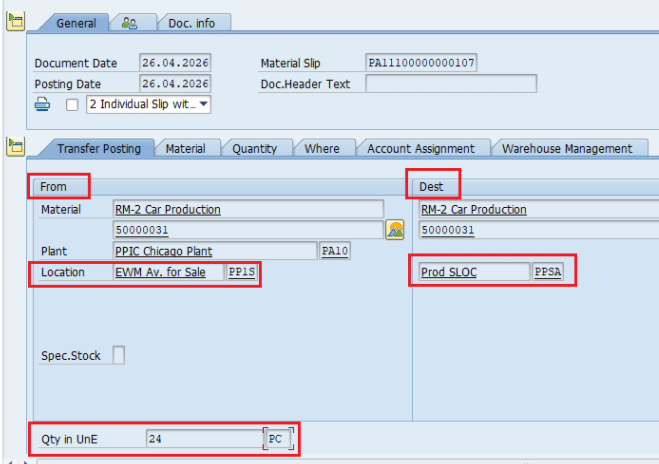
Now consume the stock
Start /SCWM/RFUI , Outbound Processes -> Consumption -> Consumption by Manufacturing Order
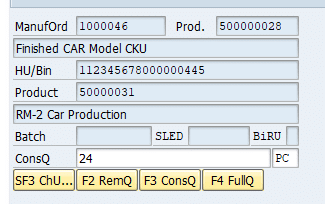
PMR is updated with consumed quantity
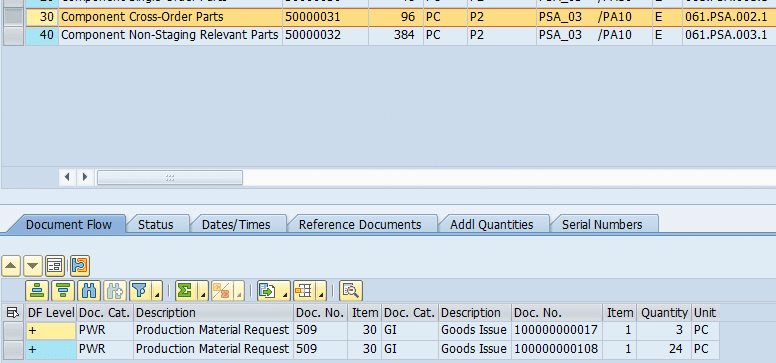
Open Quantity is updated in the PMR
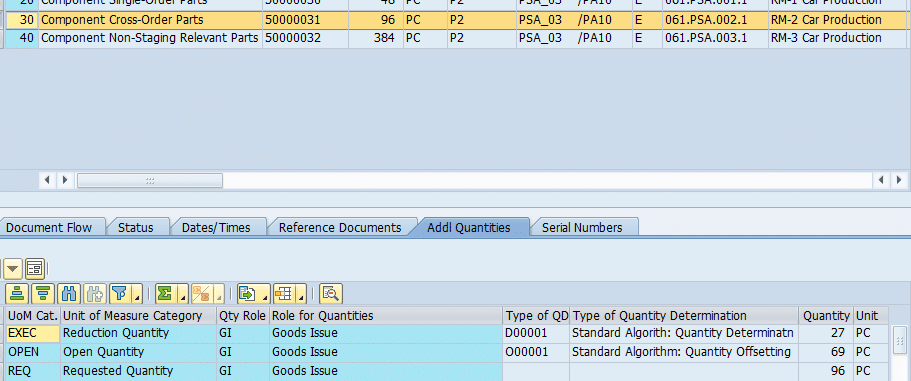
Consumption is updated in Manufacturing Order

Consumption Material Document Detail
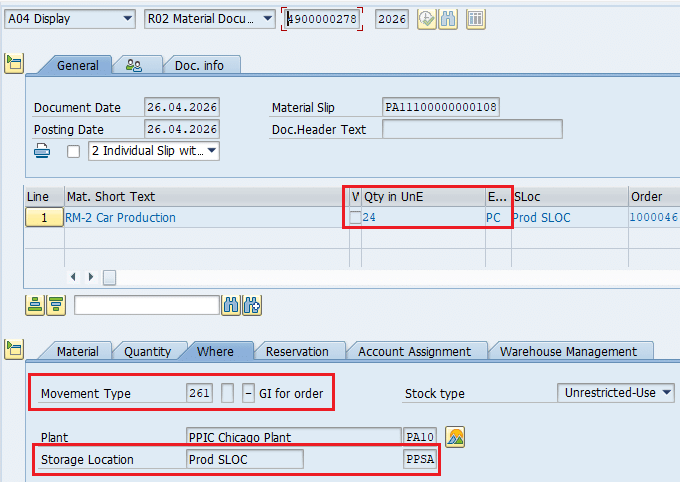
Since we have consumed PSA Quantity
- The next Staging batch Job will create another WT now for the 3 CAR (24 PC).
- After that there will be no WT creation in the next Run(s) until We consume this Quantity present in PSA or it falls below the Minimum quantity.
The next batch job (after consumption posting) will create the new WT to stage 3 CAR (24 PC)
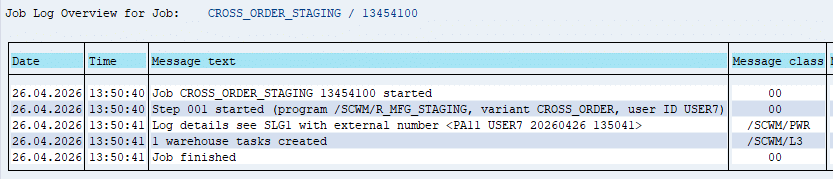
New WT for 3 CAR (24 PC) is created now

Confirm the new WT & stock of 24 PC is now in PSA

Now consume the stock and it will create the new WT of 24 PC , This will repeat till the total staging quantity of both the PMRs 141 PC is staged
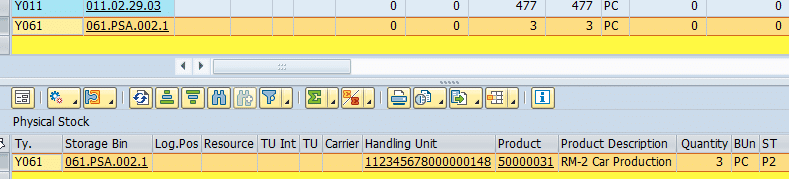
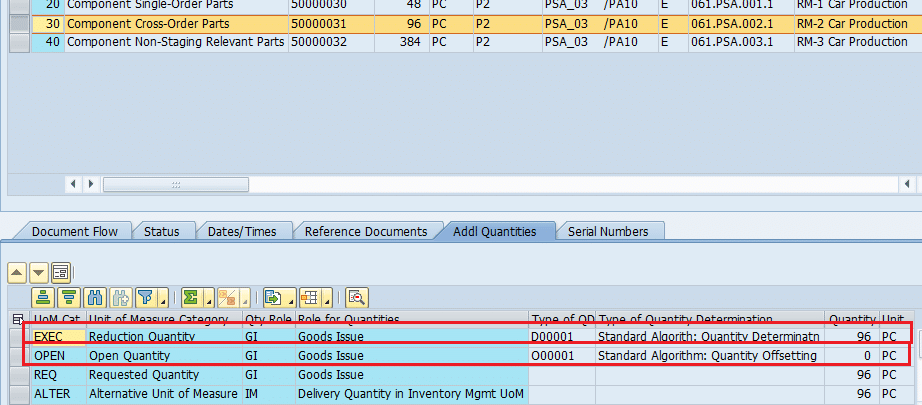
Since in the last staged CASE only 21 PC is consumed (as 3 PC is already consumed), so 3 PC will remain in the PSA.
PMR After full quantity staging & Consumption
This guide is a dedicated deep‑dive into Cross‑Order Staging in SAP EWM.
If you want to explore the other staging methods — Single‑Order Staging, Create‑Part Staging, and the complete API testing flow — continue with the main testing guide below.
6. Business Value and Strategic Impact
Optimizing Cross-Order Staging is a cornerstone of digital supply chain transformation. By moving from reactive to consolidated replenishment, organizations realize three primary benefits:
- Inventory Efficiency: PSA clutter is minimized. The warehouse only delivers what is mathematically required to support active production, reducing the “Bullwhip Effect” and freeing up valuable floor space.
- Labor Productivity: By consolidating movements into logical “Replenishment Quantities,” the number of warehouse trips is significantly reduced, allowing forklift operators to focus on high-value tasks.
- Process Automation: Scheduled batch jobs for
/SCWM/STAGEtransition the warehouse toward an autonomous “pull” system, where the software maintains the flow of materials without manual intervention.
As enterprise architects, implementing these configurations is essential for creating a lean, responsive manufacturing environment that can scale with the demands of Industry 4.0.
7. FAQ
A: The system overrides cross-order staging settings and defaults to Single-Order Staging to maintain strict batch-to-order traceability. This logic is found in class /SCWM/CL_PWR_GMBIN=>DETERMINE_STAGING_METHOD.
A: It is the Total Required Quantity from the PMR minus any Consumed Quantity (materials for which a Goods Issue has already been posted).
A: A new WT is triggered when the stock level in the PSA bin falls below the defined “Minimum Production Quantity” master data threshold.
A: The PMR must have the technical status “DMC Production Order = 1 Released.” Orders with a TECO (Technical Closure) status are automatically excluded from the selection pool.


