🌱 Start Here: SAP Org Structure Foundation
Every SAP scenario requires a working organization structure. Configure FI, SD, MM, and LE in minutes using these beginner‑friendly guides — the fastest way to prepare any SAP system for testing.
A well-structured Logistics Execution (LE) system serves as the critical architectural bridge between inventory management, sales, and finance. In any SAP S/4HANA ERP implementation, the LE organizational structure is the engine that drives physical movement and digital transparency. By optimizing this structure, businesses achieve seamless integration between Materials Management (MM) and Sales and Distribution (SD), while ensuring real-time accuracy in Financial Accounting (FI).
From a senior architect’s perspective, Logistics Execution optimization is not merely a technical requirement; it is a prerequisite for Supply Chain Management efficiency. This guide provides a professional-grade walkthrough of the essential configuration steps required to build a robust LE foundation.
Video Tutorial: Watch Before Reading
While this technical guide offers an exhaustive breakdown of the Logistics Execution (LE) module, watching the companion masterclass video is essential for visualizing the SAP S/4HANA interface and the step-by-step configuration flow.
Visit our dedicated SAP LE Org Structure Video Watch Page
Core Overview: The S4HANA LE Organization Structure Architecture
The SAP Logistics Execution (LE) organizational structure acts as the connective tissue for Goods Receipt (GR) and Goods Issue (GI) processes. It ensures seamless coordination between MM (Inventory Management) and SD (Outbound Delivery).
Crucially, every logical movement within LE is tied to financial postings in the FI module. The “Financial Posting” occurs at the point of Post Goods Issue (PGI) or Post Goods Receipt (PGR), which are triggered within these LE units. A robust setup supports complex scenarios like third-party processing, drop shipments, and intercompany stock transfers, ensuring that stock valuation and cost accounting remain accurate in real-time.
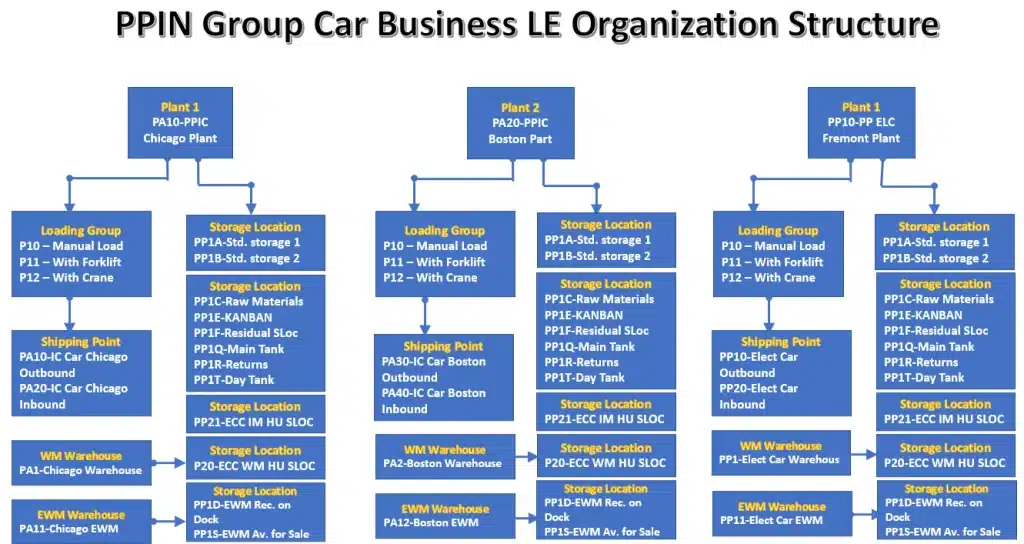
Please see below all the components of SAP S4 HANA Logistics execution organization structure elements in pictorial form for our car business.
We will configure this organization structure in this post
Step 1: Defining Shipping Points for Global Logistics
The Shipping Point is the top-level organizational unit in Logistics Execution. It is responsible for managing outbound deliveries, transportation scheduling, and distribution. It defines the physical location where goods depart
Please follow the below path to configure Shipping point

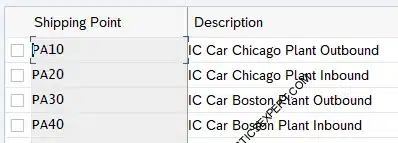
We have created below shipping points for our car business.
1.1 IC Car Shipping Points
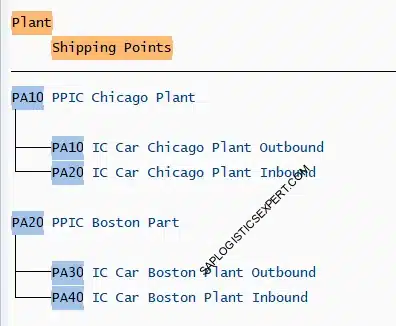
- We have created 4 shipping points to serve these two plants as given in the below screenshot.
- Two shipping points per plant
- One outbound shipping point & one inbound shipping point per each plan
CONFIGURATION ACCELERATOR
Download the SAP MM Org Structure Workbook. Use our validated copy-paste templates to eliminate manual entry errors in S/4HANA. To further accelerate your implementation and eliminate manual entry errors, we recommend utilizing the Configuration Accelerator Workbook. This tool provides pre-mapped templates that align with the best practices outlined in this guide. Check the link below.
Download configuration Accelerator Workbook →1.2 Electrical Car Shipping Points
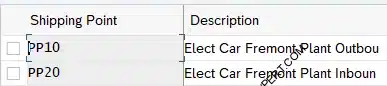
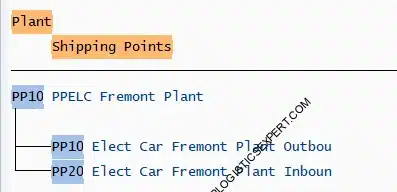
We have created 2 shipping points for electrical car plant as given in the below screenshot.
Assign Transportation Zone to the Shipping Point
To determine delivery routes effectively, Transportation Zones must be assigned to Shipping Points.
• Region East (0000000001): Assigned to shipping points for plants PA10 and PA20.
• Region West (0000000002): Assigned to shipping points for plant PP10.

Note: Transportation zone in shipping point is used to determine the route. Please see the below post for details
Step 2: Assigning Shipping Points to Plants
In this step, we link the production/storage locations (Plants) to the dispatch units (Shipping Points). Architecturally, this determines how shipments are processed. While , precision is required for the Car Business model:
Pros:
- One shipping point can serve multiple plants.
- We can allocate as many shipping points as desired to the plants.
- Any one shipping point can belong to several plants.
2.1 Shipping Points for IC Car
2.2 Shipping Points for Elect Car
🌱 Keep Going — Your LE Structure Is Almost Ready
The next steps will complete your LE organization structure and enable delivery creation, shipping, and goods movement. Continue reading — the final pieces are coming up.
Step 3: Shipping Point Determination
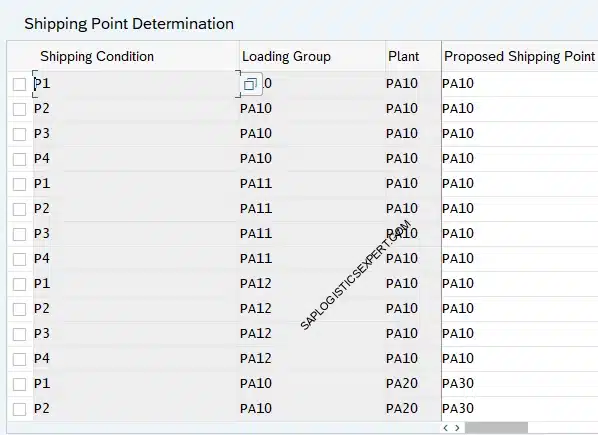
The system automatically proposes a shipping point during sales order processing using the following logic: Plant + Loading Group + Shipping Condition = Proposed Shipping Point
Shipping Point Determination:
- Only Outbound Shipping Point are configured in this section.
- There is a separate section for inbound shipping point configuration
We have determined shipping point as per below data
Please follow the below path to determine outbound shipping points

🌱 LE Org Structure Completes the Logistics Chain
Shipping points, loading groups, and transportation zones enable delivery creation and goods movement. LE works hand‑in‑hand with FI, SD, and MM to execute real‑world logistics scenarios.
3.1 Define Shipping Conditions
Define the conditions that need to be met for goods to be shipped. This is entered in customer master. Shipping point determination is carried out by the SAP system only if a shipping condition is contained in the sales document.
Note : We can also determine a shipping condition for each sales document type. This shipping condition is then used for determining the shipping point in the sales document instead of what is specified in the customer master record.
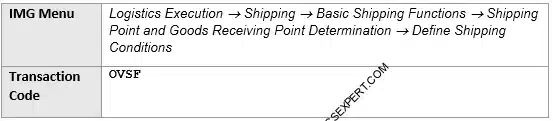
Please follow the below path to configure the shipping conditions
Below Shipping Conditions are created for our car business
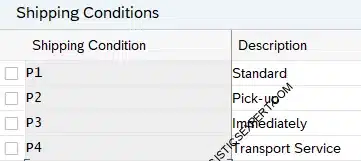
3.2 Defining Loading Groups
Loading groups define how goods are handled (e.g., forklift vs. crane) and are assigned to the material master.
Follow the below path to configure the loading groups
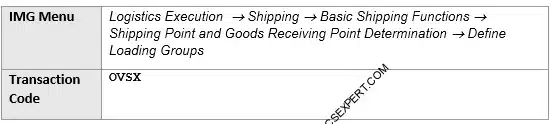
We have configured below loading groups for PA10 Plant
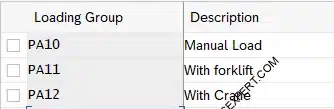
We have configured below loading groups for PA10 Plant
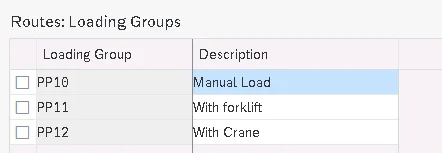
Step 4: Picking Location Determination & Rules (OVL3)
Picking rules define how the system identifies the correct storage location for outbound deliveries.
We have configured picking location determination for our car business as below.
MALA Rule: MALA is the preferred rule for S/4HANA outbound deliveries as it prioritizes the material’s storage condition—essential for handling sensitive components like hazardous batteries vs. standard automotive parts.
- Determines location based on Shipping Point + Storage Condition + Plant.
RETA Rule: Utilized primarily in the retail sector, focusing on Storage Location, Plant, and Situation.
- Determines location based on Storage Location + Plant + Situation.
For our car business, we utilize the YOBD customized delivery type.
Picking Location Rule is assigned to the Delivery Type
for our car business, we have configured a customized delivery type “YOBD”.
Configure SAP S4 HANA Sales Documents in 10 Minutes →SPRO –> IMG –> Logistics Execution –> Shipping –> Picking –> Determine Picking Location –> Define Rules for Picking Location Determination
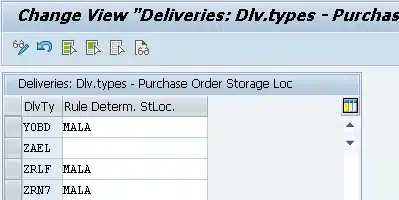
Note : We will determine picking storage locations in outbound deliveries. Since we have all type of storage locations like Std Storage Locations, IM HU Managed SLOC, WM Managed, EWM Managed so we need to determine picking storage locations corresponding to storage conditions accordingly.
4.1 Picking Location Determination in EWM
For EWM There are two separate Storage Locations for inbound goods & outbound goods.
For our car business we have configured these two as below
- PP1D – EWM Rec. on Dock
- PP1S – EWM Av. for Sale
Check Storage Location Configuration in Detail
EWM Picking location in outbound deliveries will be “PP1S – EWM Available for sales” , which is different from EWM Inbound deliveries SLOC as “PP1D – EWM Receive on Dock”. The available stock is changed from PP1D to PP1S through EWM functionality of stock availability

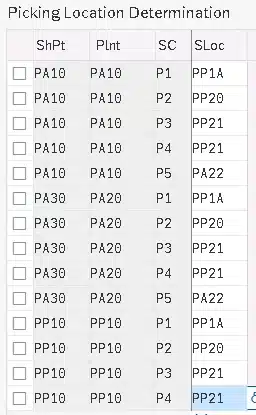
We will see the component of picking location determination in detail i.e. “Storage Conditions”
Step 4.1: Defining Storage Conditions
Storage Conditions in SAP LE (Logistics Execution) refer to predefined settings that dictate how materials should be stored, handled, and managed within a warehouse or storage location. These conditions ensure that goods are maintained under the right environmental factors, such as temperature, humidity, and safety requirements, to prevent damage and maintain quality.
Below 4 Storage conditions are configured for our car business
Storage conditions are entered in the material master record for each storage location.
Path to define storage conditions are defined for our car business

So depending upon the material handling i.e. material is inventory managed or HU mandatory or Warehouse Managed or EWM managed , we will input storage condition in the material master
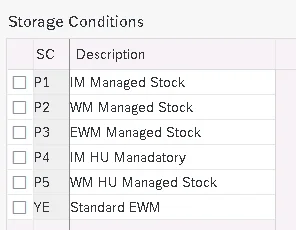
Step 5: Assigning Goods Receiving (GR) Points for Inbound Deliveries
For inbound logistics, the Goods Receiving Point is determined by the Plant and Storage Location (SLOC).
Below is the data used for this configuration
Storage Location in the Inbound Delivery:
- The storage location in the inbound delivery depends on the SLOC provided in the Purchase Order, which is pulled from the material master record.
- This storage location is present in the field named “Storage loc. for EP” on MRP 2 view of the material Master.
5.1 Assign Inbound Receiving point to PA10 Plant
We have created inbound shipping point as “PA20” for this Plant in step 1.
Assign this Shipping point as goods receiving point to the combination of plant “PA10” & all storage locations as shown in the screenshot.
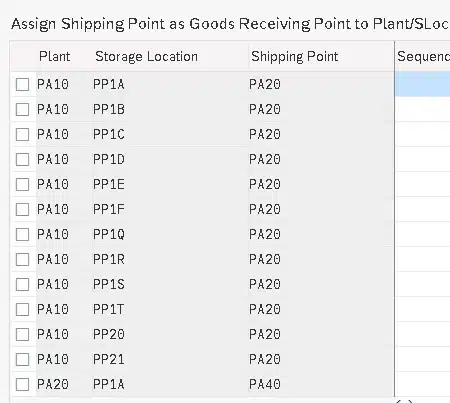
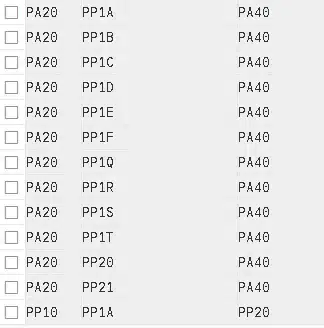
5.2 Assign Inbound Receiving point to PA20 Plant
We have created inbound shipping point as “PA40” for this Plant in step 1.
Assign this Shipping point as goods receiving point to the combination of plant “PA20” & all storage locations as shown in the screenshot.
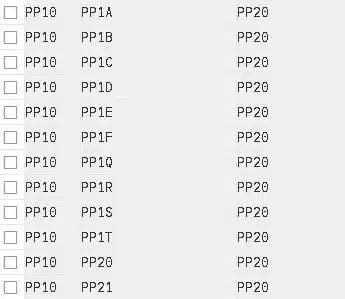
5.3 Assign Inbound Receiving point to PP10 Plant
We have created inbound shipping point as “PP20” for this Plant in step 1.
Assign this Shipping point as goods receiving point to the combination of plant “PP10” & all storage locations as shown in the screenshot.
Step 6: Transportation Group Configuration
Transportation Groups classify materials with similar transit requirements (e.g., pallets, liquid, or specialized car haulers). These are assigned to material master records and are critical for route determination.
Transportation Group:
- In SAP S/4HANA, Transportation groups are assigned to material master records.
- Transportation groups are a vital components in determining Routes.
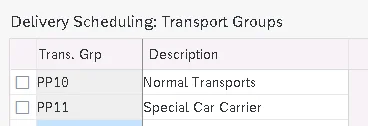
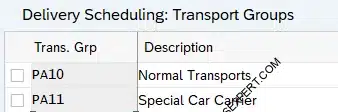
Created below transportation group for our companies
Below is the path to configure transportation group

Logistics Execution Organization structure configuration ends here.
Next Steps:
- We have configured now SAP S4HANA FI-CO, SD, MM & LE Organization Structure.
- We will start now Configuration & Activation of Material Ledger which is mandatory in S4HANA.
- After that We can start creating Materials, Vendors & Customers and further scenarios.
Conclusion & Engagement
Establishing a high-performance Logistics Execution structure requires more than just filling out tables; it requires an architectural understanding of how goods move and how finance follows. By following this 6-step “Configuration Accelerator” approach, you ensure your S/4HANA environment is built for global scale.
➡️ Next Step: Configure the Remaining Org Structures
To run complete SAP scenarios, make sure all four organization structures are ready. Continue with the remaining modules below.
Image Courtesy : Man vector created by macrovector – www.freepik.com