📘 Start With the SAP Org Structure Master Hub
This guide is part of the SAP S/4HANA Organization Structure series. If you want to configure all modules (FI, SD, MM, LE) in the correct sequence and prepare your system for end‑to‑end scenarios, begin with the master hub page.
In the era of S/4HANA Enterprise Management, the Sales & Distribution (SD) module acts as the critical engine for revenue generation and customer lifecycle management. However, the success of any ERP Digital Transformation hinges on the integrity of its foundational organizational hierarchy. For many architects, the complexity of mapping real-world business units into SAP can be a significant pain point, leading to downstream issues in reporting and logistics.
This guide provides a professional-grade, 7-step blueprint for configuring a high-performance SD organizational structure. Using a global car business—the PPIN Group—as our model, we will walk through the precise configuration steps required to achieve Supply Chain Optimization and seamless financial integration.
Key Takeaways
• Architectural Clarity: Master the hierarchy from the Client and Company Code level down to the specific Sales Area.
• Precise Configuration: Definitive T-Codes and SPRO paths for defining Sales Organizations, Distribution Channels, and Divisions.
• Business Logic: Implementation of exclusion rules for product-specific market segmentation.
• Risk & Logistics Integration: Seamlessly linking SD to Financial Accounting (FI) via Credit Control Areas and Logistics via Plant assignments.
1. Video Tutorial
💡 Watch this step-by-step video tutorial to visualize the configuration process for the PPIN Group’s SD organizational structure. While the video provides a visual walkthrough, the technical documentation below serves as the definitive reference for your implementation, containing all SPRO paths, transaction codes, and specific business data requirements for S/4HANA architectures.
Visit our dedicated SAP SD Org Structure Video Watch Page
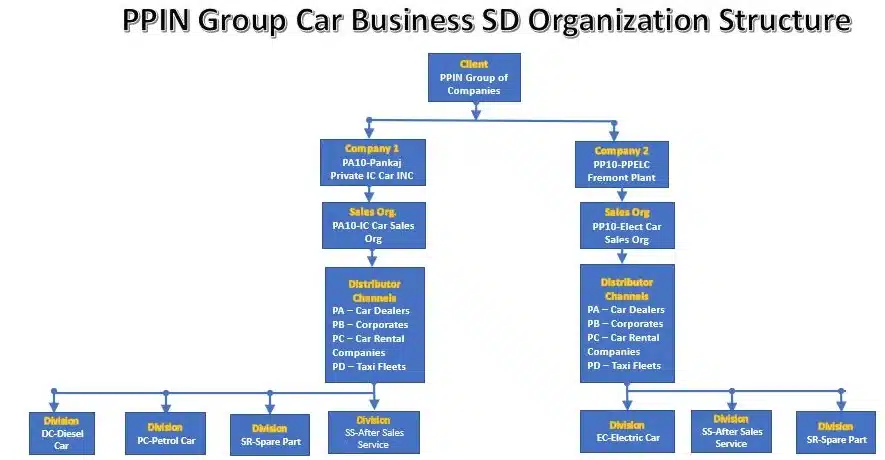
2. The Blueprint: Visualizing the SAP SD Hierarchy
The SAP SD organizational structure is not merely a collection of codes; it is a logical framework that dictates how a business transacts. The hierarchy starts at the Client level (the highest organizational unit in SAP) and flows through the Company Code (the legal entity for financial reporting).
The core of the SD module resides in the Sales Area, which is the unique tripartite combination of a Sales Organization, a Distribution Channel, and a Division. This structure ensures that every transaction is correctly categorized for pricing, tax, and reporting.
Step 1: Defining the Sales Organization
The Sales Organization is the top-level unit responsible for the sale and distribution of goods and services. It bears the legal responsibility for products and handles negotiating sales conditions.
For the PPIN Group, we distinguish between Internal Combustion (IC) and Electric vehicle technologies by defining two distinct Sales Organizations. Business rules dictate that these remain separate to manage the unique liability and market strategies of each technology.
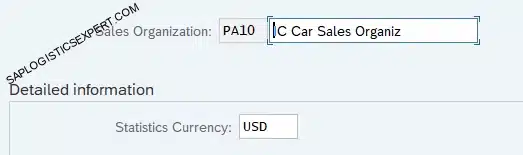
1.1 Define Sales Organization for IC Engine Car Business.
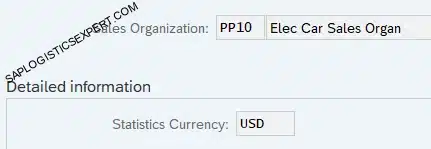
1.2 Define Sales Organization for Electrical Car Business
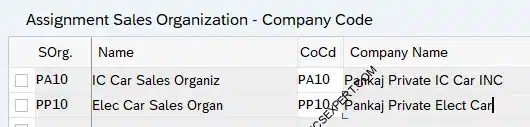
Step 2: Strategic Alignment – Assigning Sales Org to Company Code
To ensure accurate financial postings, the Sales Organization must be integrated with the Financial Accounting (FI) module. A fundamental SAP business rule states: A Sales Organization must belong to exactly one Company Code. This ensures that all revenue and cost of goods sold (COGS) are reflected in the correct legal books.
Configuration Path & T-Code:
SPRO: Enterprise Structure > Assignment > Sales and Distribution > Assign sales organization to company code Transaction Code: OVX3
CHECK COMPANY CODE CONFIGURATION IN DETAIL
Ensure your Finance foundation is solid before moving forward. Master the SAP FI Enterprise Structure guide now.
Read SAP FI Org Guide →Step 3: Defining Distribution Channels for Market Segmentation
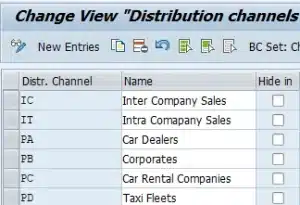
Distribution Channels represent the strategic paths used to reach the end consumer. Defining these allows for granular performance analytics and enables the business to apply different pricing strategies for different market segments.
For the PPIN Group, we have established the following distribution Channels
Configuration Path & T-Code:
SPRO: Enterprise Structure > Definition > Sales and Distribution > Define, copy, delete, check distribution channel Transaction Code: OVXI
CONFIGURATION ACCELERATOR
Download the SAP SD Org Structure Workbook. Use our validated copy-paste templates to eliminate manual entry errors in S/4HANA. To further accelerate your implementation and eliminate manual entry errors, we recommend utilizing the Configuration Accelerator Workbook. This tool provides pre-mapped templates that align with the best practices outlined in this guide. Check the link below.
Download configuration Accelerator Workbook →Step 4: Creating Divisions for Product Specialization
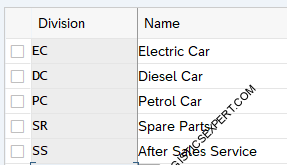
Divisions are used to segment product lines and services. This allows the architect to group materials and restrict specific price agreements or customer master data to relevant product ranges.
We define the following divisions for our vehicle and service lines:
Configuration Path & T-Code:
SPRO: Logistics – General > Material Master > Settings for Key Fields > Define Divisions Transaction Code: OMSP
Step 5: Setting Up the Sales Area – The Core Integration
The Sales Area is the backbone of the “Order-to-Cash” process. It influences pricing, customer master data, and financial reporting.
🌱 SD Org Structure Connects Sales With Logistics
SD organization structure enables pricing, delivery creation, billing, and customer‑related logistics flows. To run complete OTC scenarios, make sure FI, MM, and LE structures are also configured.
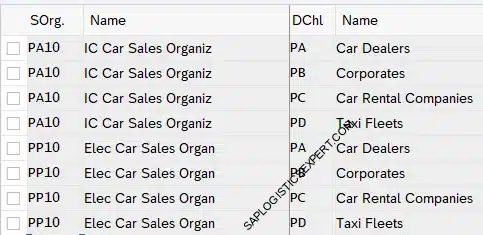
5.1 Assign Distribution Channel to Sales Organization
Both Sales Organizations (PA10 and PP10) utilize our primary market channels (PA, PB, PC, PD).
Transaction Code: OVXK
Follow the below path to Assign Distribution Channel to Sales Organization

We will assign all 4 distribution channels to our both sales organization
🌱 You’re Halfway There — Let’s Complete Your SD Setup
The next steps will finalize your SD organization structure and prepare your system for pricing, delivery, and billing scenarios. Keep going — the most important parts are coming up.
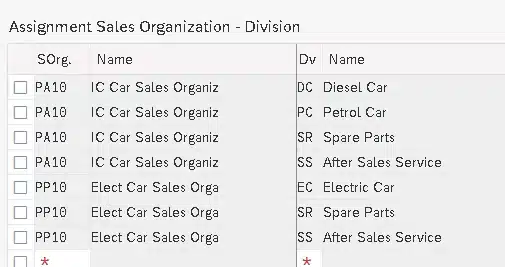
5.2 Assign Division to Sales Organization
Data integrity requires the exclusion of non-compatible product divisions.
• PA10 (IC Car Sales Org): Assigned to Diesel (DC), Petrol (PC), Spare Parts (SR), and After Sales (SS). It excludes Electric (EC).
• PP10 (Electric Car Sales Org): Assigned to Electric (EC), Spare Parts (SR), and After Sales (SS). It excludes Diesel (DC) and Petrol (PC).
5.3 Set Up Sales Area
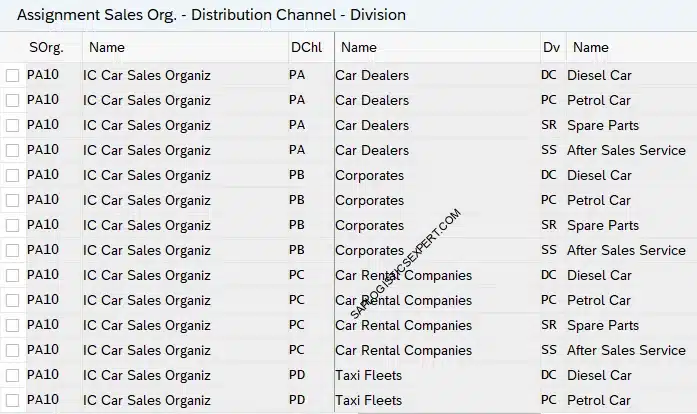
A Sales Area—comprised of a Sales Organization, Distribution Channel, and Division—defines the framework within which all sales transactions are processed. It determines how pricing, customer master data, and reporting are managed across your enterprise.
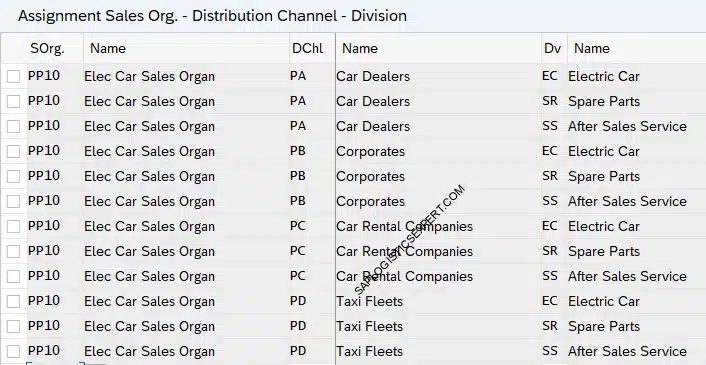
The final integration step defines the valid combinations. This results in 24 unique areas for IC Car and 18 for Electric Car.
PP10 (Electric Car Company) – It will not have Petrol Car & Diesel Car Division
Follow the below path to create the sales area

5.3.1 Setting Up Sales Area for IC Car
It will not have Electric Car Division
5.3.2 Setting Up Sales Area for Electrical Car
It will not have divisions “DC – Diesel Car” & “PC -Petrol Car”.
Step 6: Financial Risk Management – Credit Control Area
The Credit Control Area is a critical organizational unit that governs credit management policies. It ensures that customer credit limits are monitored consistently across multiple company codes, minimizing financial exposure.
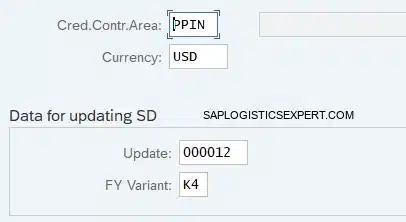
PPIN Credit Control Area Parameters:
• Credit Control Area: PPIN
• Currency: USD
• Update: 000012 (Critical for SD integration)
• Fiscal Year Variant: K4
6.1 Defining the Credit Control Area
Follow the below path to create credit control area.

We have configured credit control area “PPIN” for our car business.
6.2 Assigning Company Codes to the Credit Control Area
Both Company Codes (PA10 and PP10) are assigned to the PPIN Credit Control Area to maintain a unified credit policy.
Follow the below path to assign company code to credit control area.

We have assigned both our company codes to same credit control area “PPIN”
- A credit control area can include one or more company codes.
- A company code cannot be assigned to more than one control area.

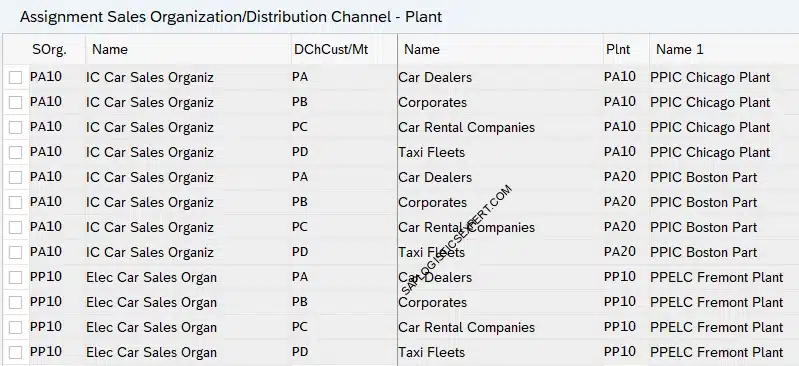
Step 7: Logistics Integration – Assigning Sales Org and DC to Plant
This integration is the final link in the chain, enabling the system to source products and execute deliveries. By linking the Sales Organization and Distribution Channel to a specific Plant, the system can automate availability checks (ATP) during the sales process.
The PPIN Logistics Mapping:
• Sales Org PA10 (IC Car) + Channels PA-PD -> Assigned to Plant PA10 (Chicago) and Plant PA20 (Boston).
• Sales Org PP10 (Electric Car) + Channels PA-PD -> Assigned to Plant PP10 (Fremont).
Follow the below path to assign Sales Organization and Distribution Channel to a Plant
SPRO -> Enterprise Structure -> Assignment -> Sales and Distribution -> Assign Sales Organization – Distribution Channel – Plant
3. Conclusion
A robust organizational structure is the bedrock of a scalable SAP S/4HANA implementation. By following this 7-step blueprint, you ensure that your sales processes are logically segmented, financially integrated, and logistics-ready.
➡️ Next Step: Configure the Remaining Org Structures
To run complete SAP scenarios, make sure all four organization structures are ready. Continue with the remaining modules below.