
Part‑0 introduces the complete roadmap for the S/4HANA–EWM Integration Series and sets the foundation for everything that follows. This post explains the overall architecture, the integration layers, and the flow of configuration across S/4HANA and EWM. Before diving into technical settings, it is essential to understand how the systems communicate, what objects participate in the integration, and how the end‑to‑end process behaves in real projects.
This introduction prepares you for the deeper configuration work that begins in Part‑1, ensuring you have a clear picture of the landscape, the sequence, and the dependencies across all seven parts of the series.
📘 Master S/4HANA EWM Integration — 7‑Part Series
You are currently reading Part 0 — the introduction to the 7‑Part S/4HANA–EWM Integration Series.
This overview sets the stage for the technical and functional steps that follow. Once you complete this introduction, continue to Part 1 to begin the actual integration work.
Go to Part 1 →Integrating SAP S/4HANA with Extended Warehouse Management (EWM) is the cornerstone of modern logistics. While many consultants understand the theory, the gap between a standard PowerPoint and a live system can be daunting for any Senior SAP Logistics Architect.
To bridge this gap, this series provides a step-by-step walkthrough based on actual system configurations and proven technical logic. By aligning your SAP ERP with Warehouse Automation, you ensure real-time visibility and a resilient supply chain.
Master S/4HANA EWM Integration: Complete 7‑Part Real‑World Guide
This 7‑part series walks you through every critical step of connecting SAP S/4HANA with Extended Warehouse Management (EWM) — from technical connectivity and ERP settings to stock mapping, document integration, and decentralized EWM.
Part 0 — Introduction: Real‑World EWM–S/4HANA Integration
Why most EWM–S/4HANA integrations fail in practice, and how this series is structured to give you a complete, end‑to‑end blueprint instead of isolated configuration tips.
Part 1 — The Technical Connectivity Layer
Learn how to connect S/4HANA and EWM at the technical level: RFC destinations, logical systems, and core communication settings that everything else depends on.
Part 2 — S/4HANA ERP Settings
Configure S/4HANA so that deliveries, stock movements, and documents are created in a way that EWM can consume reliably — without manual fixes or inconsistencies.
Part 3 — EWM Settings
Set up EWM warehouse structures, integration objects, and core settings so that ERP documents are transformed into executable warehouse tasks and processes.
Part 4 — Stock Type, Availability Group & Storage Location Mapping
Align stock types, availability groups, and storage locations between S/4HANA and EWM so that physical stock and system stock always match.
Part 5 — ERP to EWM Document Integration
Master document type mapping so that each ERP delivery, return, and production process triggers the correct EWM document and warehouse behavior.
Part 6 — Extra Steps for Decentralized EWM on S/4HANA
Implement the additional configuration required when EWM runs as a decentralized system on S/4HANA, including production integration and advanced scenarios.
Ready to move from theory to real S/4HANA–EWM connectivity?
In Part 1, we build the technical connection layer between S/4HANA and EWM so that all later configuration has a rock‑solid foundation.
Continue to Part 1: The Technical Connectivity Layer →Embedded vs. Decentralized Deployment
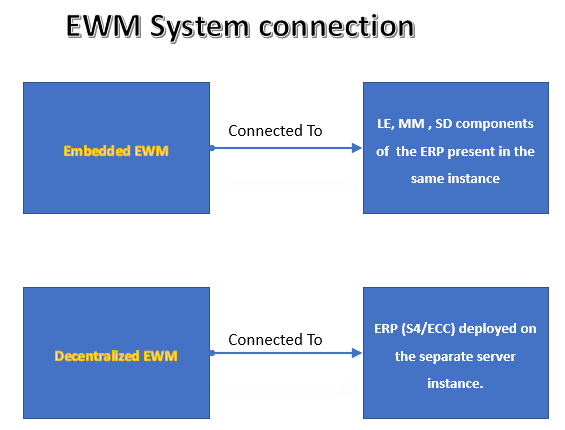
The connection logic is dictated by your deployment choice, as seen in the EWM System Connection technical architecture:
• Embedded EWM: Operates within the same instance as S/4HANA. It connects directly to LE, MM, and SD components using a “Dummy” logical system to facilitate internal communication.
• Decentralized EWM: Deployed on a separate server instance. It connects to an external ERP (S/4HANA or legacy ECC) and requires an “Actual” logical system for the EWM side.
Below activities are executed under this configuration
Expert Insight: In Decentralized S/4HANA, the system requires an actual logical system for the EWM side, whereas Embedded models use a dummy. Forgetting this distinction will stall your qRFC queue immediately and prevent your SAP Cloud ERP from recognizing the warehouse engine.
FAQ: Introduction to S/4HANA EWM Integration
The main difference lies in the instance landscape; Embedded EWM resides in the same client as S/4HANA logistics, while Decentralized EWM sits on a separate server, requiring more robust external qRFC management.
Yes, SAP S/4HANA supports both Embedded and Decentralized EWM, though the configuration paths (SPRO) vary slightly depending on whether the integration is internal or cross-server.
The Dummy system acts as a placeholder to satisfy the standard RFC-based communication protocols used by the EWM interface, even though the data never leaves the physical server.
Master S/4HANA EWM Integration : Step-by-Step Video Guide Part-0
If you’re diving into the world of SAP S/4HANA and EWM integration, this blog post lays the groundwork—but the real magic happens when theory meets practice. To see how these systems connect in real-world scenarios, check out my YouTube video “How to Connect SAP S/4HANA–EWM: Real-World Guide, Not Just Theory [Intro Video]”. It complements the blog with hands-on insights, practical walkthroughs, and visual clarity that text alone can’t capture. Watch the video alongside the article to get the full picture and accelerate your understanding.
To truly master the integration of SAP S/4HANA with EWM, theory alone won’t cut it—real-world application is where the learning sticks. This blog post gave you a practical starting point, but there’s much more to explore. Continue the journey by watching the Full Three-Part Video Series where each episode builds on the last with hands-on demonstrations and expert insights. And don’t miss the additional blog posts linked throughout this page—they dive deeper into configuration steps, troubleshooting tips, and advanced scenarios that will elevate your understanding. Whether you’re implementing, optimizing, or just curious, this series is your roadmap to doing it right.
You have now completed the foundational overview of the S/4HANA–EWM integration landscape. With the roadmap and architecture clearly understood, you are ready to begin the actual configuration journey. The next step is to establish the technical connectivity layer — the backbone that enables S/4HANA and EWM to exchange data in real time.
Continue to Part‑1 to configure RFCs, logical systems, qRFC settings, and ALE distribution, which form the technical base for all subsequent integration steps.
Don’t stop at the introduction.
The real work starts in Part 1, where we build the technical connectivity layer between S/4HANA and EWM.
Go to Part 1: Technical Connectivity Layer →