
This video and guide (Part‑4 of the S/4HANA–EWM Integration Series) focus on one of the most critical layers of the entire integration: stock type, availability group, and storage location mapping. If the earlier parts established the connectivity, ERP settings, and EWM structure, this part ensures that both systems interpret stock in exactly the same way.
Even if your technical connection and structural settings are perfect, incorrect stock mapping can still cause delivery failures, posting errors, ATP inconsistencies, and mismatched inventory between S/4HANA and EWM. This section explains how availability groups relate to stock types, how storage locations map to EWM, and how the system determines unrestricted, quality, blocked, and special stock categories during inbound and outbound processing.
Once this mapping layer is configured correctly, your warehouse will maintain consistent, real‑time stock visibility across both systems, ensuring stable inbound, outbound, and production processes.
📘 Master S/4HANA EWM Integration — 7‑Part Series
You are currently reading Part 4 of the 7‑Part S/4HANA–EWM Integration Series.
This section aligns stock types, availability groups, and storage locations. Once you complete this post, continue to Part 5 to configure document type mapping.
Go to Part 5 →One of the most persistent frustrations in warehouse management is the phenomenon of “ghost inventory”—stock that has physically arrived and is sitting in your warehouse but remains invisible to sales teams or production planners. This visibility gap often leads to missed sales opportunities, unnecessary production delays, and a general lack of trust in the system.
In SAP S/4HANA EWM, the solution to this problem lies in the strategic configuration of Availability Groups and Stock Types. By correctly mapping these technical elements, businesses can bridge the gap between physical movements and system-wide visibility, ensuring that every pallet is accounted right from the moment it hits the dock.
Takeaway 1: The Strategic Benefit of Separate Stock Visibility
Maintaining separate visibility for stock currently in the “put-away” process versus stock that is “completely available” is a critical requirement for high-velocity supply chains. By mapping separate storage locations (SLOCs) to specific availability groups, EWM ensures that inventory is categorized based on its actual physical readiness.
If we want to have separate visibility of the stock which is still under put away to the stock which is completely available then we will map separate storage locations to the respective availability groups.
This level of control is vital for organizations managing specialized inventory, such as spare parts or critical production materials. When these items are visible but correctly flagged as “in put-away,” planners can anticipate availability without prematurely promising stock that hasn’t been shelved.
Takeaway 2: Configuring Availability Groups for Diverse Material Flows
To support varied operational requirements, availability groups must be configured to reflect specific material flows. It is a common misconception that one or two groups fit all needs; rather, specialized flows require dedicated configurations to maintain bin-level integrity.
Availability Groups:
- Raw, Semi-finished, and Finished Materials: Standard inventory flows where stock moves from receipt to general storage.
- Production Staging Materials: Stock designated for manufacturing supply areas.
- Spare Parts: Inventory managed for maintenance and repairs.
2.1 Strategic Depth
For Production Staging and Spare Parts, it isn’t enough to simply change a status. To keep these stocks distinct from standard inventory in final bins, you must define a separate availability group, a dedicated set of stock types, and a unique storage location for each process. This prevents “cross-contamination” of inventory types in your warehouse analytics.
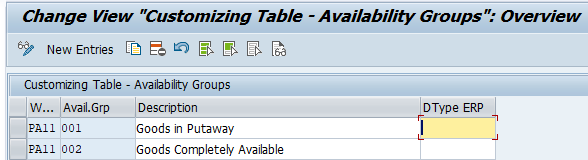
2.2 Configure Availability Group to Put-away for Raw, Semi-finish & Finished Materials
Below is the path to configure availability Group for Put-away for Raw, Semi-finish & Finished Materials

In our EWM we have configured two main availability groups, 001 for goods in put-away and 002 for goods available for sale. This is assigned to the plant and storage location of the EWM warehouse in SAP S/4HANA
2.3 Configure Availability Group for Put-away for Production Materials
Since we want to keep stock in production supply areas separate from stock on final bins, we will define a separate availability group, a set of stock types, and a storage location for the production supply areas.
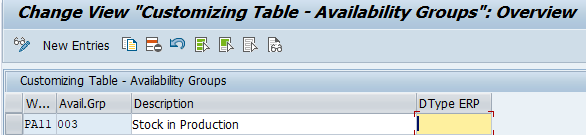
Picture: Availability Group for Put-away for Production Materials
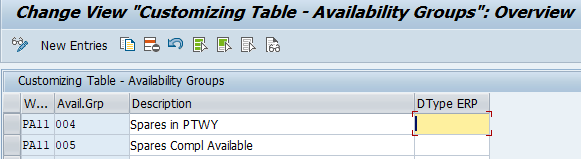
2.4 Configure Availability Group for Put-away for Spare Parts
Since we want to keep stock of spare parts separate from other materials stock on final bins, we will define a separate availability group, a set of stock types, and a storage location for the production supply areas.
Takeaway 3: Managing Stock in the Goods Receipt Zone vs. Final Bins
A critical architectural decision in EWM is how you handle Available-to-Promise (ATP) checks. If you keep stock in the Goods Receipt (GR) zone separate from stock in final bins, you prevent the system from promising “Goods in Receipt” to a customer before they are actually on the shelf and ready for picking.
- The Complex Scenario: You define two availability groups (e.g., 001 and 002), each representing a different storage location. Stock in the GR zone is managed under group 001, while final storage belongs to group 002.
- The Simple Scenario: In warehouses linked to only one plant and one storage location, you define a single availability group representing that combination and assign it to all stock types.
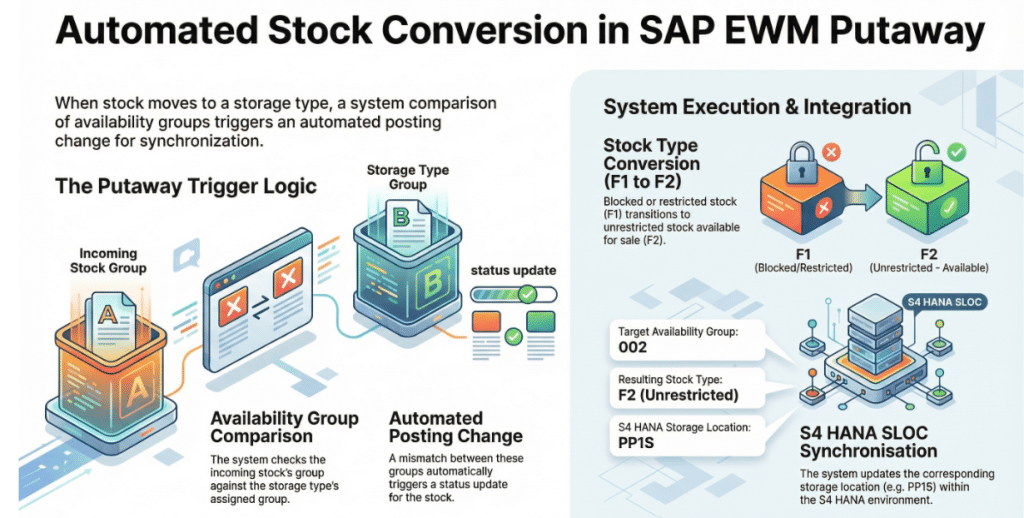
When a put-away warehouse task is confirmed in the complex setup, the system automatically triggers a posting change, moving the stock from the “put-away” group to the “available” group, ensuring absolute inventory accuracy for the sales system.
As you work through stock and availability mapping, you’ll see how these values influence every inbound, outbound, and production process.
Once you complete this part, continue to Part 5 where we configure ERP→EWM document type mapping — the heart of communication between both systems.
Continue to Part 5: ERP → EWM Document Integration →Takeaway 4: Defining Non-Location-Dependent Stock Types
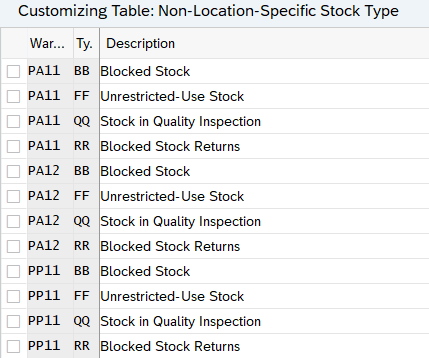
Non-location-dependent stock types are attributes that group stock based on its state (e.g., unrestricted-use, quality inspection, or blocked) regardless of its physical location in the warehouse.
While SAP provides default types—such as FF for Unrestricted-Use Stock—a Senior Consultant knows that custom types can be created to meet specific business requirements. These serve as the essential bridge between the S/4HANA stock category and the granular EWM stock type.
4.1 Define Non-Location-Dependent Stock Type
These are stock types that group stock based on their attributes and are independent of stock location in the warehouse. SAP has provided some non-location-specific stock types by default, but we can create more per our business requirements.
Takeaway 5: The Critical Mapping: S/4HANA Storage Locations to EWM
The integration between the S/4HANA core and EWM hinges on mapping storage locations to EWM warehouse numbers and assigning the appropriate availability group.
A vital but often overlooked part of this mapping is the “Default party for disposal.” For example, in a standard EWM setup for warehouse PA11, you must create a plant vendor (e.g., PA01VEN01) and assign it as the party for disposal. This technical link ensures that when stock moves between the ERP and EWM layers, the system knows exactly which legal entity or plant “owns” the stock.
5.1 Map Storage Locations from ERP/S4 to EWM for our Warehouses
Here we map storage locations onto the warehouse numbers in Extended Warehouse Management (EWM) and assign an availability group to each storage location.

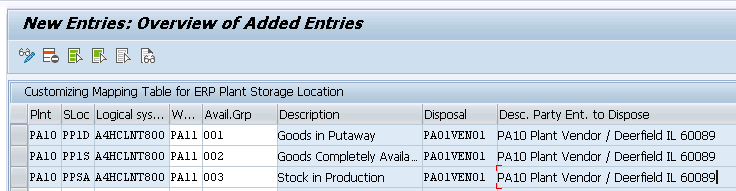
Note: We have created the plant vendor PA01VEN01 and assigned the same to as “Default party for disposal” for warehouses PA11
Takeaway 6: How the System Determines Stock Type (The Logical Flow)
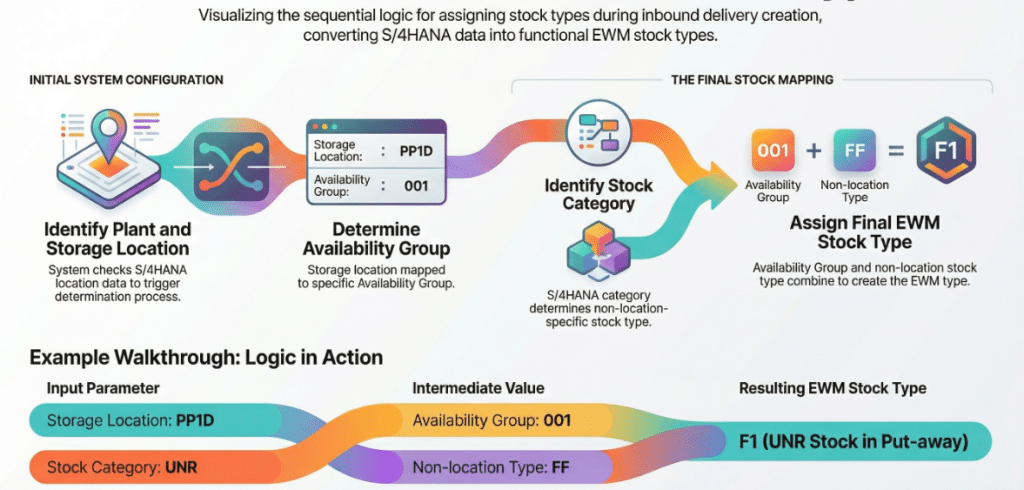
When an Inbound Delivery (IBD) is created in EWM, the system executes a precise logical sequence to determine the stock type. Understanding this hierarchy is key to troubleshooting “ghost inventory” issues.
6.1 The Step-by-Step Logic
- Identify Plant/SLOC: The system reads the delivery data (e.g., SLOC PP1D).
- Determine Availability Group: Based on the mapping, it finds the group (e.g., 001 – Goods in Put-away).
- Cross-Reference Stock Category: It checks the S/4HANA stock category (e.g., UNR for Unrestricted).
- Find Non-Location Type: UNR maps to the non-location type (e.g., FF).
- Final EWM Stock Type Determination: The combination of Availability Group 001 + Non-Location Type FF = EWM Stock Type F1 (UNR Stock in Put-away).
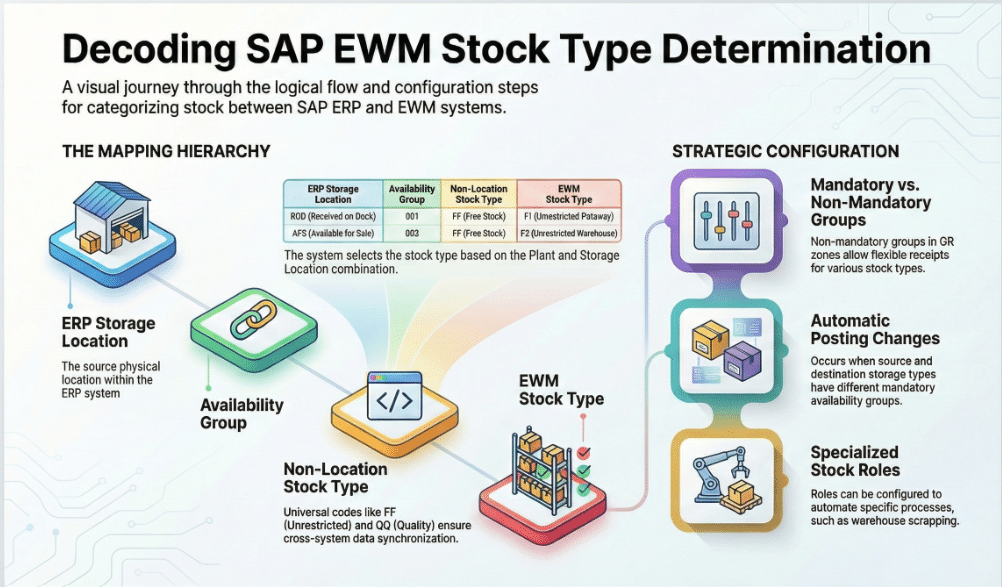
6.2 Configure Stock Type for Our Warehouses
In this activity, map the availability group and non-location-specific stock type with the stock type in embedded EWM for a specific warehouse like F1-UNR Stock in Put-away, F2-UNR Stock Warehouse. Now this EWM stock type is mapped to non-location specific stock type and availability group F1(UNR Stock in Put-away) is mapped to 001 (Goods in put-away) & FF (UNR Use-Stock) F2 (UNR Stock in WH) is mapped to 002 (Goods Completely Available)
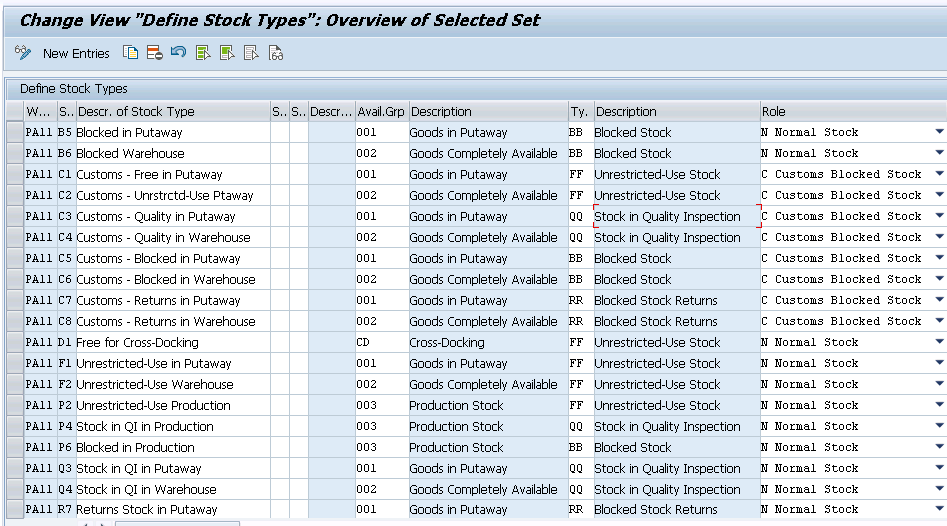

Important Hierarchy Hint: Availability groups can be assigned at both the Warehouse Process Type (WPT) level and the Storage Type level. The system always gives preference to the settings defined at the Storage Type level.
Takeaway 7: Automating the Posting Change During Put-away
The true power of EWM lies in its ability to automate the transition from “received” to “available.” When a warehouse task moves stock from a zone with Availability Group 001 to a storage type configured with Availability Group 002, a sequence of events is triggered:
- Internal Posting Change: EWM automatically changes the stock type from F1 to F2 (Unrestricted Stock Warehouse).
- ERP Synchronization: This change triggers a message back to S/4HANA, which automatically performs a storage location move to the corresponding SLOC, such as PP1S.
This automation ensures that the moment a worker confirms a put-away, the sales team sees that stock as “available” in S/4HANA, maximizing fulfilment speed.
Takeaway 8: EWM Availability- End‑to‑End Explained
Part 1: Inbound Delivery is Created
When an inbound delivery is created in embedded EWM, the system first checks the plant and storage location in SAP S/4HANA. Based on this combination, it determines the availability group. For example, for storage location PP1D, the system finds availability group 001 (Goods in Put‑away).
Next, the system looks at the stock category from S/4HANA. Since the stock category is UNR, the non‑location‑specific stock type becomes FF (UNR Use‑Stock).
Using the mapping between the availability group and the non‑location stock type, the system determines the EWM stock type as F1 (UNR Stock in Put‑away). This stock type F1 is then automatically filled in the inbound delivery created in embedded EWM.
Part 2: Inbound Delivery is Put-Away
When stock is put away in a storage bin whose availability group differs from the stock’s current availability group, the system automatically performs a posting change.
For example, if delivery stock with type F1 is placed into a storage type assigned to availability group 002, and availability group 002 is mapped to stock type F2, the system will change the stock to F2 during putaway. This makes the stock unrestricted and available for sale.
This posting change also triggers a storage location change in S/4HANA to the corresponding SLOC PP1S.
Note
Availability group is also set at the WPT level. The system always gives preference to the availability group set at the storage type level, if it doesn’t find one, it looks for an availability group set at the process type level. If no availability group is set at either of these levels, then the embedded EWM stock type remains unchanged.
You have now aligned stock types, availability groups, and storage locations between S/4HANA and EWM — eliminating one of the most common causes of integration failures. With stock mapping complete, the next step is to configure the document‑flow layer that controls how inbound and outbound deliveries move between ERP and EWM.
Continue to Part‑5 to understand how delivery documents are created, mapped, and processed across both systems.
Stock is mapped. Now control how every document behaves.
Part 5 is the core of ERP→EWM integration. Get document type mapping wrong, and every downstream process suffers.
Continue to Part 5: ERP → EWM Document Integration →