
In the high-stakes environment of enterprise manufacturing, the bridge between warehouse management and the production floor is often where operational efficiency is either won or lost. As organizations migrate to SAP S/4HANA, the integration between Extended Warehouse Management (EWM) and Production Planning (PP) has evolved from basic material movements to sophisticated, demand-driven replenishment strategies. Central to this evolution is the Production Material Request (PMR), a document that serves as the single point of truth for production requirements in EWM.
The strategy for staging these requirements—specifically how much to move and when—is governed by Quantity Calculation Types. While many organizations rely on simple threshold-based replenishment, elite SAP Solutions Architects are increasingly leveraging Quantity Calculation Type 3: Calculation Based on PMRs. This logic represents a paradigm shift from reactive replenishment to proactive, requirement-aware fulfillment, ensuring that the Production Supply Area (PSA) is neither a bottleneck due to shortages nor a liability due to excessive inventory.
1. Quantity Calculation Type 3 – Calculation Based on PMRs
Quantity Calculation Type 3 is a technical configuration setting within the SAP EWM PSA Bin Assignment table. It dictates that the system must evaluate both the minimum stock threshold of a PSA bin and the total outstanding requirements of active Production Material Requests (PMRs) before generating a Warehouse Task (WT). The primary objective is to fulfill the total PMR demand through iterative movements while respecting the physical capacity limits (minimums) of the PSA, making it the optimal choice for complex cross-order staging scenarios.
1.1 The Technical Architecture: Quantity Calculation Types in PSA Bins
In SAP EWM, the PSA (Production Supply Area) is the physical and logical location where components are staged for production consumption. The configuration of how these bins are replenished is maintained via the PSA Bin Assignment. Choosing the correct Quantity Calculation Type is not merely a technical preference; it is a strategic decision that dictates the warehouse’s responsiveness to production volatility.
To understand the superiority of Type 3, we must contrast it with the industry-standard Type 2.
| Calculation Type | Logic Trigger | Fulfillment Objective | Impact on WT Frequency | Optimal Use Case |
| Type 2: Quantity Based | Drops below the “Minimum Quantity” threshold in PSA. | Refill the bin to the “Replenishment Quantity” or “Maximum.” | High: Triggers whenever a threshold is breached, regardless of actual demand. | High-frequency, low-variance C-parts with steady consumption. |
| Type 3: PMR Based | PMR requirement check + Minimum Quantity logic. | Fulfill the total PMR demand while maintaining safety levels. | Optimized: Tasks are sized to fulfill specific requirements, reducing “empty” movements. | Complex manufacturing with variable components and cross-order demand. |
1.2 Beyond Thresholds: The PMR Advantage
While Type 2 logic is “blind” to the actual production schedule—responding only to the current bin balance—Type 3 is “requirement-aware.” It queries the /SCWM/PMR table to identify exactly how much material is needed for upcoming orders. This allows the system to differentiate between a bin that is low because of a one-time spike and a bin that is low because of a sustained production run.
In a Type 3 scenario, the system uses the “Requirement Type” (typically Type 1000 for Cross-Order Staging) to aggregate demand. It then calculates the “Quantity Staged” against the “Total Requirement” to determine the “Rest of the Requirement.” This ensures that the system doesn’t just stop at a safety level; it continues to work until the production order is fully supported.
1.3 Prerequisites and Master Data Setup for Type 3 Logic
Before implementing Type 3 staging, a Principal Solutions Architect must ensure the underlying master data and configuration framework are robust. The staging report (/SCWM/PSASTAGE2) relies on several interconnected data points.
a) Production Supply Area (PSA) and Bin Assignment
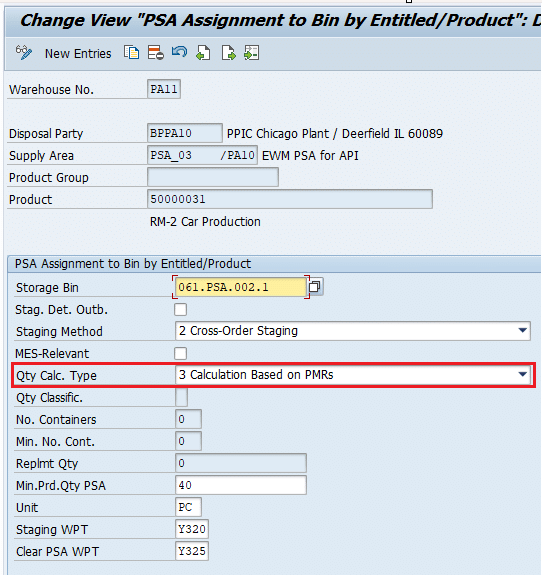
The PSA must be defined and mapped to the appropriate storage bin. The critical path for this configuration in the IMG is:
- Path: Extended Warehouse Management > Goods Issue Process > Production Supply > Maintain PSA Bin Assignment
- Key Field: Quantity Calculation Type must be set to “3 – Calculation Based on PMRs.”
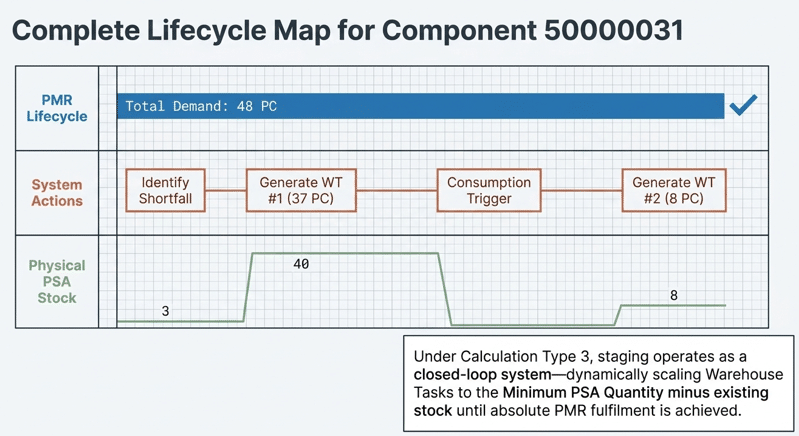
1.4 Case Study Analysis: Component 50000031 Staging Logic
To demonstrate the iterative precision of Quantity Calculation Type 3, let us examine a real-world scenario involving material component 50000031. This material is a critical component for several production lines, and the warehouse uses cross-order staging to manage its flow.
Phase 1: The Initial State and Variables
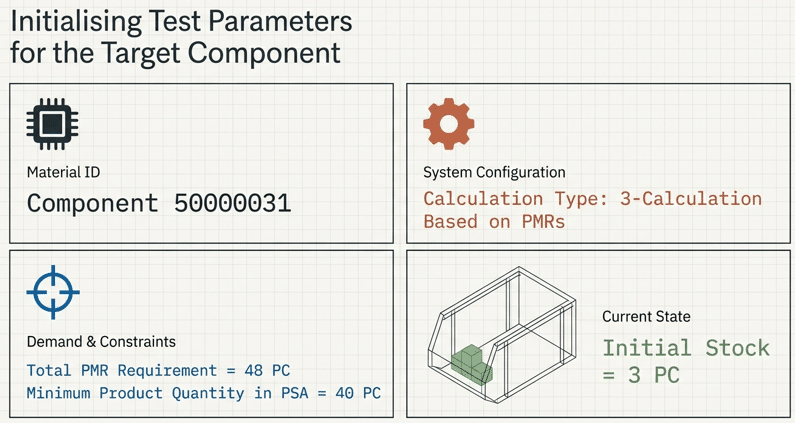
At the start of the production shift, the system evaluates the current stock status and the replenishment parameters:
- Material: 50000031
- Current Stock in PSA Bin: 3 PC
- Minimum Product Quantity (Safety Threshold): 40 PC
- Total PMR Requirement (Total Demand): 48 PC
Phase 2: The First Execution of the Staging Report (/SCWM/R_MFG_STAGING
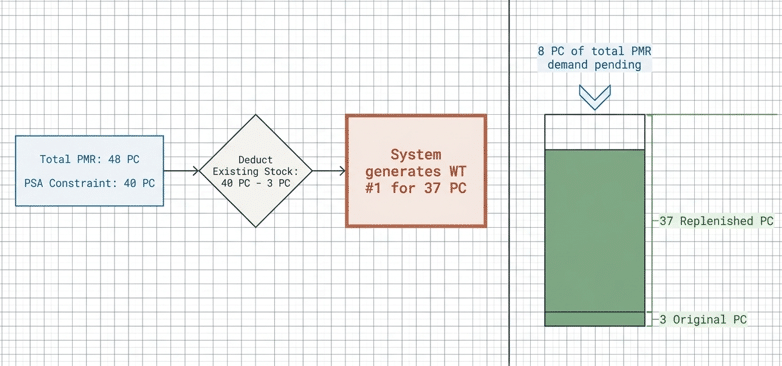
/SCWM/R_MFG_STAGINGWhen the staging report is executed, the system identifies that the 3 PC in the PSA is well below the 40 PC minimum.
Calculation:
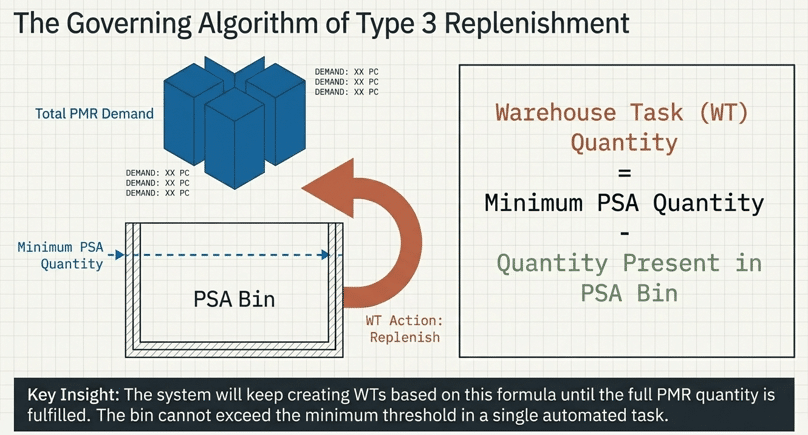
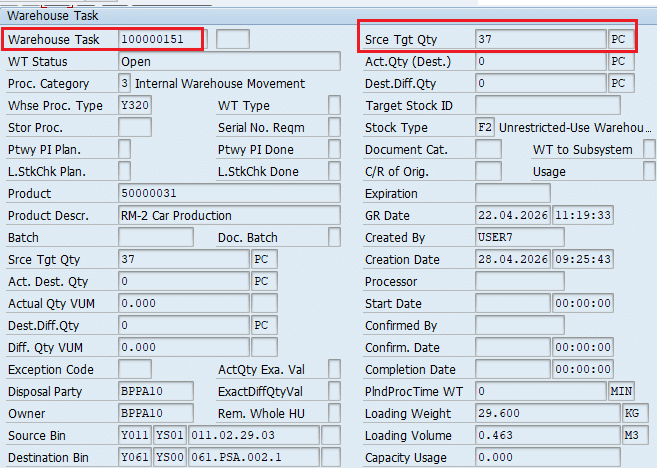
- Target (Min) 40 PC – Current 3 PC = 37 PC.
- Action: The system creates a Warehouse Task (WT) for 37 PC.
At this point, 37 PC is in transit or staged. The total quantity staged (3 + 37) equals 40 PC. Under Type 2 logic, the system might consider this “complete” because the minimum threshold is met. However, Type 3 logic continues to monitor the “Rest of the Requirement.”
/SCWM/R_MFG_STAGINGPhase 3: Iteration and Consumption-Based Triggering
The core intelligence of Type 3 is its iterative nature. The source context specifies that the system monitors the fulfillment of the PMR requirement.
The Step-by-Step Logic Flow:
- Initial Fulfillment: 40 PC is now present in the PSA.
- PMR Check: Total Requirement (48 PC) – Total Staged (40 PC) = 8 PC Remaining.
- Consumption/Movement Trigger: Once the initial 37 PC is moved to the bin or consumed by the production line, the system re-evaluates the “Rest of the Requirement.”
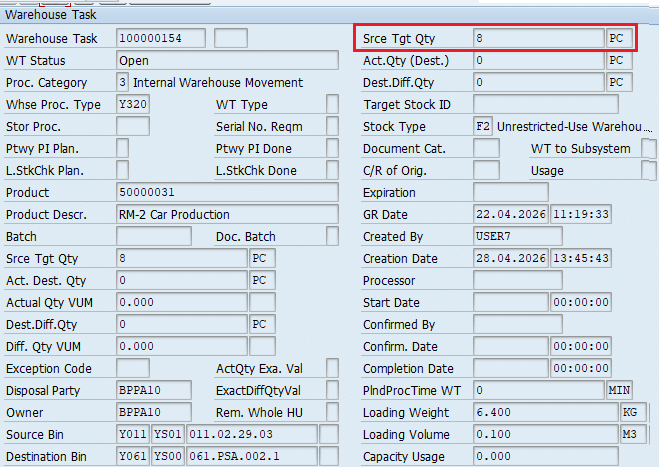
- Final WT Creation: The system creates a subsequent Warehouse Task for the remaining 8 PC.
| Step | Requirement | PSA Stock | Quantity Staged | Rest of Requirement | WT Created |
| Initial State | 48 PC | 3 PC | 3 PC | 45 PC | N/A |
| Iteration 1 | 48 PC | 3 PC | 40 PC | 8 PC | 37 PC |
| Iteration 2 | 48 PC | 40 PC | 48 PC | 0 PC | 8 PC |
This ensures the PSA never exceeds a quantity that would cause physical congestion (by capping individual movements at the replenishment level) while guaranteeing the total 48 PC requirement is eventually met.
WT created after Iteration 1
Consumed 37 Qty from the PSA and system will create fresh WT
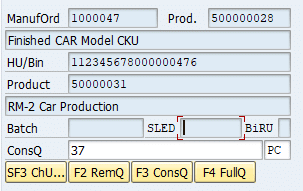
Now to fulfill the PMR quantity of 48 PC, system has created fresh WT of 8 PC
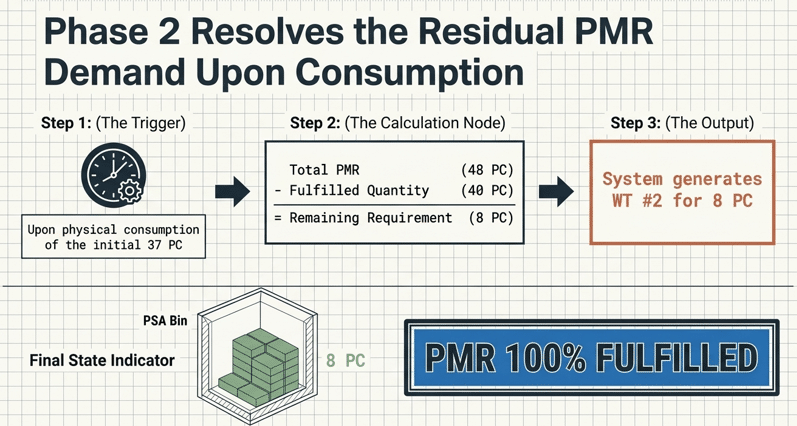
Now in the next run, system will not create any WT as PMR quantity is already fulfilled as shown above.

2. Expert Best Practices
For the Senior SAP Consultant, the implementation of Type 3 requires more than just changing a dropdown menu. It requires an understanding of how the staging report interacts with the Warehouse Process Type (WPT) and the Post-Processing Framework (PPF).
2.1 Technical Execution: The Staging Report (/SCWM/R_MFG_STAGING)
The staging report is the engine that drives this logic. In a production environment, this is rarely run manually. Instead, it is scheduled as a background job (Transaction: SM36) to run at specific intervals (e.g., every 30 minutes).
- Pro-Tip: Use a specific Selection Variant for the staging report that filters by PSA or Warehouse Process Type. This ensures that high-priority materials using Type 3 logic are processed with a higher frequency than standard C-parts.
2.2 Advanced Configuration: Warehouse Process Types (WPT)
Ensure that the WPT used for staging (typically a 3xxx series) is configured for immediate confirmation if the warehouse utilizes AGVs (Automated Guided Vehicles). If manual picking is involved, ensure the “Round Down” or “Quantity Rounding” features in the WPT do not conflict with the precise math of the Type 3 PMR calculation.
2.3 The “Minimum Quantity” vs. “Replenishment” Balance
In Type 3 logic, the “Minimum Product Quantity” acts as a flow-control valve. If you set the minimum too low, the system will create many small WTs to fulfill a large PMR. If you set it too high, you risk overflowing the PSA bin. Always base the “Minimum Quantity” on the physical capacity of the bin and the “Replenishment Quantity” on the standard handling unit (HU) size of the material.
2.4 Optimization of Working Capital
By staging only what is required for active PMRs, companies can significantly reduce the “Dead Stock” sitting on the production floor. This optimizes working capital by ensuring that high-value components remain in the main warehouse storage—where they are available for other orders or even returns—until the last possible moment.
2.5 Reduction in PSA Congestion
In many manufacturing plants, floor space is more expensive than warehouse space. Type 3 logic prevents the “clutter” of over-staged materials. By staging in iterations (as seen with the 37 PC then 8 PC logic), the system ensures that the production area only holds what is physically manageable.
2.6 Alignment with Demand-Driven Replenishment (DDMRP)
Type 3 staging is the warehouse-side execution of Demand-Driven Replenishment. It aligns with SAP S/4HANA’s goal of “Live Engineering,” where changes in the production schedule (updated PMRs) immediately reflect in warehouse tasks. If a PMR quantity is reduced, the “Rest of the Requirement” calculation automatically adjusts, preventing the warehouse from moving unnecessary stock.
3. FAQ
A: The system tracks the “staged quantity” within the PMR document. If the initial staging run only fulfills a portion of the demand (to avoid exceeding PSA limits), the “rest of the requirement” remains open. The next iteration of the staging report will identify this gap and create the subsequent WT.
A: Crate part staging often uses a different logic (Type 1 or 2). Type 3 is specifically designed for Cross-Order and Single-Order staging where the PMR is the primary document. For crate parts, the system typically ignores individual requirements in favor of a full-crate replenishment.
A: SAP EWM will create a “Partial WT” for the available amount and log a shortage. Once the source bin is replenished, the staging report must be re-run to fulfill the “rest of the requirement.”
A: No. This logic requires the PSA to be EWM-managed. The system needs the visibility of the PMR and the granular stock data only available in an EWM-managed environment.
3. Conclusion
Quantity Calculation Type 3 (Calculation Based on PMRs) is more than a configuration toggle; it is a commitment to precision in the digital supply chain. By bridging the gap between bin-level safety thresholds and actual production requirements, SAP EWM allows organizations to operate with a “Lean” mindset without sacrificing the safety of their production uptime.
For enterprise environments managing high-value components or space-constrained production floors, the iterative, demand-aware logic of Type 3 is the gold standard. It reduces waste, improves inventory turnover, and ensures that your warehouse is an active participant in the manufacturing process.


