
In the high-velocity environment of a modern digital supply chain, the difference between operational excellence and logistical friction often lies in the smallest details of task execution. For SAP Extended Warehouse Management (EWM) architects, one of the most critical—yet frequently misunderstood—levers for performance is the configuration of Warehouse Task (WT) rounding.
At its core, WT rounding is the system’s mechanism for aligning theoretical demand with physical reality. Without robust rounding logic, a warehouse system might generate instructions that are mathematically correct but operationally impossible, such as asking a heavy-duty reach truck to pick “0.47 of a pallet” from a bulk storage rack. By mastering rounding rules, packaging specifications, and the distinction between Rounding and Operative Units of Measure (UoM), solution architects can ensure that every task generated by the system is optimized for both human labor and automated handling systems.
Featured Summary: What is Warehouse Task Rounding? Warehouse Task (WT) rounding is the functional ability within SAP EWM to adjust requested outbound or internal quantities to standardized logistical increments. By rounding quantities to “clean” units—such as full pallets, layers, or boxes—the system prevents fractional picking, maintains storage hygiene in bulk zones, and ensures that warehouse tasks align with the physical packaging levels defined in the system’s Packaging Specifications.
1. The Logistical Necessity of Rounding
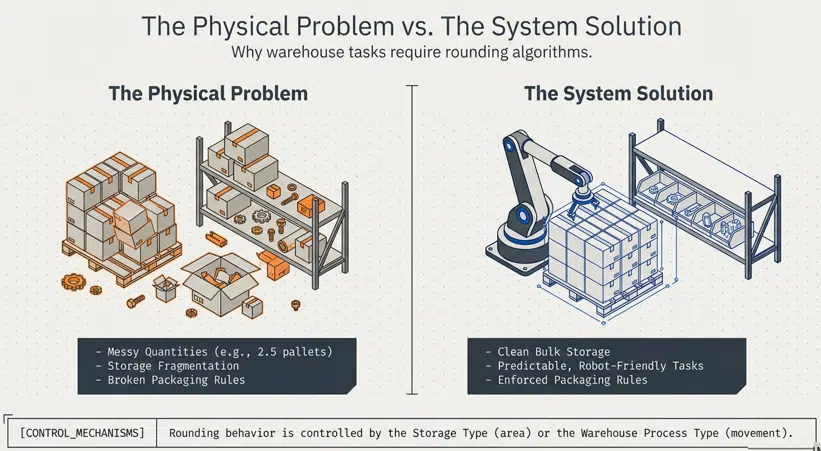
The fundamental challenge of warehouse management is the “half-pencil” analogy. In a classroom, a teacher requires students to bring whole pencils; a half-pencil is functionally useless for the task at hand. In the warehouse, moving fractional logistical units (e.g., 2.5 pallets) creates immediate volumetric inefficiency.
If an operator is directed to remove 2.5 pallets from a bulk storage area, they are forced to “break bulk,” leaving a partial pallet in a zone designed for full-unit storage. This leads to several critical pain points:
- Bin Fragmentation: Partial pallets take up the same footprint as full pallets, reducing the effective capacity of the warehouse.
- Operational Friction: Breaking a pallet requires manual effort—cutting shrink wrap, down-stacking, and potentially re-labeling—which slows down the picking process.
- Inaccurate Inventory: Frequent breaking of units increases the risk of “lost” pieces and counting errors.
The objective of rounding is to bridge this gap. By enforcing rules that dictate how quantities are adjusted, architects can maintain “storage hygiene”—ensuring that bulk areas remain dedicated to full units while partial quantities are redirected to specialized picking zones. This creates “robot-friendly” tasks for Automated Storage and Retrieval Systems (ASRS) and human-efficient instructions for RF-guided workers.
2. Core Concepts: The Four Primary Rounding Rules
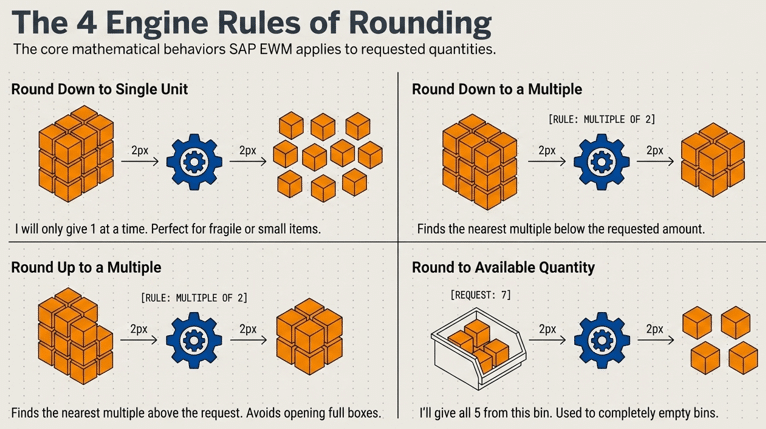
SAP EWM provides four distinct logic paths for rounding, which are assigned at the Storage Type or Warehouse Process Type (WPT) level.
2.1 Round Down to a Single Unit
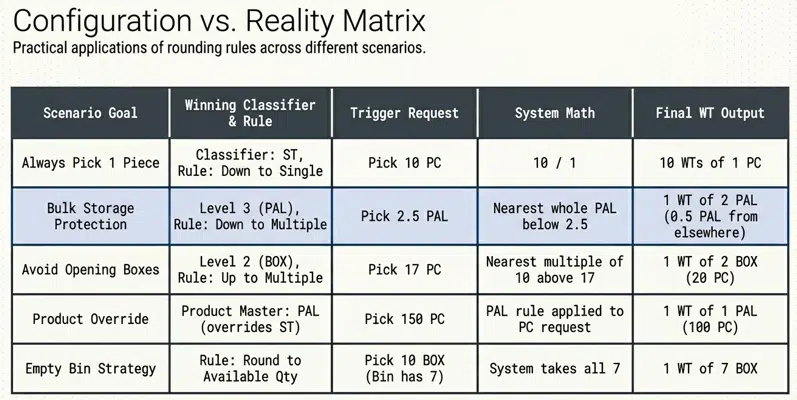
This rule is designed for high-precision or high-value environments. If a request is made for 10 units, and this rule is active, the system does not create one task for 10 pieces; instead, it creates 10 individual warehouse tasks for one unit each. This is essential for fragile items or products requiring individual serial number capture or specialized handling for every single piece.
2.2 Round Down to a Multiple
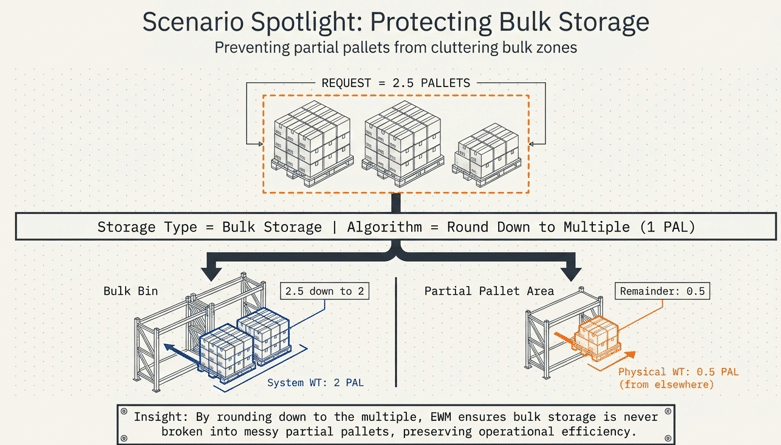
This is the standard for bulk storage optimization. The system rounds the requested quantity down to the nearest multiple of the defined logistical unit.
- Logic: If the rounding multiple is 1 Pallet (100 PC) and the order is for 250 PC, the system rounds down to 200 PC (2 Pallets).
- Search Path Logic: Crucially, when the system rounds down, it does not simply discard the remainder. It creates a task for the 2 full pallets from the bulk zone and then initiates a second search to fulfill the remaining 50 pieces from a different storage type (e.g., a partial-pallet picking area).
2.3 Round Up to a Multiple
Used primarily in wholesale and fulfillment scenarios where “Full Box Only” policies are enforced.
- Logic: If a customer orders 17 pieces and the box multiple is 10, the system rounds up the task to 20 pieces (2 Boxes). This ensures that the warehouse never ships partial boxes, maintaining packaging integrity and simplifying the shipping process.
2.4 Round to Available Quantity in Bin
This rule is a powerful tool for bin clearing and volumetric optimization. If a task requires 10 pieces, but the specific bin selected contains only 8 pieces, the system rounds the task down to 8. This ensures the bin is completely emptied, clearing the way for new stock and reducing the “tailings” of inventory scattered across the warehouse.
3. The Architect’s Hierarchy: UoM Selection Logic
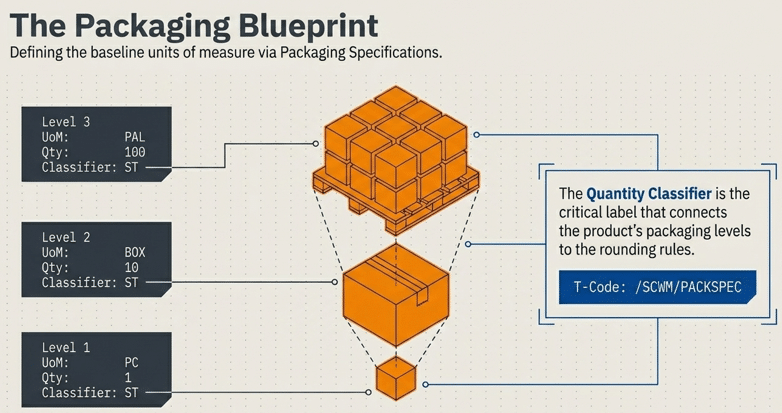
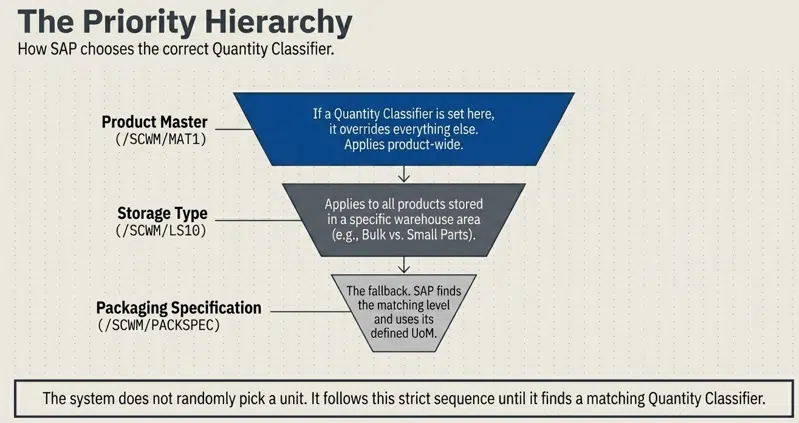
SAP EWM does not arbitrarily select a unit for rounding; it follows a rigorous priority hierarchy to determine which Quantity Classifier to use. This classifier is the “bridge” that connects the storage configuration to the Packaging Specification.
3.1 The Priority Order
| Priority | Configuration Level | Architectural Impact |
| 1 (Highest) | Product Master (/SCWM/MAT1) | Defined in the Warehouse Data tab. If a classifier is set here, it overrides all other settings. This allows for product-specific rounding (e.g., “Always round this specific fragile item to 1 PC”) within a general storage area. |
| 2 | Storage Type (/SCWM/LS10) | Defined at the area level. This is the most common configuration point, ensuring all products in a specific zone (like Bulk) follow the same logistical increments. |
| 3 (Lowest) | Packaging Specification | If no classifier is found in the Product Master or Storage Type, the system defaults to the level-specific logic within the PackSpec itself. |
3.2 The 8-Step Decision Flow
To understand how a Warehouse Task is born, an architect must follow the system’s internal logic path:
- Classifier Search (Product): Does the Product Master Warehouse Data contain a Quantity Classifier? If yes, use it.
- Classifier Search (Storage Type): If Product Master is blank, does the Storage Type have a Quantity Classifier? If yes, use it.
- Classifier Fallback: If both are blank, the system defaults to the Packaging Specification’s internal hierarchy.
- Level Matching: The system scans the active Packaging Specification for a level that matches the identified Quantity Classifier (e.g., ‘ST’ for Standard).
- Unit Identification (Rounding UoM): The Unit of Measure defined at that matching level (e.g., PAL, BOX, PC) is selected as the Rounding UoM. This is the unit used for all mathematical splits and quantity adjustments.
- Operative UoM Determination: The system then looks for the Operative UoM proposal (often the Preferred UoM in the Product Master).
- Quantity Conversion: If the Rounding UoM (e.g., PAL) differs from the Operative UoM (e.g., PC), the system performs the conversion (2 PAL = 200 PC).
- Task Execution: The WT is saved and presented to the user on the RF screen or printed label in the Operative UoM.
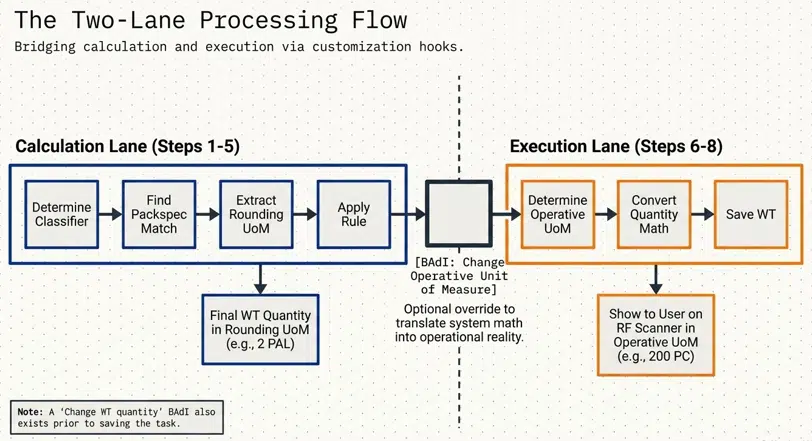
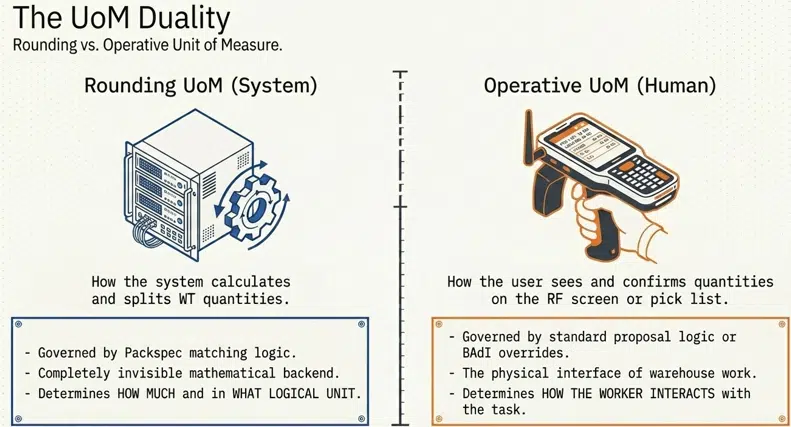
4. Advanced Logic: Rounding UoM vs. Operative UoM
The most common point of confusion for EWM consultants is the distinction between how the system calculates a task and how the worker executes it.
4.1 Rounding UoM (The Math)
This is the unit used in steps 1–5 of the decision flow. It determines how the system splits the quantity and whether it rounds up or down.
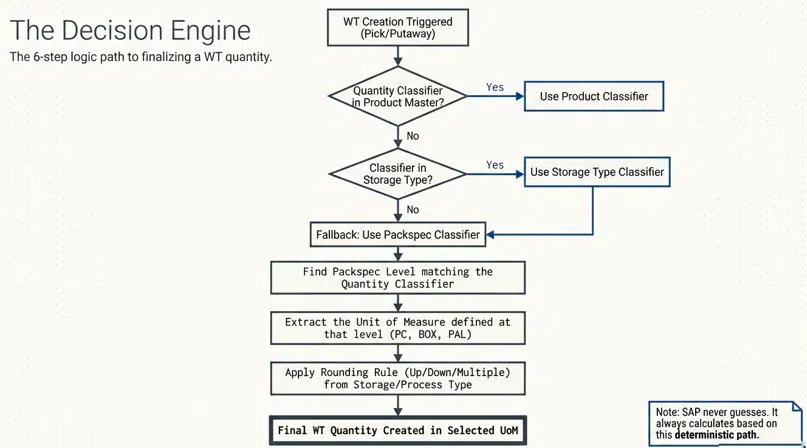
4.2 Operative UoM (The Display)
This is the unit the worker sees. It is determined in steps 6–8.
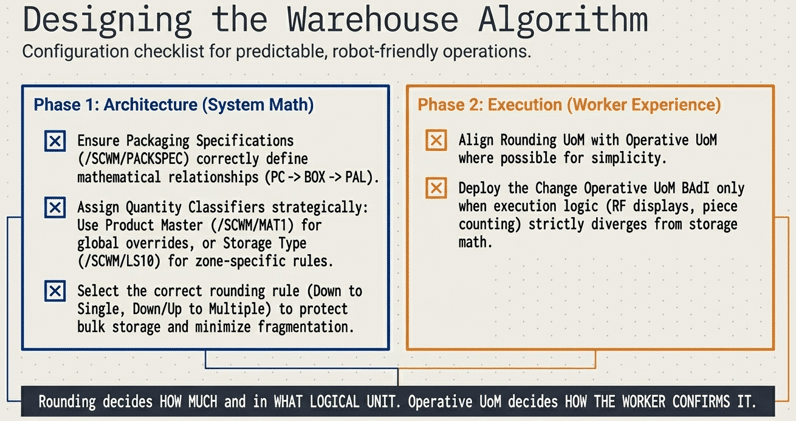
5. Practical Scenarios of UoM Divergence
Now we will look into some practical scenarios of UoM Divergence.
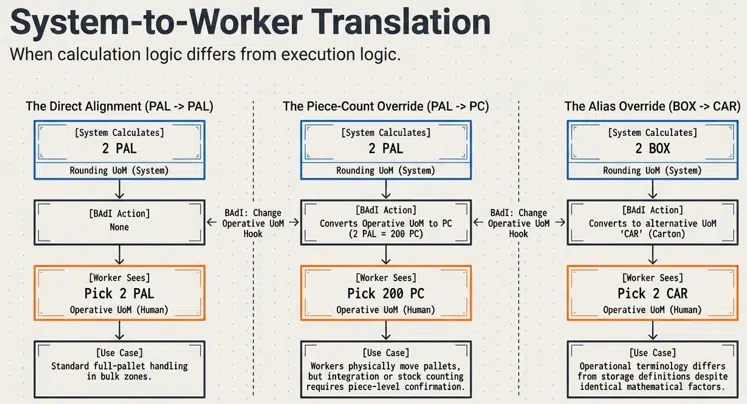
5.1 Case A: System rounds in PAL, Operator works in PAL (Standard Bulk)
- Business: Full pallet picking where the worker confirms “1 PAL.”
- Result: Calculation and display are identical. Simple and intuitive.
5.2 Case B: System rounds in PAL, Operator works in PC (The Count-Back Method)
- Business: The system must pick full pallets to maintain bulk integrity, but the corporate reporting or the warehouse confirmation process requires counting in pieces.
- Logic: The system rounds a 250 PC request down to 2 PAL (Rounding UoM). However, via the BAdI: Change Operative Unit of Measure, the system converts this for the RF screen.
- Worker View: “Pick 200 PC.”
- Architect Benefit: You preserve the bulk pallet in the bin while satisfying the requirement for piece-level confirmation.
5.3 Case C: Calculation in BOX, Display in CAR (Carton)
- Business: The PackSpec uses “BOX” (10 PC), but the business uses the term “CAR” (Carton) on the floor.
- Logic: Rounding UoM is BOX. The BAdI converts the display unit to CAR. The quantity remains 10 PC, but the “unit of work” is renamed for the operator.
5.4 Technical Extension Hooks (BAdIs)
To achieve these advanced scenarios, architects utilize two specific BAdIs:
- Change WT Quantity (/SCWM/EX_CORE_RMS_DETERMINE): Allows you to manipulate the calculated rounding result before the task is saved.
- Change Operative UoM (/SCWM/EX_CORE_CR_OPERATIVE_UOM): Allows you to override the default display unit on the Warehouse Order/RF screen.
6. Real-World Case Studies
Now we will look into detail for some real world case studies
6.1 Small Parts & Fragile Goods
- Objective: Force individual handling for 10 high-value electronics.
- Config: PackSpec Level 1 = 1 PC (Classifier ‘FRG’). Storage Type Classifier = ‘FRG’. Rounding Rule = “Round Down to Single Unit.”
- Result: A request for 10 units generates 10 separate WTs, each for 1 PC. This prevents the worker from grabbing a handful and potentially damaging or miscounting the items.
6.2 Bulk Storage: Avoiding “Partial Pallet” Leftovers
- Objective: Never break a pallet in the “High-Bay” zone.
- Config: Rounding Rule = “Round Down to Multiple.” Multiple = 1 PAL.
- Result: A request for 2.8 pallets creates a WT for 2 pallets from the high-bay. The system then automatically searches for the remaining 0.8 pallets in the “Partial Picking Zone.” Bulk integrity is maintained.
6.3 Fulfillment: Forced Full-Box Increments
- Objective: Retailers only accept full boxes of 12.
- Config: Rounding Rule = “Round Up to Multiple.” Multiple = 1 BOX (12 PC).
- Result: A customer orders 10 pieces. The system rounds up to 12 pieces (1 BOX). The customer is billed for the full box, and the warehouse avoids open-box inventory.
7. Strategic Takeaways & KPIs
The strategic implementation of SAP EWM rounding rules directly impacts several key performance indicators (KPIs):
- Throughput: By creating “clean” tasks, you reduce the time workers spend breaking down pallets or counting fractional units.
- Bin Utilization: Round-to-available-quantity rules significantly reduce bin fragmentation, increasing the effective storage capacity of the warehouse by up to 15%.
- Labor Efficiency: Aligning Rounding and Operative UoMs ensures that workers see instructions in the units they physically handle, reducing cognitive load and errors.
Rounding logic is the bridge between the digital “perfection” of an order and the physical “reality” of the warehouse floor. By correctly configuring these rules, architects transform SAP EWM from a simple recording system into a powerful engine of operational efficiency.
8. FAQ: Technical Consultant Queries
A: The system follows the hierarchy and looks at the Storage Type. If the Storage Type is also blank, it defaults to the level-by-level logic of the Packaging Specification.
A: Yes. This is exactly what the Operative UoM is for. Use the BAdI /SCWM/EX_CORE_CR_OPERATIVE_UOM to change the display unit (e.g., from PAL to PC) while keeping the internal rounding logic based on the pallet.
A: This is handled by the “Storage Type Search Sequence.” When a rounding rule (like Round Down) results in a remainder, the system completes the first task and then automatically restarts the search for the remaining quantity, typically finding it in a storage type where the rounding rule is not as restrictive.
A: Yes, the logic remains consistent across Decentralized EWM and S/4HANA Embedded EWM, utilizing the same /SCWM/LS10 and /SCWM/PACKSPEC transactions.


