
This end-to-end testing case study demonstrates how SAP EWM uses Quantity Classifier, Alternative Units of Measure, Warehouse Process Types, and Put away Strategies to automate full-pallet picking, enforce rounding rules, and generate correct Warehouse Tasks (WTs) during production staging.
What is SAP EWM Quantity Classifier?
In SAP EWM, a Quantity Classifier is a strategic configuration tool that dictates how the system selects the appropriate Unit of Measure (UoM) and applies rounding logic during Warehouse Task (WT) creation.
(with PC, CAR, and PAL units) to support the production of Finished Good 500000043.
We explore how the Quantity Classifier manages specific demands of a Production Material Request (PMR) and the operational necessity of picking full pallets.
We walk through the complete flow—from material creation to inbound, put away, PMR generation, staging, and WT creation—highlighting why EWM rounded 18 PC to 30 PC and created 1 PAL WT.
1. Raw Material Setup (50000042)
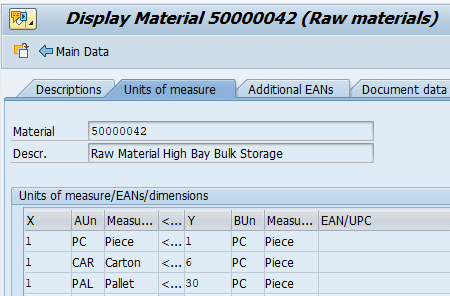
The testing began by creating a new raw material 50000042 with the following configuration:
- Product Group: YP (Single Order)
Significance of Product Group “YP” (SINGLE_ORDER) Assigning the product group “YP” as “SINGLE_ORDER” is a critical decision for inventory segregation. This configuration triggers the PCSO (Single-Order Staging) item type.
- Base UoM: PC
- Alt UoM 1: CAR (Carton) = 6 PC
- Alt UoM 2: PAL (Pallet) = 30 PC
- Info Record: Vendor PA01VEN01 for Plant PA10
This multi-level UoM structure is essential for EWM’s rounding logic and pallet-based picking.
2. Storage Type & Bin Configuration
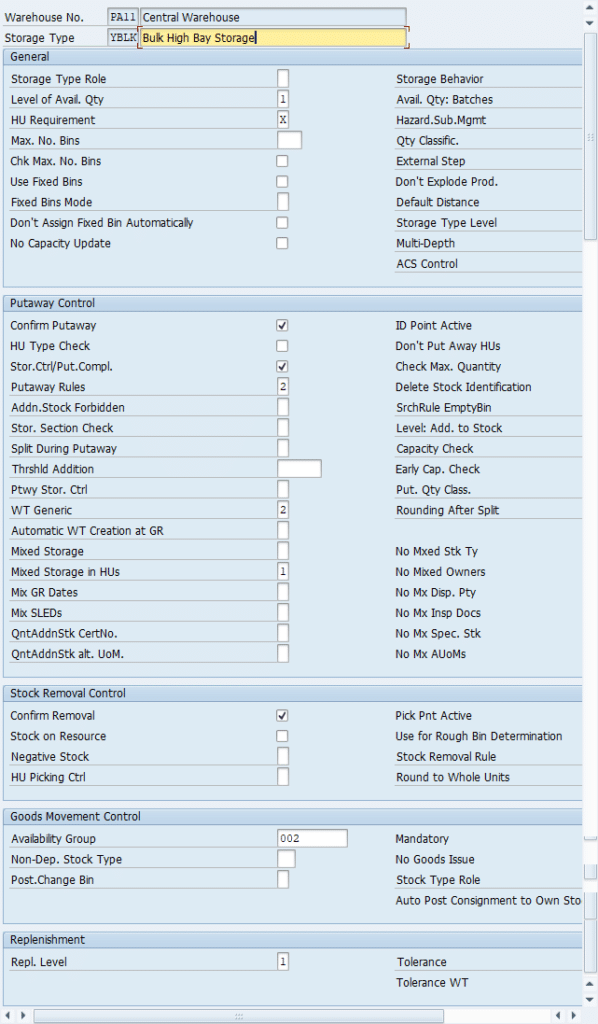
To support bulk storage and pallet handling, the following configuration was completed:
- Storage Type: YBLK
- Storage Section: YBLK
- Bin Structure: ASL 01–02
- Bin Generation: /SCWM/LS10
- Activity Area: YBLK (assigned to Storage Type)
- Bin Sorting: /SCWM/SBST
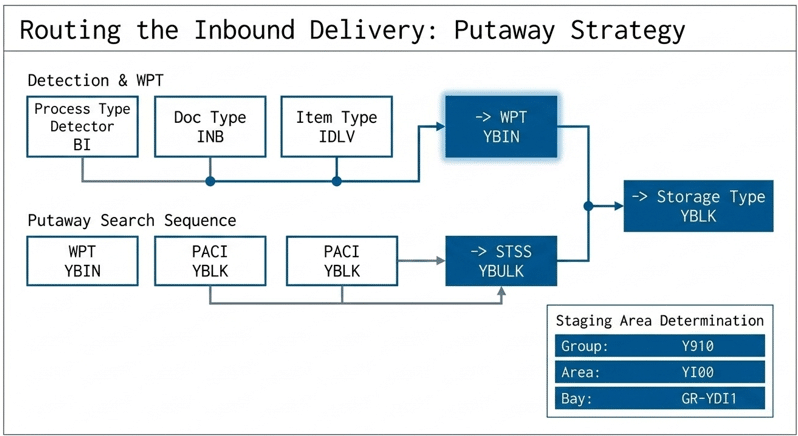
3. Warehouse Process Type (WPT) & Putaway Strategy
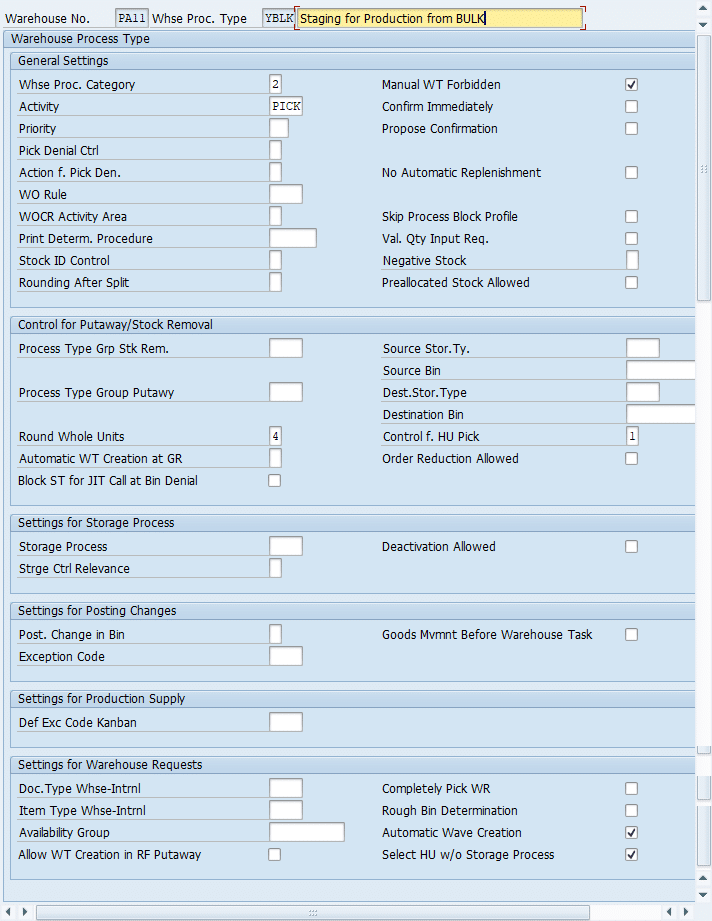
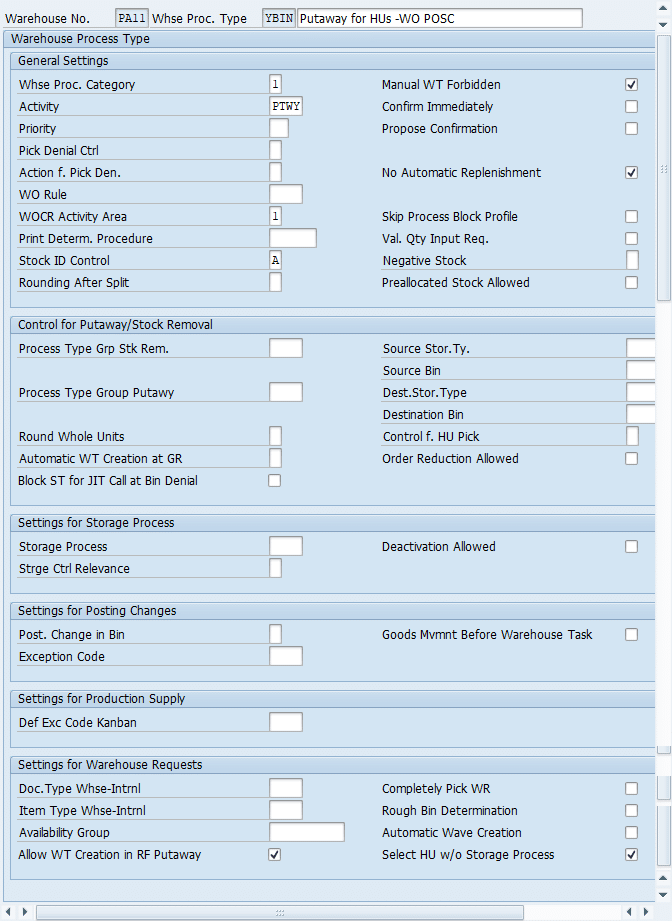
The following WPTs and strategies were configured:
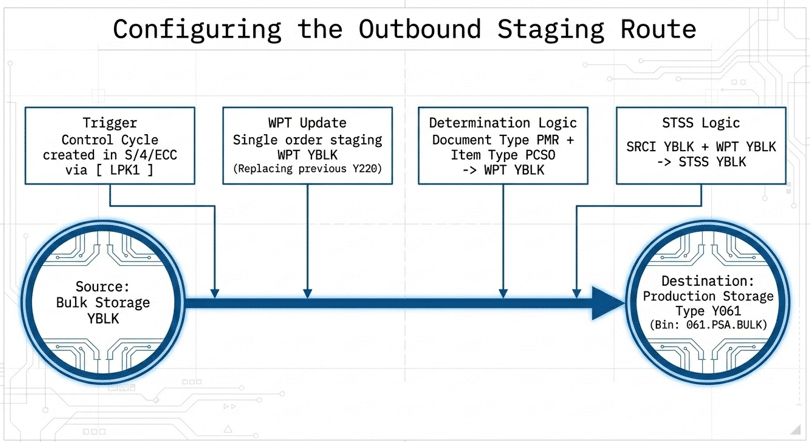
- Single Order Staging WPT: YBLK
- Putaway STSS: YBLK
- PACI: YBLK (assigned in Product Master)
- Process Type Detector: BI
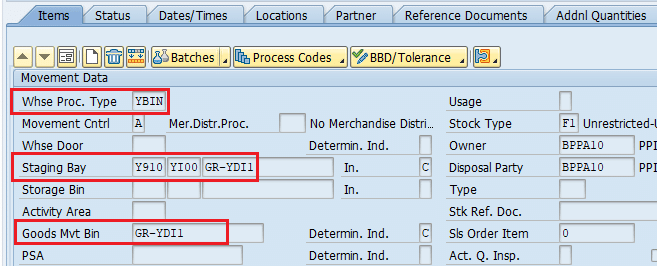
- Inbound WPT: YBIN (determined via PTD BI)
Inbound delivery document type INB and item type IDLV were also configured for correct WPT determination.

4. Inbound Delivery & Put away Execution
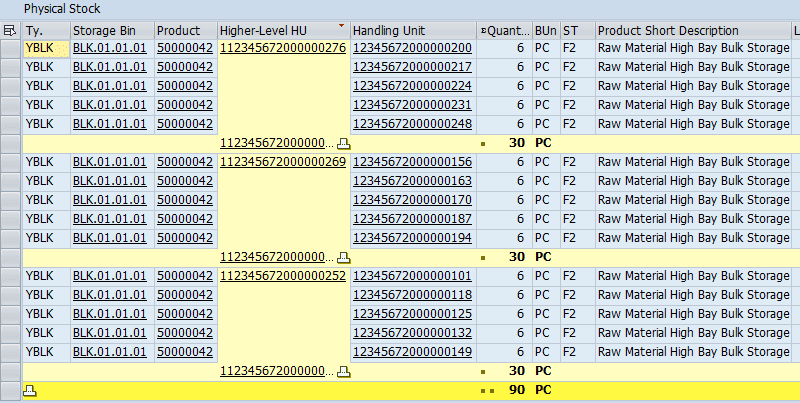
A purchase order was created for 90 PC (3 PAL). The inbound delivery was created and distributed to EWM.
Initially, the inbound delivery was created in PAL due to “Preferred AUoM” in the product master. This caused issues during packing (e.g., 0.2 PAL). The preferred AUoM was removed, and the inbound was recreated.
After packing and GR posting, stock was successfully placed in YBLK storage type.
5. Finished Good Setup (500000043)
A new FG 500000043 was created with:
- BOM: 3 PC of RM 50000042 → 1 PC FG
- PSA: PSA_04 (created in ECC via PK05 and replicated to EWM)
- Work Center: WC_BULK (assigned to PSA_04)
- Routing: Group 50000004
- Production Version: Created
- Control Cycle: LPK1
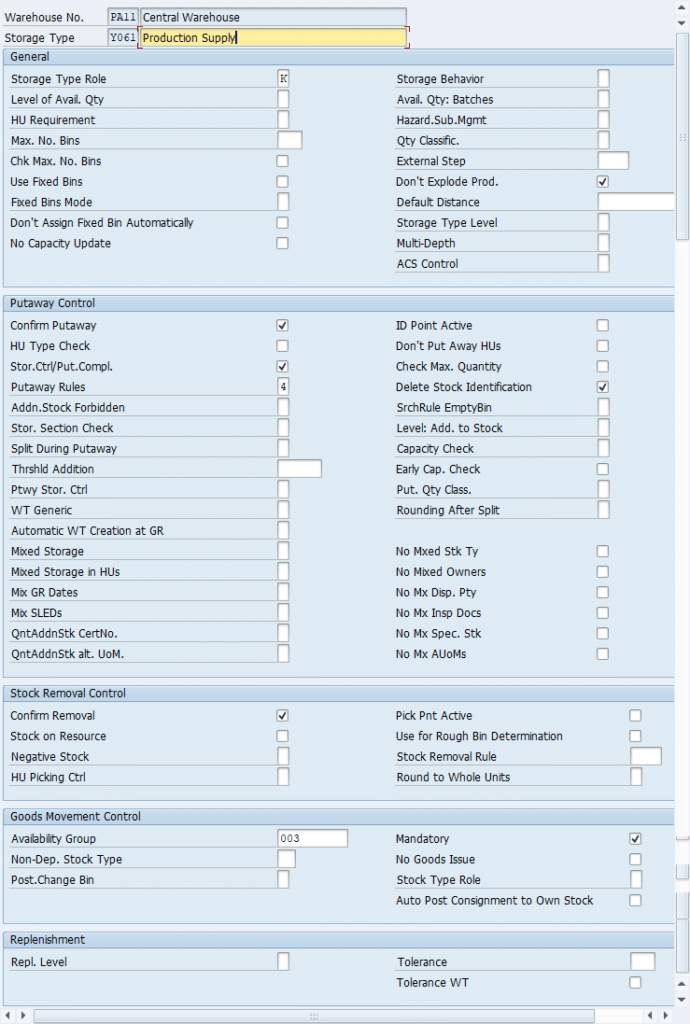
Production Storage Type Y061 and bin 061.PSA.BULK were created and sorted.
6. Staging & Queue Determination Setup
- Queue Type: STG1 (Staging for Assembly Line)
- Queue: STG-BLK-61
- Queue Determination: Source AA YBLK → Dest AA Y061 → Activity INTL
- Resource Group: YALL
- Resource Type: RT01 (Manpower)
- User Assignment: Completed
7. Production Order & PMR Creation
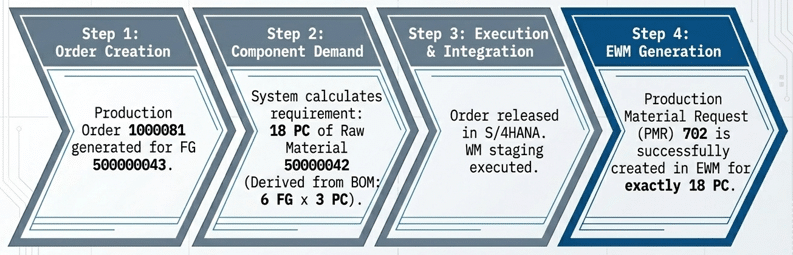
A production order 1000081 was created for FG 500000043, requiring:
- 18 PC of component 50000042
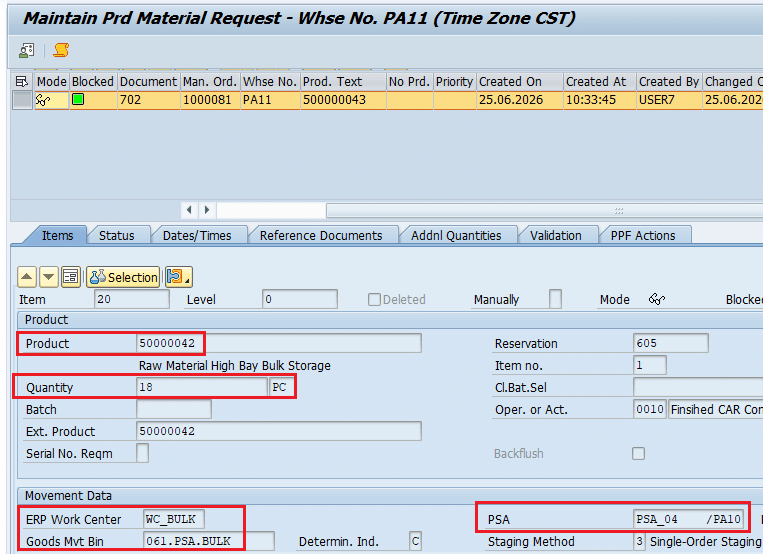
After release, WM staging was executed, and PMR 702 was created in EWM.
Triggering the Demand: Production Order Release
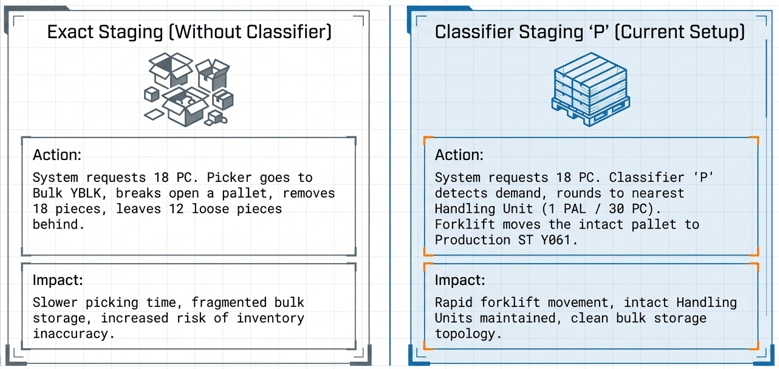
8. The Key: WT Was Created for 30 PC (1 PAL) Instead of 18 PC
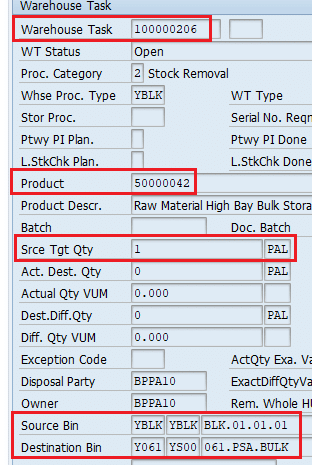
During staging, EWM created a WT for 30 PC (1 PAL) instead of the PMR quantity 18 PC.
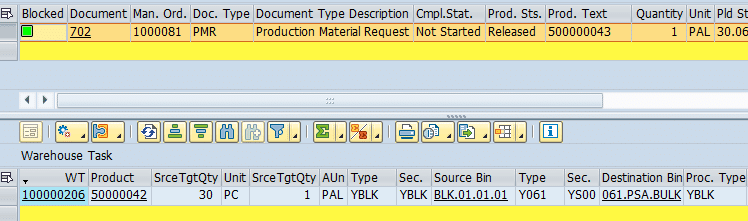
Even more interesting: EWM created 1 PAL WTs (30 PC) instead of 18 PC.
9. WT Creation Log Analysis
The WT creation log clearly shows:
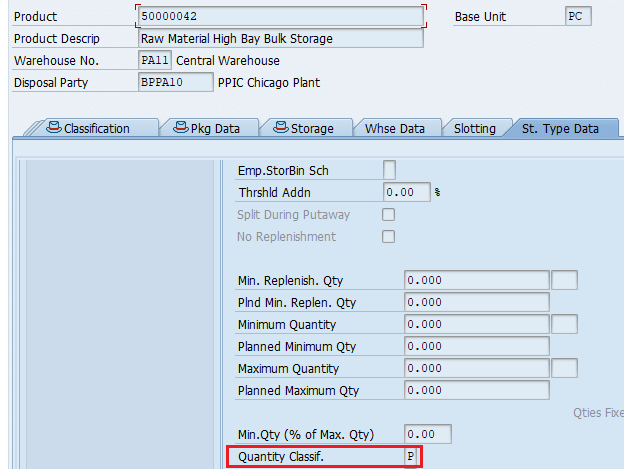
- AUoM set to PAL due to Quantity Classifier “P”
- Requested quantity rounded to 30 PC
- Destination quantity = 1 PAL



This is expected behavior when:
- Product is classified as pallet-managed
- WPT uses rounding rule “Round Up to Multiple of Unit”
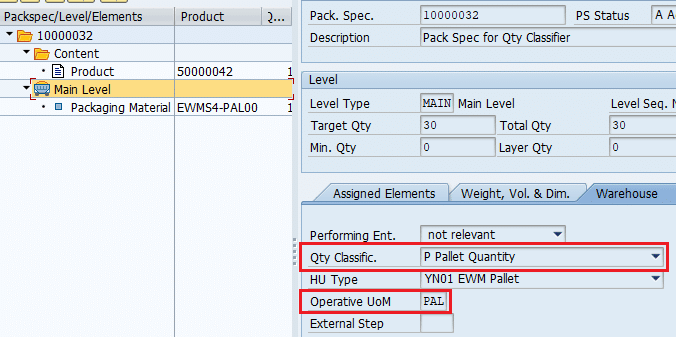
- Packaging specification defines pallet quantity
specification defines 1 PAL = 30 PC. The WPT is configured to round up WT quantity
to the nearest multiple of this unit. Because of this, the PMR requested 18 PC, the system
rounded it up to 1 full pallet (30 PC).
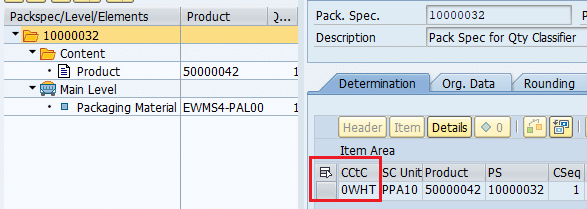
The pack spec also sets the operative UoM to PAL, and a condition record for
0WHT ensures the WT is created in the alternate UoM PAL.
10. Why EWM Rounded 18 PC → 30 PC
Because:
- Pallet size = 30 PC
- PMR requirement = 18 PC
- Rounding rule = Round Up to Full Pallet
Therefore:
11. Business Impact of Quantity Classifier Logic
- Full pallets only (no partial picks)
- Cleaner inventory (no leftover half pallets)
- Predictable staging
- Operator-friendly picking
- Consistent pallet-level handling
12. Conclusion
This end-to-end testing confirms that SAP EWM’s Quantity Classifier and rounding logic work exactly as designed:
- AUoM automatically switches to PAL
- Requested quantity is rounded to full pallet multiples
- WTs are created at pallet level
- Inventory remains clean and consistent
For pallet-managed materials, this behavior is not a bug—it is a powerful feature that ensures operational accuracy and efficiency.