
SAP Production Staging Quantity Calculation is the automated logic within SAP IM, WM, and EWM used to determine the exact volume of components required at a Production Supply Area (PSA). By evaluating current stock levels against production order requirements or predefined min/max thresholds, the system triggers replenishment tasks to ensure material availability while preventing floor-space congestion.
1. The Critical Role of Material Staging in Digital Transformation
In the high-stakes environment of S/4HANA digital transformations, the integration between the warehouse and the shop floor is where strategic planning meets physical execution. As a Senior Architect, I often see organizations focus heavily on the “Big Math” of MRP while neglecting the “Last Mile” math of production staging. This is a critical error. Accurate material staging is the pulse of a lean manufacturing environment.
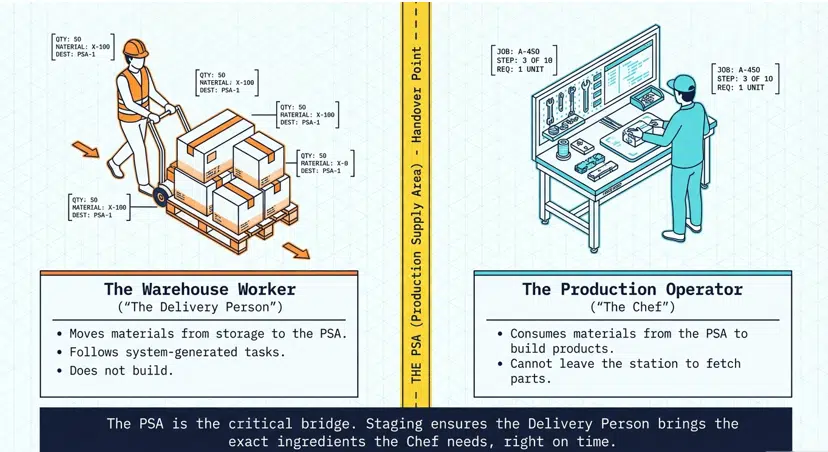
To visualize this, consider the two primary personas in this workflow:
The Warehouse Worker (The Delivery Person)
Their objective is logistical efficiency—minimizing travel distance, maximizing pallet density, and ensuring inventory accuracy within the four walls.
The Production Operator (The Chef)
Their objective is throughput. Like a chef in a Michelin-star kitchen, they cannot afford to stop mid-service to hunt for ingredients. They need the right quantity in the right spot at the right moment.
The core problem arises when the system’s “Math” deviates from the factory floor’s “Physicality.” Over-calculations lead to “Ghost Stock”—inventory the system thinks is available for other orders but is actually physically cluttering the Production Supply Area (PSA). Under-calculations lead to line stoppages.
Modern SAP S/4HANA environments resolve this through various methodologies, each with distinct calculation logic:
- Inventory Management (IM): Simple room-to-room movements.
- Warehouse Management (WM): Bin-to-bin movements with warehouse tasks.
- Extended Warehouse Management (EWM): Sophisticated, PMR-driven replenishment.
- Kanban: Pull-based, visual signals.
2. PART 1: The Core Math: How SAP Decides “How Much?”
SAP’s staging engine functions differently depending on whether you are operating in a basic storage environment or a complex, high-velocity warehouse.
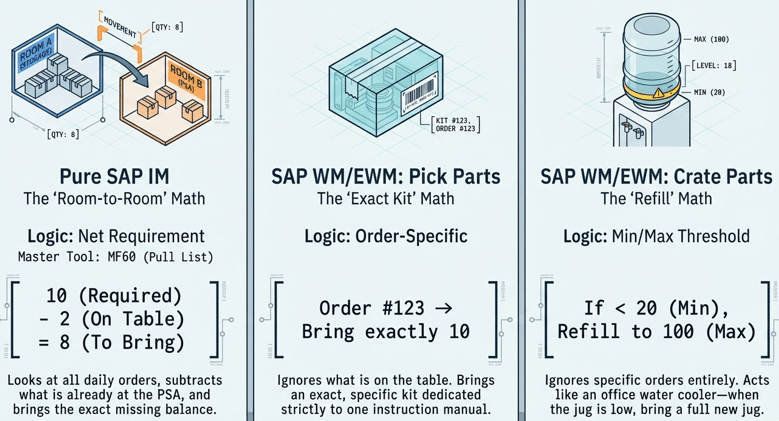
2.1 Pure SAP IM (The “Room-to-Room” Math)
In simple setups, SAP utilizes “Net Requirement” logic. This is essentially a basic subtraction problem: (Total Requirement) – (Current PSA Stock) = Staging Quantity.
The master tool for this level is MF60 (The Pull List). This transaction acts as a cockpit for the production controller. It aggregates requirements across multiple production orders.
Architect’s View: If you have three separate orders for 10 units each, and 5 units are already at the PSA, MF60 identifies a “Missing Part” quantity of 25. It then triggers a transfer posting (Movement Type 311) to move exactly 25 units from the main warehouse to the production storage location.
2.2 SAP WM/EWM: Pick Parts (The “Exact Kit” Math)
Pick Parts follow “Order-Specific” logic. Crucially, the system ignores any stock already sitting at the PSA. It treats every production order as a unique, isolated event.
- Scenario Study: The Gold-Plated Bolt. In luxury automotive manufacturing, a specific gold-plated bolt may be required for a bespoke engine. Because of the part’s high value and audit requirements, you cannot risk the operator “grabbing one from the jar.” SAP triggers a task for the exact count (e.g., 5 bolts) tied specifically to Order #123. The logic is 1:1, ensuring total order integrity.
2.3 SAP WM/EWM: Crate Parts (The “Refill” Math)
Crate parts operate on “Min/Max Threshold” logic. The system does not care about individual production orders; it only cares about the level of the container (the “Crate”) at the PSA.
- The Water Cooler Analogy: In a busy office, nobody “orders” a single cup of water from facilities. Instead, when the water cooler jug hits a minimum level, a worker replaces the entire 5-gallon jug to ensure a constant supply.
- Scenario Study: The Soda Factory. In a high-speed bottling plant, bottle caps are consumed by the thousands. The warehouse doesn’t stage for individual orders; it monitors the PSA bin. When the bin falls below 5,000 caps (Minimum), SAP triggers a replenishment for 20,000 caps (Maximum), ensuring the “Chef” never runs out of ingredients.
2.4 Comparison Table: Staging Logic Drivers
| Logic Type | Method | Transaction / Tool | Primary Decision Driver |
| Net Requirement | SAP IM | MF60 | Aggregated shortfall across daily orders |
| Order-Specific | Pick Parts | Warehouse Task | 1:1 integrity of a single production order |
| Min/Max Threshold | Crate Parts | PK01/PK11 (Control Cycle) | PSA container capacity/thresholds |
3. PART 2: Handling Units (HU) and the Two-Level Packaging Challenge
In enterprise-grade logistics, we rarely move loose items. We move Handling Units (HUs).
3.1 The Hierarchy of Packaging
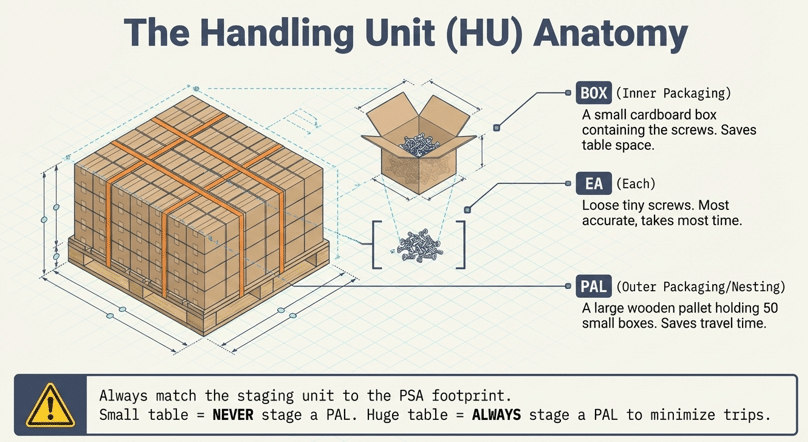
- The Inner (The Box): The smallest manageable container.
- The Outer (The Pallet/Nesting): The carrier holding multiple boxes.
3.2 Logic by Staging Method
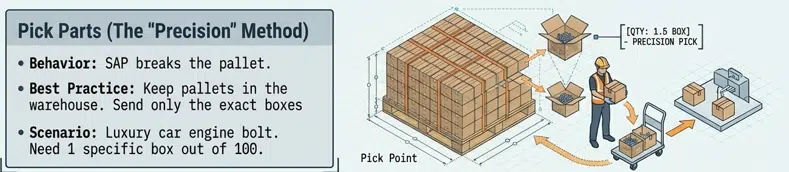
The system must decide whether to “Break the Pallet” in the warehouse or send the whole unit to the floor.
3.2.1 Pick Parts:
To maintain the “Exact Kit” logic, workers often use a Pick Point. If you need 150 screws, but they come in boxes of 100 on a pallet of 50 boxes, the worker brings the pallet to a picking station, takes one full box and 50 loose screws, and sends only that “kit” to the PSA.
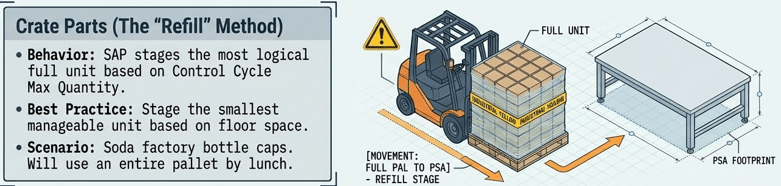
3.2.2 Crate Parts:
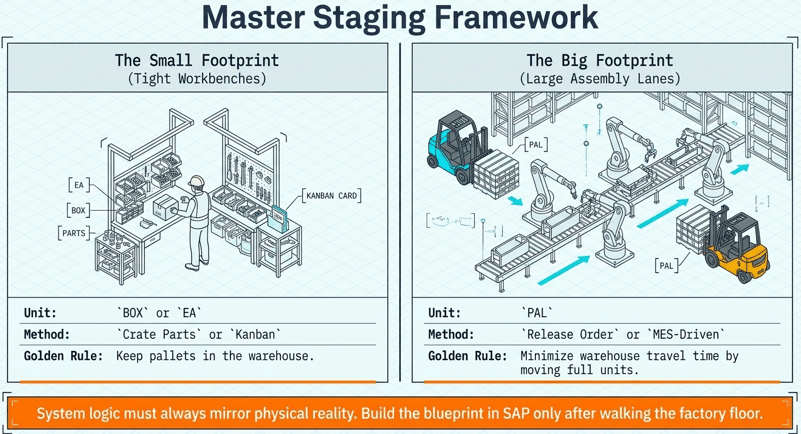
SAP prefers full HUs. You define the staging unit in the Control Cycle (PK01/PK11). If you set the unit to “PAL,” the system will always trigger a full pallet replenishment.
3.2.3 Release Order Parts:
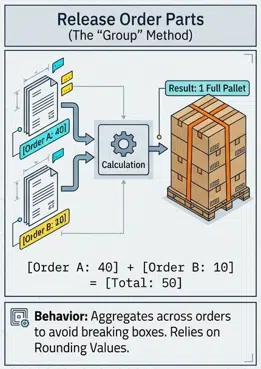
This is “Cumulative Staging.” If Order A needs 40 boxes and Order B needs 10, SAP aggregates this to 50 boxes—which equals one full pallet—optimizing the move for the forklift driver.
3.2.4 Kanban:
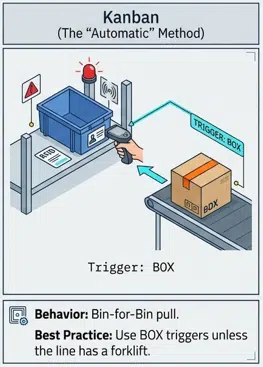
This is “Bin-for-Bin.” When a box is scanned as “Empty,” it triggers a status change that signals EWM to bring exactly one replacement box.
3.3 Expert Tip: PSA Sizing Constraints
Always audit the physical dimensions of the PSA before configuration.
3.3.1 Small/Cramped PSA
Set the Staging Unit to BOX or EA. Staging a pallet here causes “Safety Hazards” and “Ghost Stock” clutter.
3.3.2 Large PSA
Set the Staging Unit to PAL to minimize forklift traffic and maximize labor efficiency.
4. PART 3: Advanced Production Integration (PMR) Logic
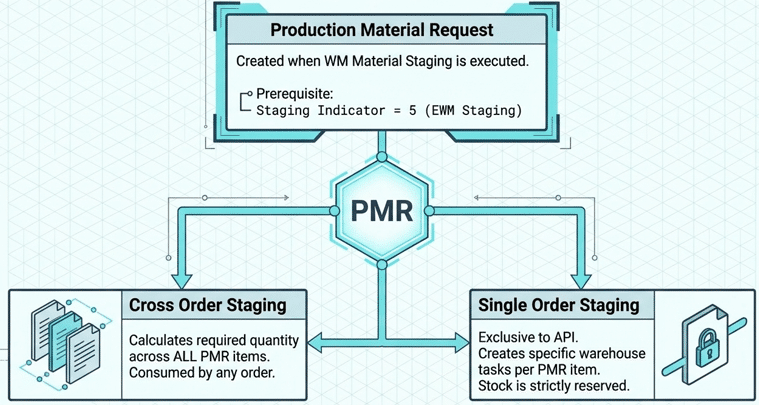
For S/4HANA EWM environments, the Production Material Request (PMR) is the gold standard. It is the warehouse-side mirror of the production order. A PMR is only generated when the Control Cycle is set to Staging Indicator ‘5’ (EWM Staging).
4.1 The PMR Calculation Framework
PMRs allow for a degree of nuance that legacy WM simply cannot match. You have two primary calculation paths:
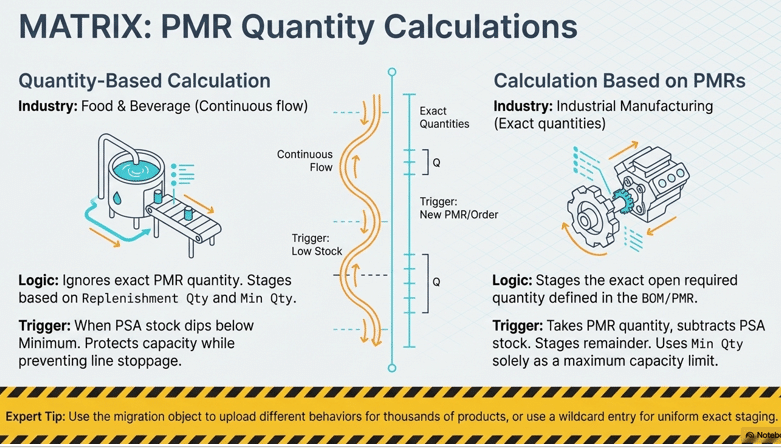
A. Quantity-Based Calculation (Continuous Replenishment)
This is designed for industries with fluctuating BOM accuracy, such as Food or Process manufacturing.
- Logic: Staging is triggered if: (Current PSA Stock) + (Open Warehouse Tasks) < Minimum Product Quantity.
- Result: The system creates a task for the Replenishment Quantity defined in the system.
- Architect’s Note: This is independent of the PMR item quantity. Even if you theoretically have enough for the order, if the shelf is below the minimum, the system refills it. This ensures “Buffer Stock” is always present.
Here The Proposed Quantity for staging is calculated based on the Open Required Quantity of the PMR. The system considers existing staging Warehouse Tasks and the Open Goods Issue Quantity. If Open Required Quantity exists then the system proposes the Staging Quantity.
The “Min.Prd.Qty PSA” serves as a threshold. If the sum quantity (Stock on Production Supply Area + Warehouse Task Quantity) is below this threshold, the system uses the “Replmt Qty” as staging proposal in field Proposed Quantity and Staging Quantity. You can manually adjust the quantity in field Staging Quantity. This logic applies to Cross-Order Staging products.
B. Calculation Based on PMRs (Industrial Precision)
This is the standard for Industrial Manufacturing. It covers the use case previously handled by delivery-based staging.
- Logic: (PMR Item Quantity) – (Quantity on PSA) – (Open Tasks) = Staging Quantity.
- Refinement: You can use the Minimum Product Quantity field as a cap to ensure you don’t exceed the PSA’s physical capacity, effectively “metering” the material flow.
4.2 The “Wildcard” Configuration
Senior consultants often maintain settings for thousands of products. To streamline this, SAP allows a “Wildcard Entry.” By leaving the product field empty in the bin assignment, you can set a global rule (e.g., “Always stage full PMR quantity”) that applies to all components not otherwise specified.
5. PART 4: The Packaging Lifecycle — Who Opens the Box?
A common point of failure in process design is not defining when a sealed Handling Unit becomes “loose” inventory.
| Staging Method | Who Opens It? | Where? | SAP Transaction |
| Pick Parts | Warehouse Worker | Picking Station | LT01 / Warehouse Task |
| Crate Parts | Production Worker | At the PSA Table | CO11N / COR6N |
| Release Order | Production Worker | At the PSA Table | CO15 |
| Kanban | Production Worker | At the PSA Table | PK13N |
- The Backflush Mechanism: For Crate and Release Order parts, the material stays “digitally sealed” until a Confirmation (CO11N) occurs. At that point, SAP “reaches” into the digital box and subtracts the consumed quantity.
6. PART 5: The “Clean-Up” — Returning Leftovers to Stock
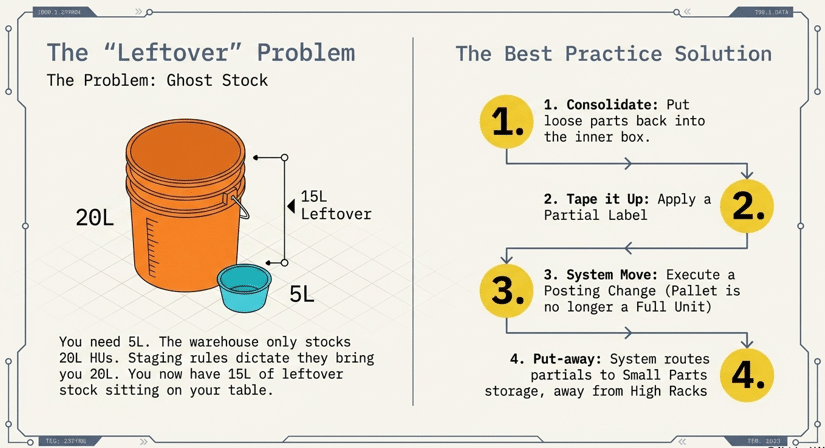
Leftovers are an inevitable byproduct of Rounding Rules. If you need 12 units but the box size is 10, the system will stage 20.
6.1 Return Procedures by Level
- Level 1 (IM): Perform a transfer posting via MIGO (Movement Type 312). This is the “Undo” button that moves stock from the production room back to the main warehouse.
- Level 2 (WM): Use LT0G. This is the specialized tool for returning stock tied to a specific production order. It identifies the “unconsumed” balance and suggests a return bin.
- Level 3 (EWM): Trigger a “Clear PSA” Warehouse Task. The operator scans the HU, and the system directs the return to a suitable storage location.
6.2 The “Half-Empty” Rule: Physical Execution
When returning partial HUs, the following “Real-World” steps are mandatory:
- Consolidate: Place loose items back into the original inner box.
- Partial Labeling: Use a Posting Change in EWM to notify the system the HU is a “Partial.” Print a new “Partial Label” so the next worker knows the count is not standard.
- Strategic Put-away: The system should direct partial HUs to a “Small Parts” zone rather than a bulk high-rack to optimize future picking.
7. TROUBLESHOOTING & ADVANCED ARCHITECTURES
7.1 Expert Troubleshooting Matrix
| Issue | Potential Cause | Architect’s Fix |
| PSA Overflow | Rounding rules too aggressive or “Crate” logic used for bulky items. | Adjust PK01 rounding or use LT0G to purge excess. |
| Ghost Stock | Backflush failed or manual movement was never recorded. | Execute a Cycle Count (Physical Inventory) for the PSA bin. |
| Replenishment Fails | Minimum quantity set too high or “Wildcard” conflict. | Verify the “GPS” of the part in the Control Cycle. |
7.2 Advanced: The Developer & Lean Approach
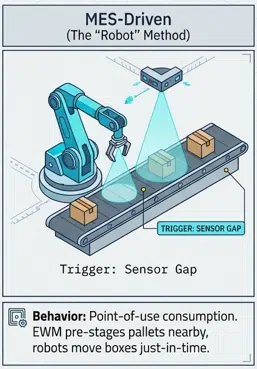
- Staging via API: In “Industry 4.0” setups, an external MES system monitors the line. It uses the Warehouse Order and Task API to trigger staging based on real-time sensor data, specifying the exact product and destination PSA.
- Minimalistic “No Staging”: For ultra-lean environments, skip the staging step entirely. Stock is consumed directly from the warehouse bin via the Post Goods Movement app. The system triggers a Material Document Slip with the bin location printed on it, which the worker uses as a “Shopping List” to grab parts directly as needed.
8. FAQ: Strategic Insights
No. Single-order staging (reserving stock specifically for one order) is exclusive to Advanced Production Integration (PMR) logic in EWM.
These are typically marked as “Not Relevant for Staging” in the Control Cycle. They are consumed via backflush from a fixed silo location, bypassing traditional staging tasks.
Avoid this. Leaving it empty or setting it unrealistically high can lead to infinite staging requests, as the system will never believe the PSA is “Full.”
Yes. By using the “Clear PSA” task and proper Partial Label output management, the system can automate the identification and return-routing of partial units.
In S/4HANA, MB1B is a deprecated transaction. MIGO (Movement Type 312) is the modern, unified standard for all IM-level transfer postings.
9. CONCLUSION & CALL TO ACTION
Mastering SAP production staging is a balance of architectural precision and shop-floor reality. By correctly configuring your PMR logic, Control Cycles, and Rounding Rules, you eliminate “Ghost Stock” and ensure your “Chefs” are always ready for service.
Ready to optimize your S/4HANA digital supply chain? Explore more SAP insights on https://www.saplogisticsexpert.com


